
- Yaş sınırı17+
- KategoriSağlık ve Fitness
- GeliştiriciTRACKTEAM PTY LTD
- Dillerİngilizce
- Boyut1,2 MB
Resmi App Store sayfasına bağlanır
Download.org, Team Hub için hiçbir dosya barındırmaz. Düğme, uygulamanın App Store üzerindeki sayfasını açar; uygulamayı orada TRACKTEAM PTY LTD yayınlar. Sayfanın son kontrolü: 07.11.2026.
Ekran görüntüleri
Hakkında
Geliştirici bu metni dilinizde sunmamış.
Overview
** TeamHub works with TeamHR app running on nearby iPhone or iPad.
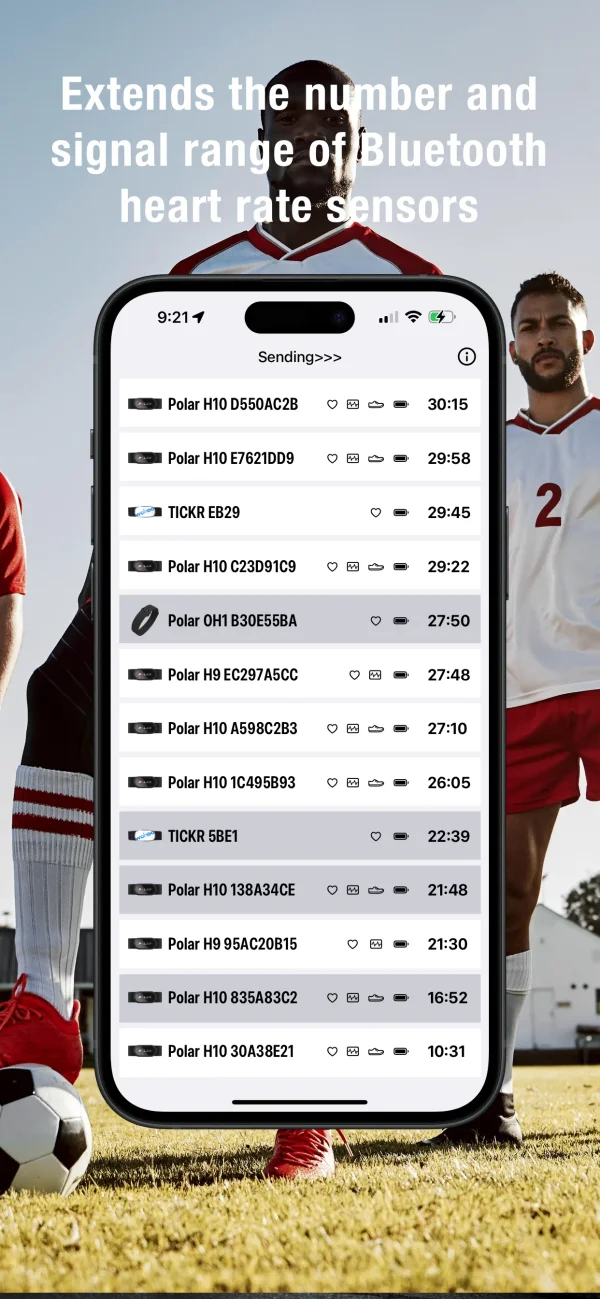
TeamHub connects to Bluetooth heart rate sensors^ and anonymously sends real time heart rate and step data to the TeamHR app for display on a large TV. TeamHub can run on one or more iPhones, acting as signal repeaters for the TeamHR app. It is used to extend the total number and signal range of Bluetooth heart rate sensors. TeamHub can connect up to 13 Bluetooth heart rate sensors per iPhone, supporting up to 50 players in the TeamHR app. Ideal for football fields, athletics tracks, or swimming pools.
You can download TeamHR from the App Store here:
https://apps.apple.com/app/id6739381886
Key Features
- Easy to setup - simply download and launch from one or more iPhones!
- Restricted to pairing with Bluetooth heart rate sensors only
- Reads heart rate data privately by displaying sensor names only
- Sends heart rate data anonymously to TeamHR app running on iPhone
- Sends step data anonymously to TeamHR app running on iPhone (Polar H10 sensors only)
- Bluetooth heart rate sensors switch between multiple instances of this app
- Player profile data is not used and is never shared with this app
Setup
1. Start a session in Network mode on the TeamHR device. TeamHR will then wait for one or more TeamHubs to connect.
2. Launch TeamHub on one or more devices. These hubs act as signal repeaters for nearby heart rate sensors and work best when positioned around the perimeter of the training ground.
3. TeamHub will connect to the TeamHR device and show a confirmation message.
4. TeamHub automatically finds and pairs with heart rate sensors~ but may experience delays when the screen is off.
5. When TeamHR disconnects (i.e., session stopped), TeamHub automatically unpairs from all heart rate sensors. The screen must be on before starting another session.
6. TeamHub recognizes only Bluetooth heart rate devices, and TeamHR accepts data only from allocated sensors.
7. TeamHub sends heart rate data anonymously to TeamHR. It runs securely on any iPhone, as TeamHR never shares profile data with it.
8. If you’re experiencing connection issues, try restarting the session on the TeamHR device. You can also clear the Bluetooth cache on your TeamHub device by turning Bluetooth off and then back on in Settings > Bluetooth.
^Works only with Bluetooth heart rate sensors compatible with Network mode including Polar H7/H9/H10/OH1/SENSE/PRO and Wahoo TICKR (not Apple Watch).
~Polar H10 sensors with Firmware 4.0.4 or later show a "Bluetooth Pairing Request" the first time they connect to a TeamHub. Tap Pair to accept, and the prompt won't appear again on that TeamHub. We recommend pairing all affected sensors on each TeamHub before starting a session, so the prompt doesn't interrupt tracking.
Yenilikler
Sürüm 1.13 · 24.06.2026
- Updated Setup screen with Polar H10 Bluetooth Pairing Request.
Uygulama gizliliği
Bu uygulamanın verileri nasıl işlediği hakkında TRACKTEAM PTY LTD tarafından App Store üzerinde yapılan beyan.
-
Veri toplanmıyor
Geliştirici bu uygulamadan hiçbir veri toplamıyor.
Gizlilik uygulamaları, örneğin kullandığınız özelliklere veya yaşınıza göre değişiklik gösterebilir.
Bilgiler
- Satıcı
- TRACKTEAM PTY LTD
- Kategori
- Sağlık ve Fitness
- Sürüm
- 1.13
- Güncellendi
- 24.06.2026
- Yayın tarihi
- 09.01.2025
- Boyut
- 1,2 MB
- Gereksinim
- iOS 16.6 veya sonrası
- Yaş sınırı
- 17+
- Fiyat
- Ücretsiz
- Diller
- İngilizce
- Telif hakkı
- © 2026 Trackteam Pty Ltd
Bunları da beğenebilirsiniz
-
 BOX ALTITUDE PROSağlık ve Fitness
-
 Strength Tracker - MaxineSağlık ve Fitness
-
 KinetikIQSağlık ve Fitness
-
 SwimBETTERSağlık ve Fitness
-
 NordBordSağlık ve Fitness
-
 VO2 Max Trainer: HIIT, Zone 2Sağlık ve Fitness
-
 ForceDecksSağlık ve Fitness
-
 ForceFrameSağlık ve Fitness
-
 Training Plan for Over 50sSağlık ve Fitness
-
 Recognise FootTıp