
- Độ tuổi17+
- Danh mụcSức Khỏe & Thể Dục
- Nhà phát triểnTRACKTEAM PTY LTD
- Ngôn ngữTiếng Anh
- Kích thước1,2 MB
Liên kết đến trang App Store chính thức
Download.org không lưu trữ tệp nào của Team Hub. Nút này mở trang ứng dụng trên App Store, nơi TRACKTEAM PTY LTD phát hành ứng dụng. Trang được kiểm tra lần cuối: 07/11/2026.
Ảnh chụp màn hình
Giới thiệu
Nhà phát triển chưa cung cấp nội dung này bằng ngôn ngữ của bạn.
Overview
** TeamHub works with TeamHR app running on nearby iPhone or iPad.
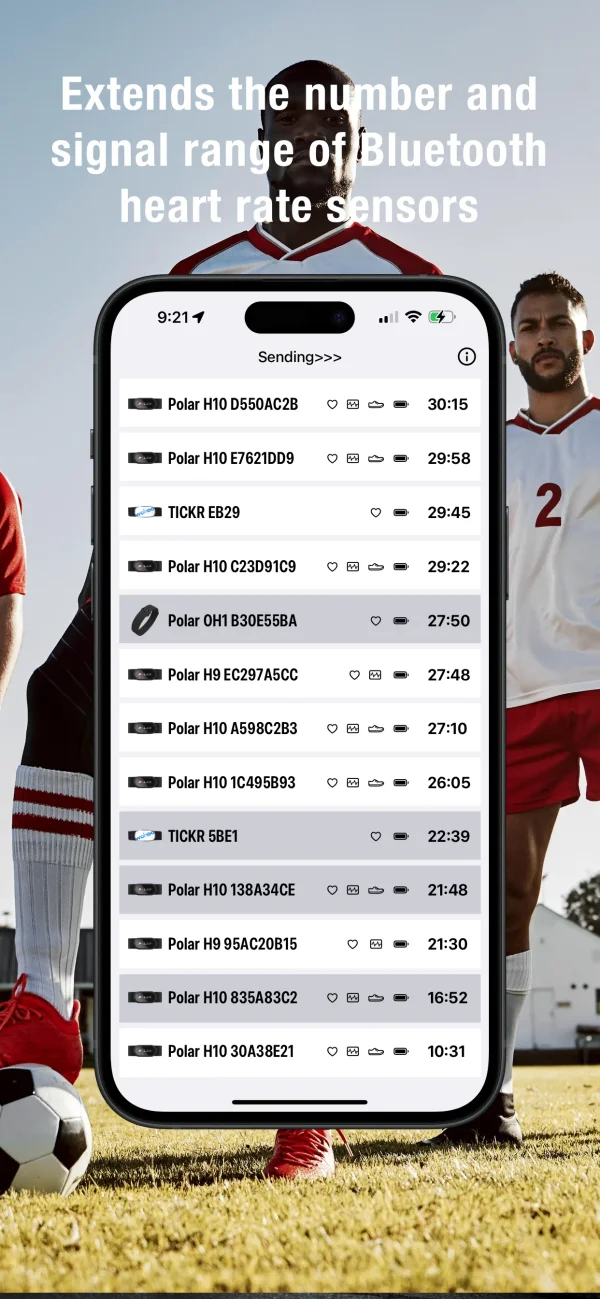
TeamHub connects to Bluetooth heart rate sensors^ and anonymously sends real time heart rate and step data to the TeamHR app for display on a large TV. TeamHub can run on one or more iPhones, acting as signal repeaters for the TeamHR app. It is used to extend the total number and signal range of Bluetooth heart rate sensors. TeamHub can connect up to 13 Bluetooth heart rate sensors per iPhone, supporting up to 50 players in the TeamHR app. Ideal for football fields, athletics tracks, or swimming pools.
You can download TeamHR from the App Store here:
https://apps.apple.com/app/id6739381886
Key Features
- Easy to setup - simply download and launch from one or more iPhones!
- Restricted to pairing with Bluetooth heart rate sensors only
- Reads heart rate data privately by displaying sensor names only
- Sends heart rate data anonymously to TeamHR app running on iPhone
- Sends step data anonymously to TeamHR app running on iPhone (Polar H10 sensors only)
- Bluetooth heart rate sensors switch between multiple instances of this app
- Player profile data is not used and is never shared with this app
Setup
1. Start a session in Network mode on the TeamHR device. TeamHR will then wait for one or more TeamHubs to connect.
2. Launch TeamHub on one or more devices. These hubs act as signal repeaters for nearby heart rate sensors and work best when positioned around the perimeter of the training ground.
3. TeamHub will connect to the TeamHR device and show a confirmation message.
4. TeamHub automatically finds and pairs with heart rate sensors~ but may experience delays when the screen is off.
5. When TeamHR disconnects (i.e., session stopped), TeamHub automatically unpairs from all heart rate sensors. The screen must be on before starting another session.
6. TeamHub recognizes only Bluetooth heart rate devices, and TeamHR accepts data only from allocated sensors.
7. TeamHub sends heart rate data anonymously to TeamHR. It runs securely on any iPhone, as TeamHR never shares profile data with it.
8. If you’re experiencing connection issues, try restarting the session on the TeamHR device. You can also clear the Bluetooth cache on your TeamHub device by turning Bluetooth off and then back on in Settings > Bluetooth.
^Works only with Bluetooth heart rate sensors compatible with Network mode including Polar H7/H9/H10/OH1/SENSE/PRO and Wahoo TICKR (not Apple Watch).
~Polar H10 sensors with Firmware 4.0.4 or later show a "Bluetooth Pairing Request" the first time they connect to a TeamHub. Tap Pair to accept, and the prompt won't appear again on that TeamHub. We recommend pairing all affected sensors on each TeamHub before starting a session, so the prompt doesn't interrupt tracking.
Có gì mới
Phiên bản 1.13 · 24/06/2026
- Updated Setup screen with Polar H10 Bluetooth Pairing Request.
Quyền riêng tư của ứng dụng
Những gì TRACKTEAM PTY LTD khai báo trên App Store về cách ứng dụng này xử lý dữ liệu.
-
Dữ liệu không được thu thập
Nhà phát triển không thu thập bất kỳ dữ liệu nào từ ứng dụng này.
Phương thức đảm bảo quyền riêng tư có thể khác nhau, chẳng hạn như tuỳ theo các tính năng bạn sử dụng hoặc độ tuổi của bạn.
Thông tin
- Người bán
- TRACKTEAM PTY LTD
- Danh mục
- Sức Khỏe & Thể Dục
- Phiên bản
- 1.13
- Cập nhật
- 24/06/2026
- Phát hành
- 09/01/2025
- Kích thước
- 1,2 MB
- Yêu cầu
- iOS 16.6 trở lên
- Độ tuổi
- 17+
- Giá
- Miễn phí
- Ngôn ngữ
- Tiếng Anh
- Bản quyền
- © 2026 Trackteam Pty Ltd
Có thể bạn cũng thích
-
 BOX ALTITUDE PROSức Khỏe & Thể Dục
-
 Strength Tracker - MaxineSức Khỏe & Thể Dục
-
 KinetikIQSức Khỏe & Thể Dục
-
 SwimBETTERSức Khỏe & Thể Dục
-
 NordBordSức Khỏe & Thể Dục
-
 VO2 Max Trainer: HIIT, Zone 2Sức Khỏe & Thể Dục
-
 ForceDecksSức Khỏe & Thể Dục
-
 ForceFrameSức Khỏe & Thể Dục
-
 Training Plan for Over 50sSức Khỏe & Thể Dục
-
 Recognise FootY Tế