Address Label Creator
Craft custom mailing labels
Được thiết kế cho iPad, Mac
149.000đ
- Độ tuổi4+
- Danh mụcKinh Doanh
- Nhà phát triểnGilbert Hansen
- Ngôn ngữTiếng Anh
- Kích thước109,4 MB
Liên kết đến trang App Store chính thức
Download.org không lưu trữ tệp nào của Address Label Creator. Nút này mở trang ứng dụng trên App Store, nơi Gilbert Hansen phát hành ứng dụng. Trang được kiểm tra lần cuối: 14/11/2026.
Ảnh chụp màn hình


Giới thiệu
Nhà phát triển chưa cung cấp nội dung này bằng ngôn ngữ của bạn.
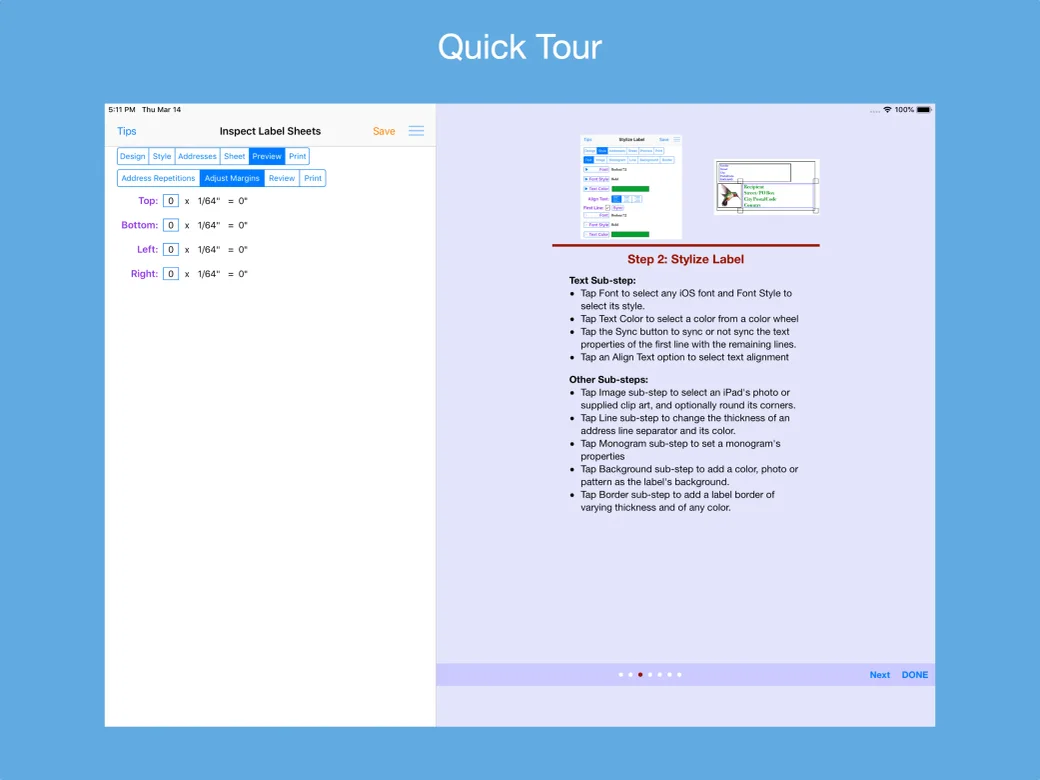
Design custom address and shipping labels from predefined templates. Populate label sheet with addresses from an address list constructed from manual entries, contacts, saved lists and/or spreadsheets, each with its own repetition count. Preview the label sheets before printing. Save design and address list to device. Supports all Avery A4 and Letter return address, address and shipping label products plus all Unistat and Herma rectangular A4 label products.
Features:
* Step-by-step workflow, each with 1 or more sub-steps:
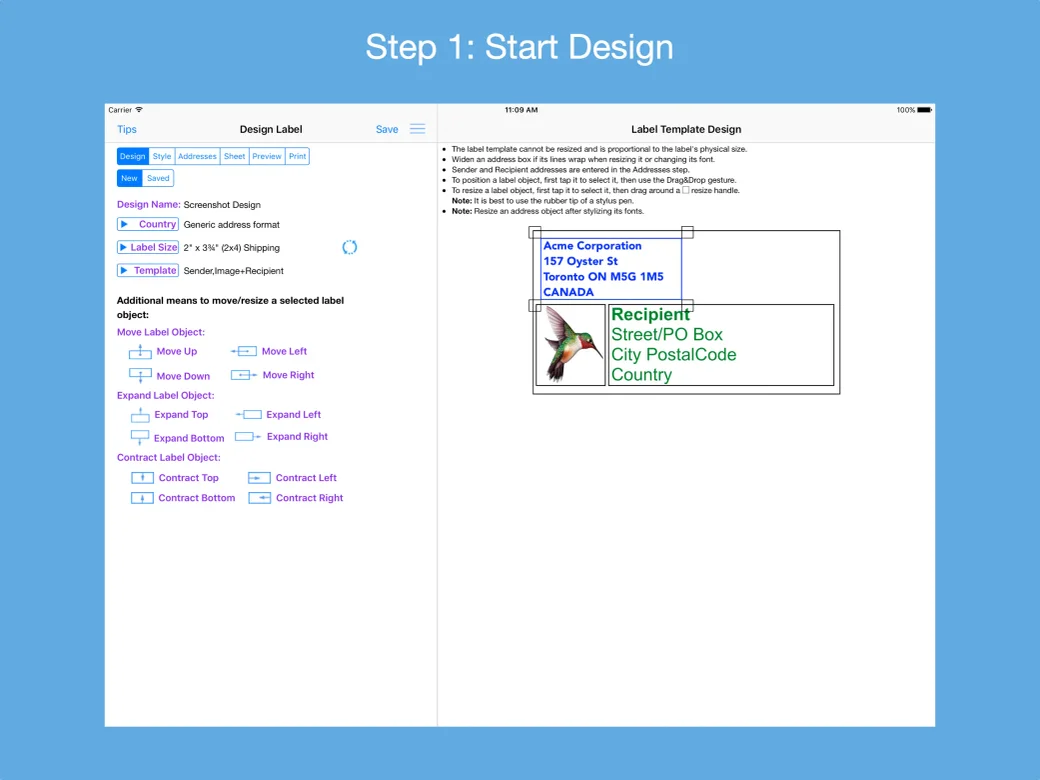
STEP 1: Start new design or restore saved design
* Select a country postal format from a list of 58 countries
* Select an A4 or Letter return address, address or shipping label size
* Turn an address label into a shipping label and vice versa
* Select a provided label template
* Position and resize label objects using gestures and/or buttons
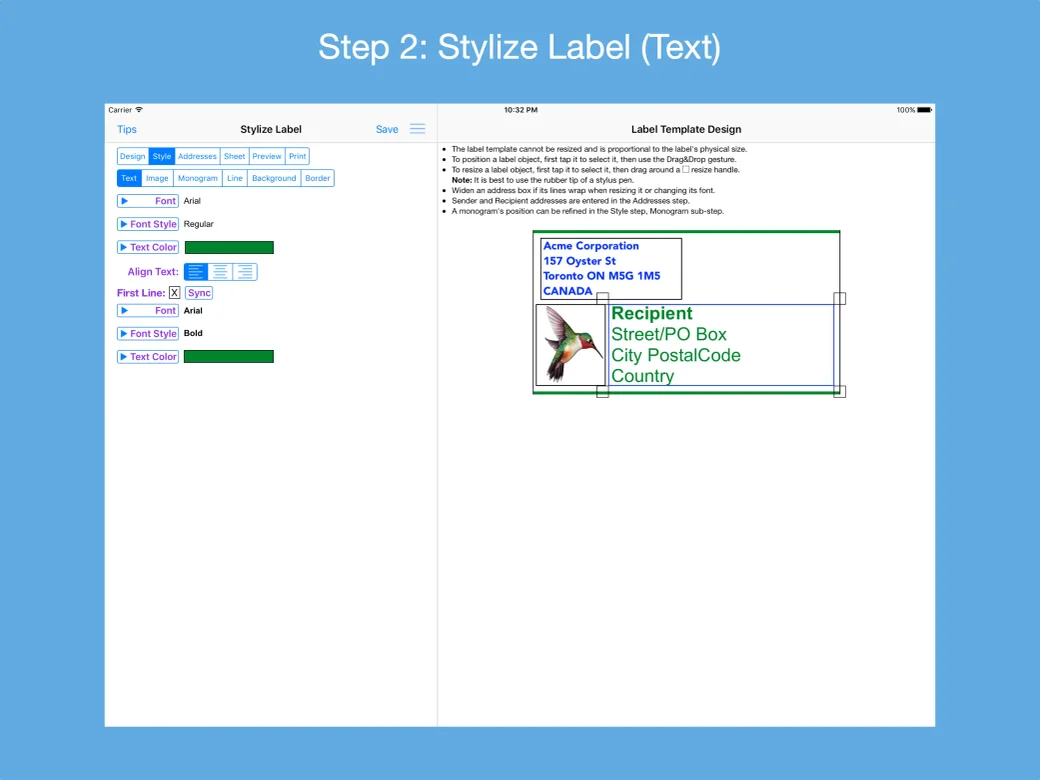
STEP 2: Stylize label
* Use any available iOS font or supplied font and its font styles
* Text can be any color selected from a color wheel or entered as a hexadecimal value
* The first line of text can have its own text properties distinct from those of the remaining lines
* Select images from device photos or supplied clip art
* Select monogram's font, letter and color, and optionally encase in a circle or oval frame
* A shipping address line separator can be of varying thickness and of any color
* An optional label background can be any color, device photo or supplied pattern of varying opacity. The pattern can be scaled.
* An optional label border can be of varying thickness and of any color
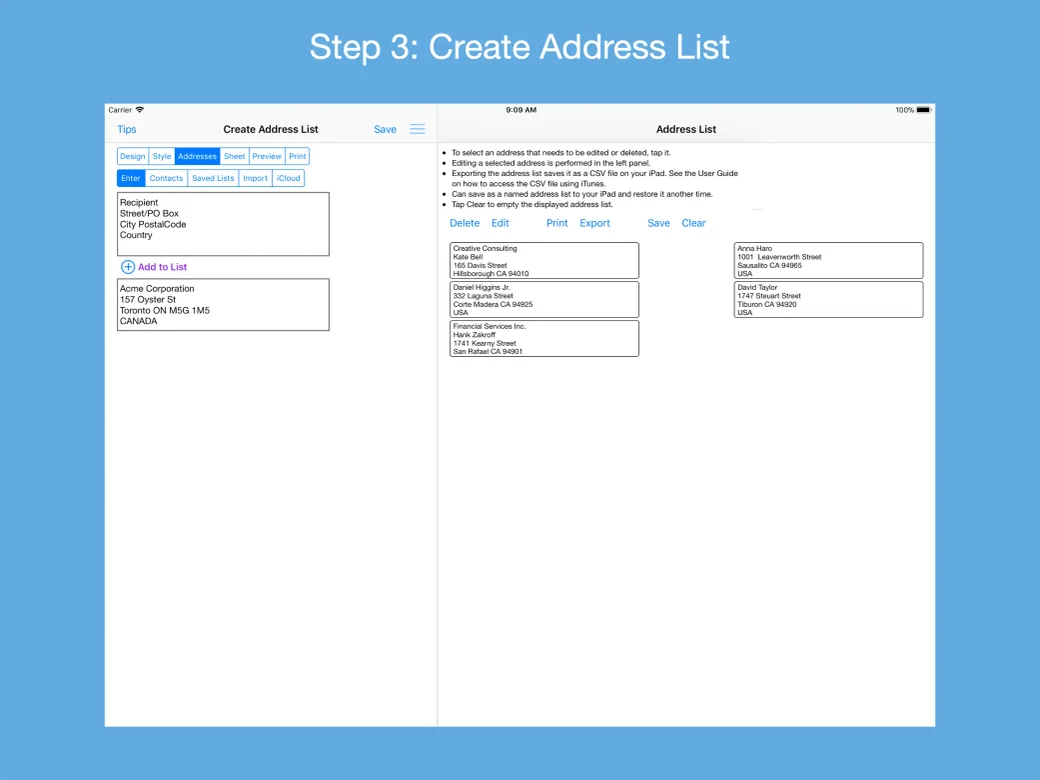
STEP 3: Construct address list
* Build a list of addresses by 1) entering them manually; 2) selecting contacts with addresses; 3) selecting a saved address list; 4) importing addresses in a CSV file on iPad; 5) importing addresses in a CSV file on iCloud Drive and/or 6) exporting an address spreadsheet as a CSV file and transferring it to the app.
* Manage address list - edit or delete an address; print, export to a CSV spreadsheet or clear the list
* Save address list to device; restore later
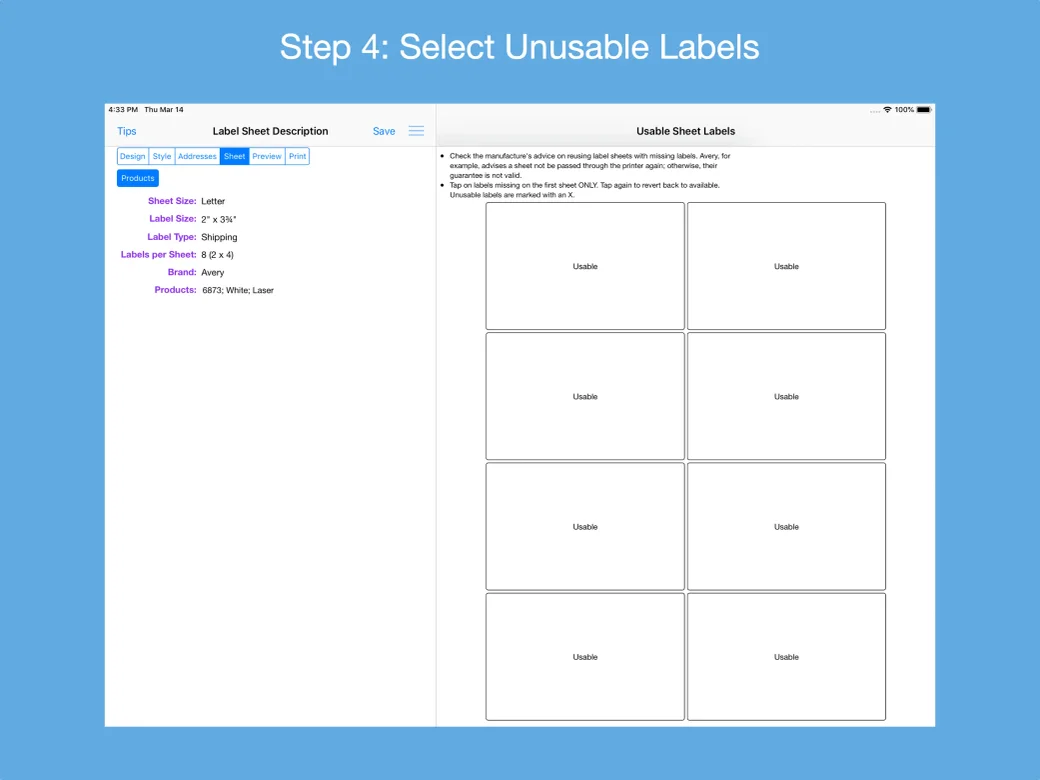
STEP 4: Examine label sheet’s product specifications; mark unusable labels on 1st sheet
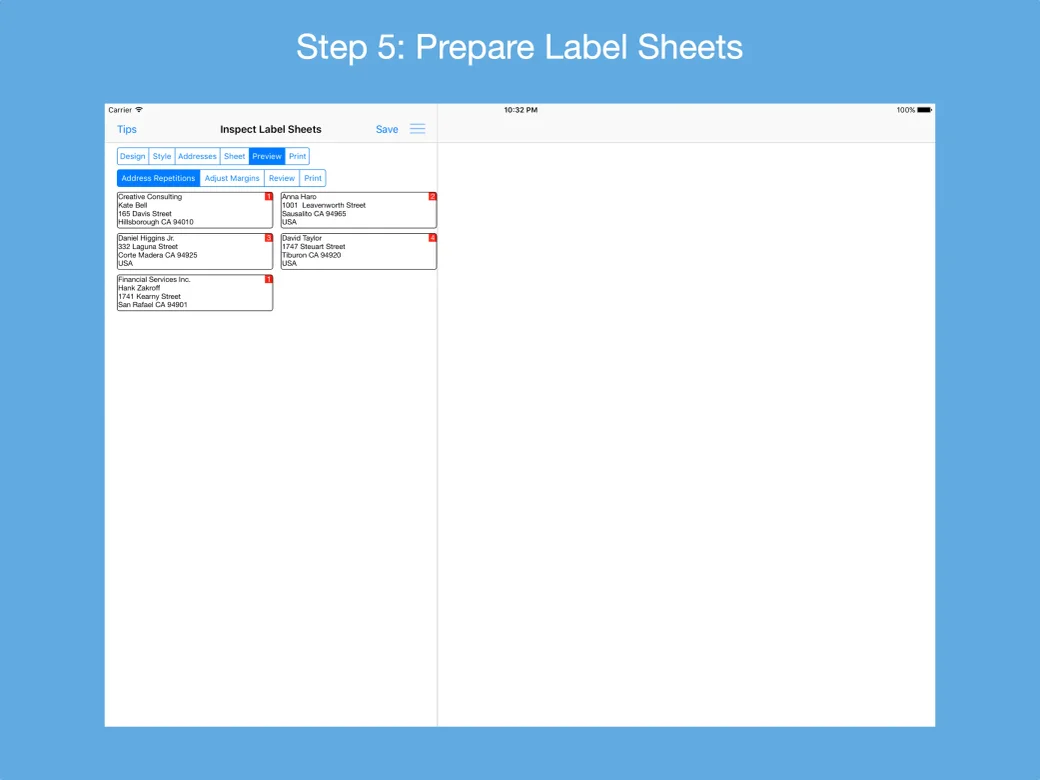
STEP 5: Preview label sheets
* Specify how many times each address is to be replicated on the label sheets
* Adjust sheet margins when printed results are not perfectly aligned
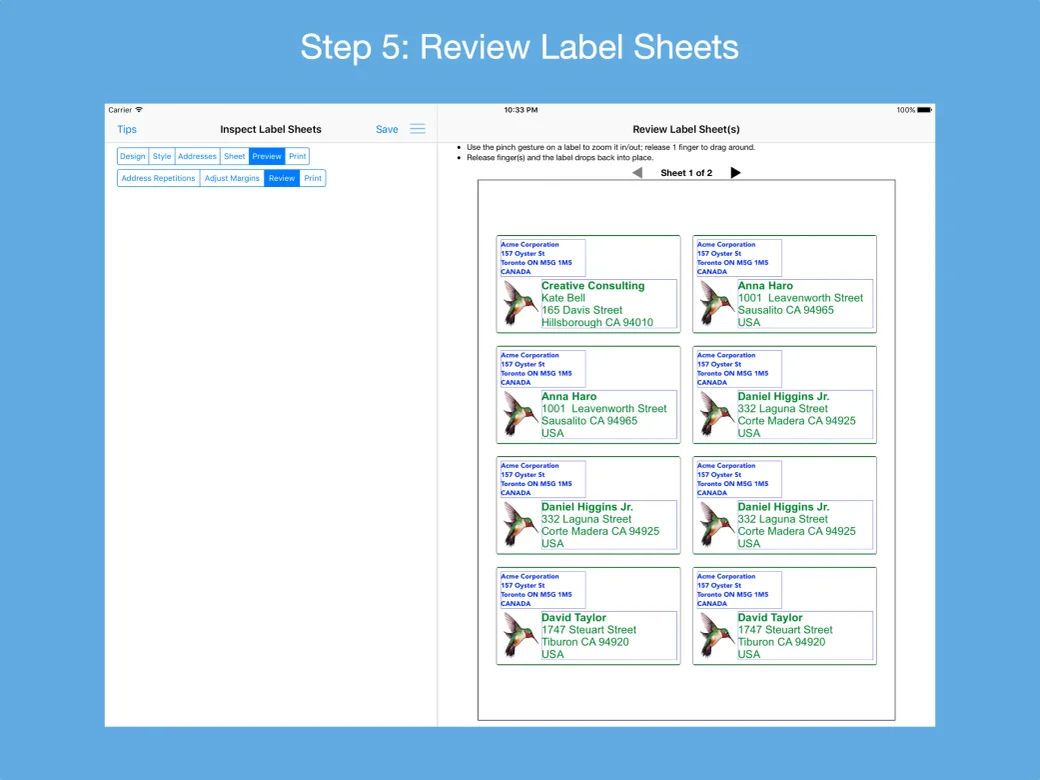
* Review label sheets for alignment accuracy before printing to label sheet
* Print outlined labels and overlay on label sheet to check label content lines up correctly
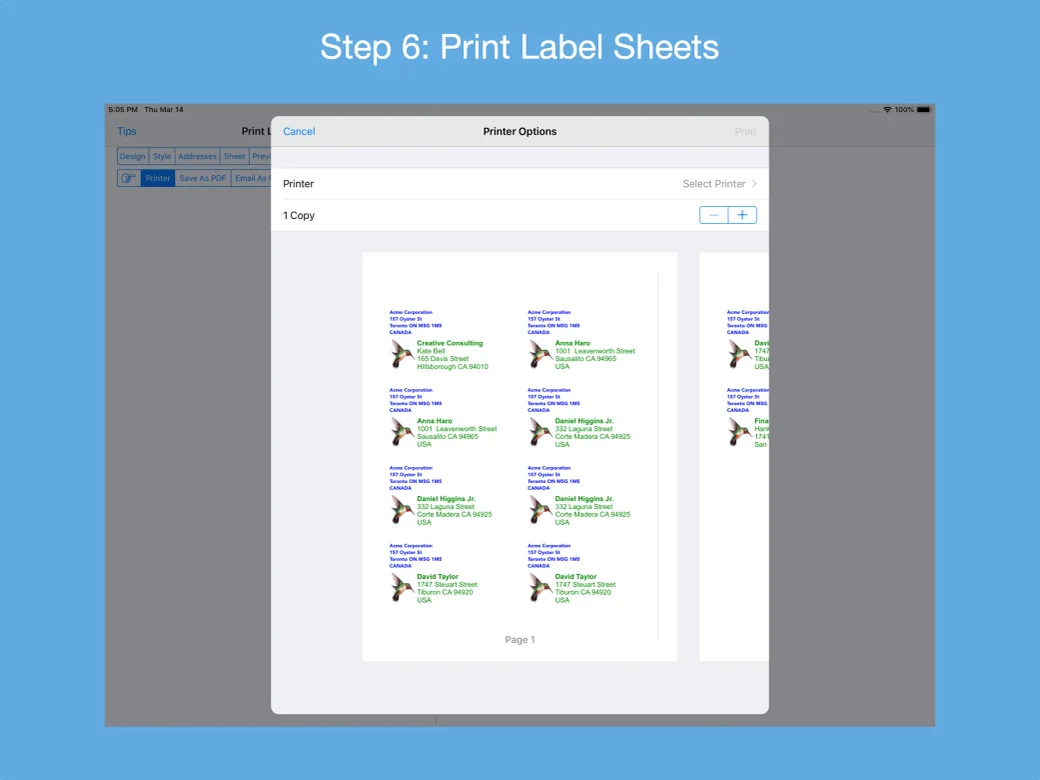
STEP 6: Print label sheets to an AirPrint enabled printer, save to a PDF file or e-mail as a PDF for printing later or elsewhere. PDF needed for borderless printing.
* The User Guide provides instructions on how to best print the label PDF file and do borderless printing.
* Save design to device and restore another time
* Detailed User Guide with FAQs within app and on support website verusapps.com. Within the app it can be searched for keywords and phrases.
* The Quick Guide and Quick Tour, viewable on-demand, provide a way to quickly learn how to use the app.
The app requires permission to access Contacts and Photos on the device; otherwise, an address cannot be selected from Contacts and a label image cannot be selected from Photos.
Send e-mail to support@verusapps.com to report issues, make improvement suggestions or ask questions.
The app's Privacy Policy is available at http://verusapps.com/index.php/privacy-policy-for-address-label-creator/
Có gì mới
Phiên bản 4.9.0 · 26/02/2026
1. Compatible with iOS/iPadOS 26+, macOS 26+
2. The miniumum supported iOS is now iOS 16+ and macOS 16+
3. Fixed known crash bugs.
4. The app now provides a default label design, AppDefault. To start a new design, simply select the Saved sub-step of Design and in the displayed list of saved designs, select AppDefault. For a different default design, modify the default and save it, e.g., as MyDefault; AppDefault cannot be overwritten nor can it be deleted. When the app is launch the very first time without having saved the AppDefault design, "Design Saved" will be displayed briefly.
5. The Design step now has 3 sub-steps:
1) Now: the current design
2) Saved: selecting displays a list of the saved designs; includes the AppDefault design
3) New: selecting starts a new design by restoring the AppDefault design
6. The name of the substep New under Design has been changed to Now.
7. For those using the macOS version, it is advisable to read Section 11: macOS Version's Differences in the User Guide.
8. If you have any issues, e-mail them to support@verusapps.com to get them resolved. We welcome suggestions for improving the app.
Quyền riêng tư của ứng dụng
Những gì Gilbert Hansen khai báo trên App Store về cách ứng dụng này xử lý dữ liệu.
-
Dữ liệu không được thu thập
Nhà phát triển không thu thập bất kỳ dữ liệu nào từ ứng dụng này.
Phương thức đảm bảo quyền riêng tư có thể khác nhau, chẳng hạn như tuỳ theo các tính năng bạn sử dụng hoặc độ tuổi của bạn.
Thông tin
- Người bán
- Gilbert Hansen
- Danh mục
- Kinh Doanh
- Phiên bản
- 4.9.0
- Cập nhật
- 26/02/2026
- Phát hành
- 23/09/2016
- Kích thước
- 109,4 MB
- Yêu cầu
- iOS 16.6 trở lên
- Độ tuổi
- 4+
- Giá
- 149.000đ
- Ngôn ngữ
- Tiếng Anh
- Bản quyền
- © 2016-2026 Gil Hansen
Có thể bạn cũng thích
-
 Grocery list - online syncHiệu Suất
-
 Clip Board Tool +Kinh Doanh
-
 WritePDFKinh Doanh
-
 Tips & Tricks Pro - for iPadHiệu Suất
-
 Window WarehouseKinh Doanh
-
 AssetExplorer | CloudKinh Doanh
-
 Chat Genius - AI Bot AssistantHiệu Suất
-
 MyNotebook - simple note app -Hiệu Suất
-
 Templates for Pages (Nobody)Hiệu Suất
-
 Chuyển excel sang pdfConvert xls to pdf