
- Độ tuổi4+
- Danh mụcTiện Ích
- Nhà phát triểnYasuko Shikiuchi
- Ngôn ngữTiếng Anh+ 1 ngôn ngữ khác
- Kích thước12,0 MB
Liên kết đến trang App Store chính thức
Download.org không lưu trữ tệp nào của DeferDeck. Nút này mở trang ứng dụng trên App Store, nơi Yasuko Shikiuchi phát hành ứng dụng. Trang được kiểm tra lần cuối: 17/11/2026.
Ảnh chụp màn hình

Giới thiệu
Nhà phát triển chưa cung cấp nội dung này bằng ngôn ngữ của bạn.
Organizing your photos has never been easier.
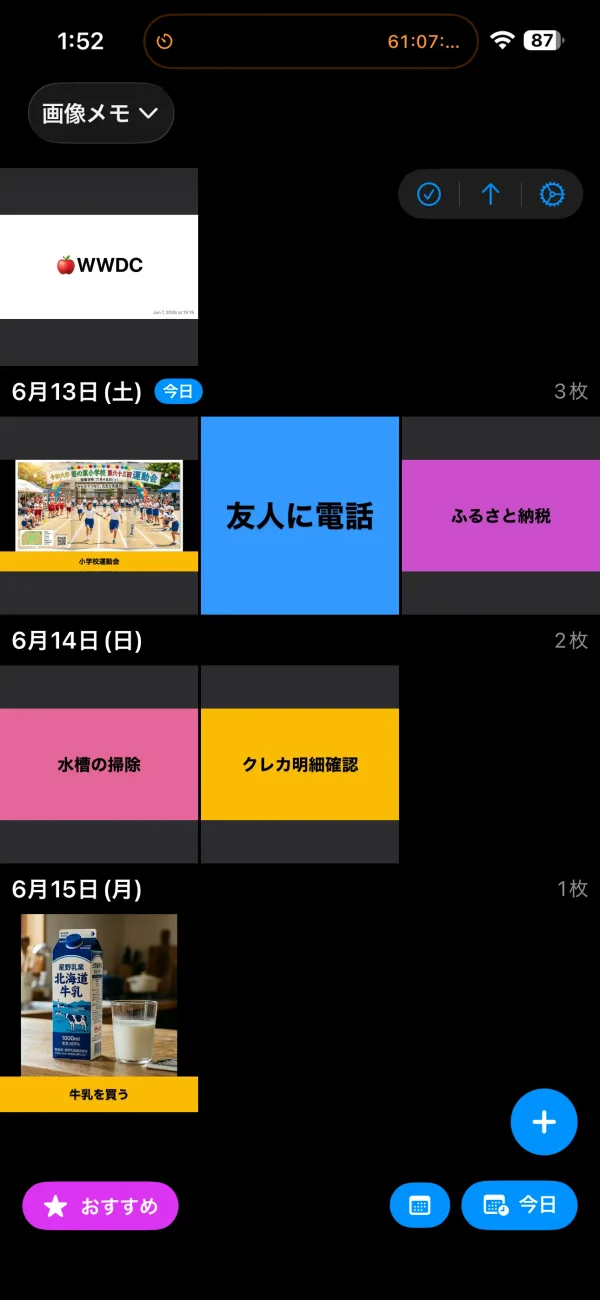
DeferDeck lays out your Photo Library albums in clean, date-by-date sections—your "deck"—so you can organize, browse, and even defer photos to the future, all in one simple place.
**What you can do**
Clear out screenshots in bulk
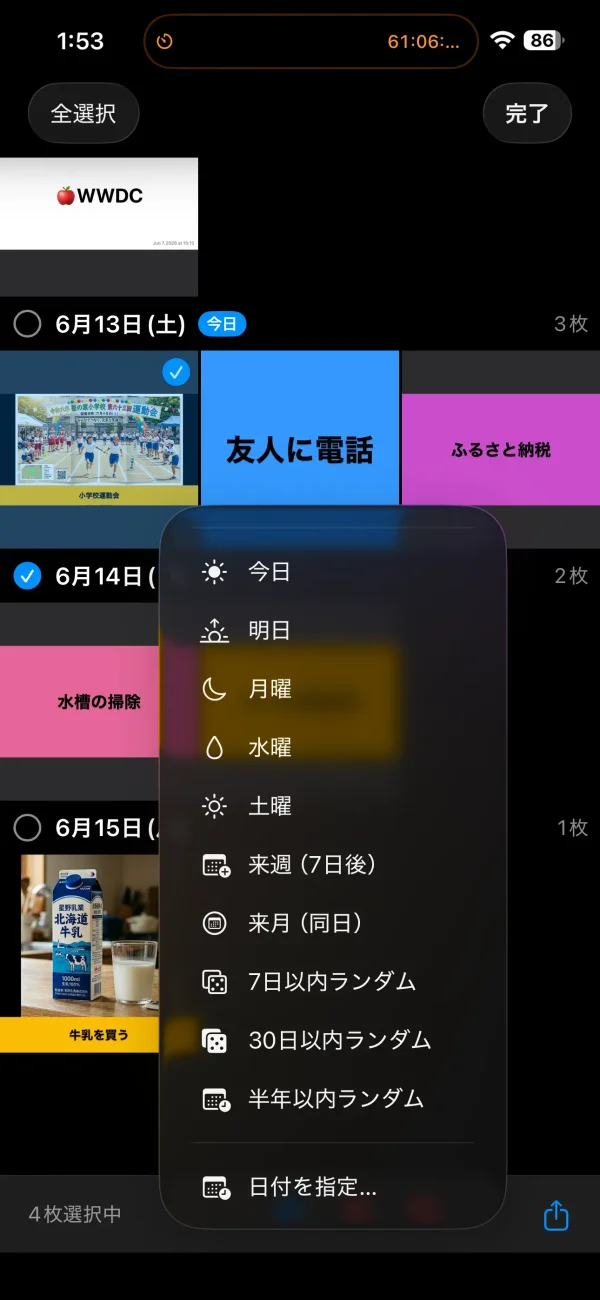
Select all those piled-up screenshots at once and delete them in a tap. Align several photos to the same date or move them into other albums together—no more one-by-one. Got a photo to send a friend? Share & Delete shares it and tidies up in a single step.
Turn images into reminders
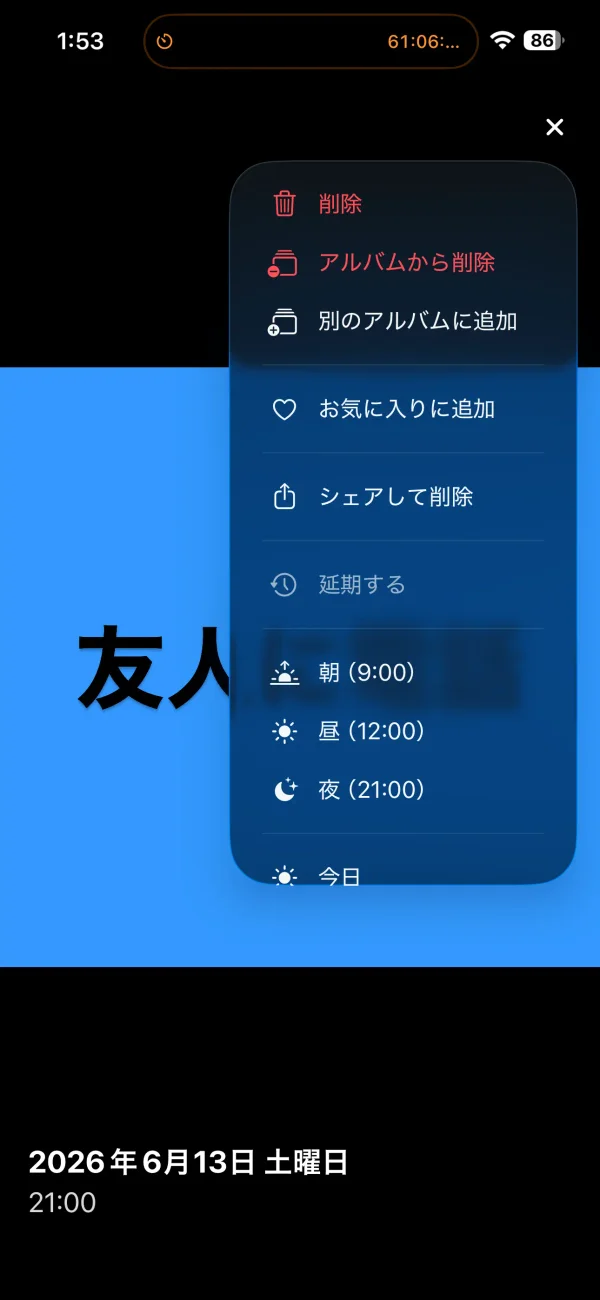
A sale flyer, a school-event pamphlet, a concert announcement—just set a photo's date to the day it matters, and it'll quietly catch your eye every time you open Photos. Anything you'd rather handle later? Defer it to tomorrow, next Saturday, next month, a specific time of day, or even a random future date. Deferred by mistake? Undo it right after, straight from the toast.
Build daily routines
Add a photo to Routine and its date rolls forward to today automatically, every day—perfect for a medication note, a stretching routine, or anything you want in front of you daily. Check or remove routine photos anytime from Quick Access.
Copy text from screenshots
A Wi-Fi password, an order number, a URL—copy any text you spot in a screenshot straight from the detail view, no retyping required.
Create images with text
Tap the + button and choose Create Memo to turn a note into a photo. Add a label and it's automatically filed into a matching album, so it's easy to find later.
Relive your memories
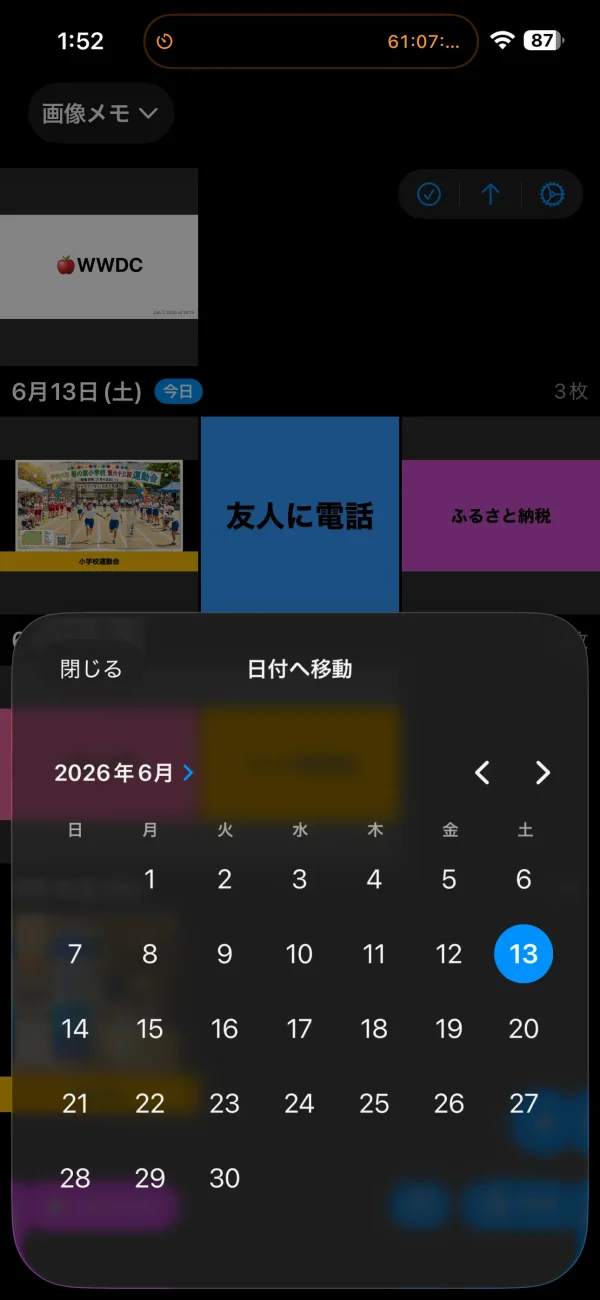
Open an album from a trip or a special day, choose a date, and jump straight to that day's photos. The moments you're looking for, right at your fingertips.
**Key features**
- Albums shown in date-by-date sections
- One-tap jump to any date
- Bulk select, delete, and add to albums
- Share & Delete—share and organize at once
- Batch-change or defer photo dates, with time-of-day and random options
- Undo a postpone right after you make it
- Routine photos roll forward to today automatically
- Copy text from screenshots in one tap
- Create text images, auto-filed by label
Có gì mới
Phiên bản 1.0.22 · 21/10/2026
- Improved stability
Quyền riêng tư của ứng dụng
Những gì Yasuko Shikiuchi khai báo trên App Store về cách ứng dụng này xử lý dữ liệu.
-
Dữ liệu được sử dụng để theo dõi bạn
Có thể được sử dụng để theo dõi bạn trên các ứng dụng và trang web do công ty khác sở hữu.
- Mã định danh
- Dữ liệu sử dụng
-
Dữ liệu liên kết với bạn
Có thể được thu thập và liên kết với danh tính của bạn.
- Mã định danh
-
Dữ liệu không liên kết với bạn
Có thể được thu thập nhưng không liên kết với danh tính của bạn.
- Dữ liệu sử dụng
- Chẩn đoán
Phương thức đảm bảo quyền riêng tư có thể khác nhau, chẳng hạn như tuỳ theo các tính năng bạn sử dụng hoặc độ tuổi của bạn.
Thông tin
- Người bán
- Yasuko Shikiuchi
- Danh mục
- Tiện Ích
- Phiên bản
- 1.0.22
- Cập nhật
- 21/10/2026
- Phát hành
- 18/06/2026
- Kích thước
- 12,0 MB
- Yêu cầu
- iOS 18.0 trở lên
- Độ tuổi
- 4+
- Giá
- Miễn phí
- Ngôn ngữ
- Tiếng Anh, Tiếng Nhật
- Bản quyền
- © yaas.jp 2026
Có thể bạn cũng thích
-
 ScreenPenguin: Photo OrganizerTiện Ích
-
 New ToDo List & Tasks & PhotoTiện Ích
-
 ImageBlocker: Contents BlockerTiện Ích
-
 Wristwatch calendarTiện Ích
-
 Tagged Notes App - Tag PadTiện Ích
-
 Multi Counter - Lên xuốngTạo bộ đếm và đếm lên xuống
-
 VisiMarks: Bookmark ManagerTiện Ích
-
 CIO 公式アプリTiện Ích
-
 EZ Sign(TM) NFCTiện Ích
-
 裁判官マップTiện Ích