
Framework: Daily Planner
Plan tasks, shifts & routines
Được thiết kế cho iPhone, iPad
29.000đ
- Độ tuổi4+
- Danh mụcHiệu Suất
- Nhà phát triểnSamuel Ogden
- Ngôn ngữTiếng Anh+ 17 ngôn ngữ khác
- Kích thước5,2 MB
Liên kết đến trang App Store chính thức
Download.org không lưu trữ tệp nào của Framework: Daily Planner. Nút này mở trang ứng dụng trên App Store, nơi Samuel Ogden phát hành ứng dụng. Trang được kiểm tra lần cuối: 17/11/2026.
Ảnh chụp màn hình
Giới thiệu
Nhà phát triển chưa cung cấp nội dung này bằng ngôn ngữ của bạn.
Framework – Daily Planner
Take control of your entire day with one clear timeline.
No subscriptions. No clutter. Just a simple, visual way to plan your time.
Feel in control of your day again.
See exactly where you are, what’s next, and how your day flows — all in one place.
Why people choose Framework
– No subscriptions or hidden costs
– Your entire day in one clear timeline
– Built for real life, including shift work
– Works offline, with optional iCloud sync
– Clean, fast, and distraction-free
A Clear View of Your Day
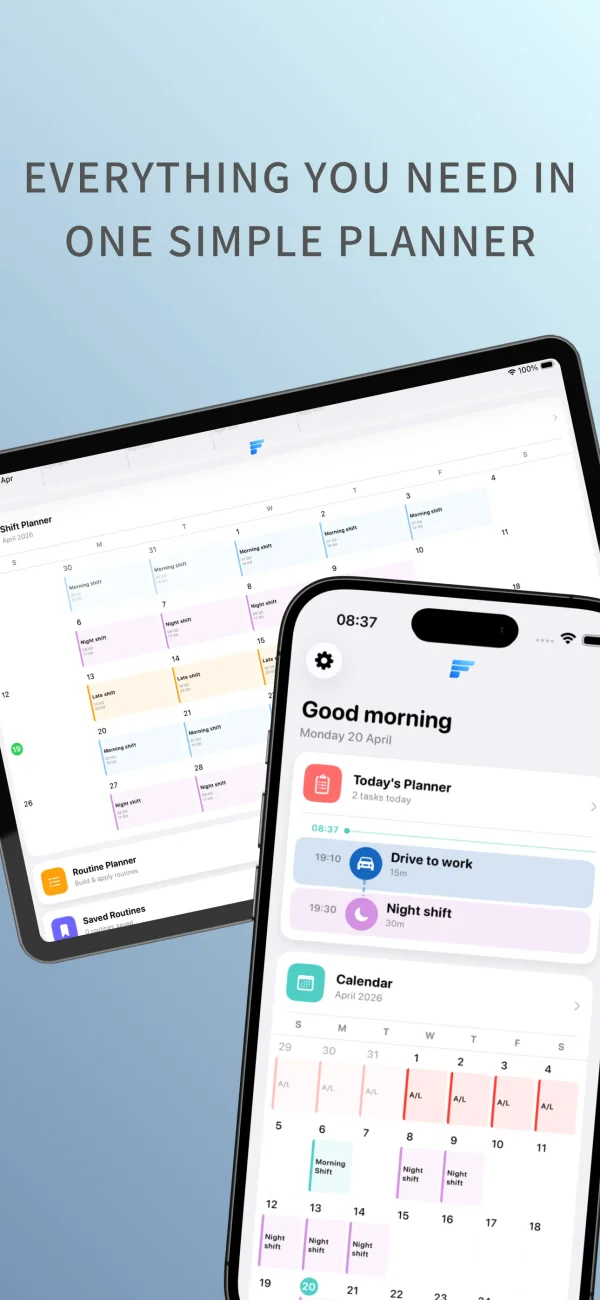
Your Home View brings everything together:
– A live timeline of today that updates in real time
– Instantly see what’s active, what’s next, and what’s done
– Built-in calendars for both tasks and shifts
– Quick access to your routines and saved plans
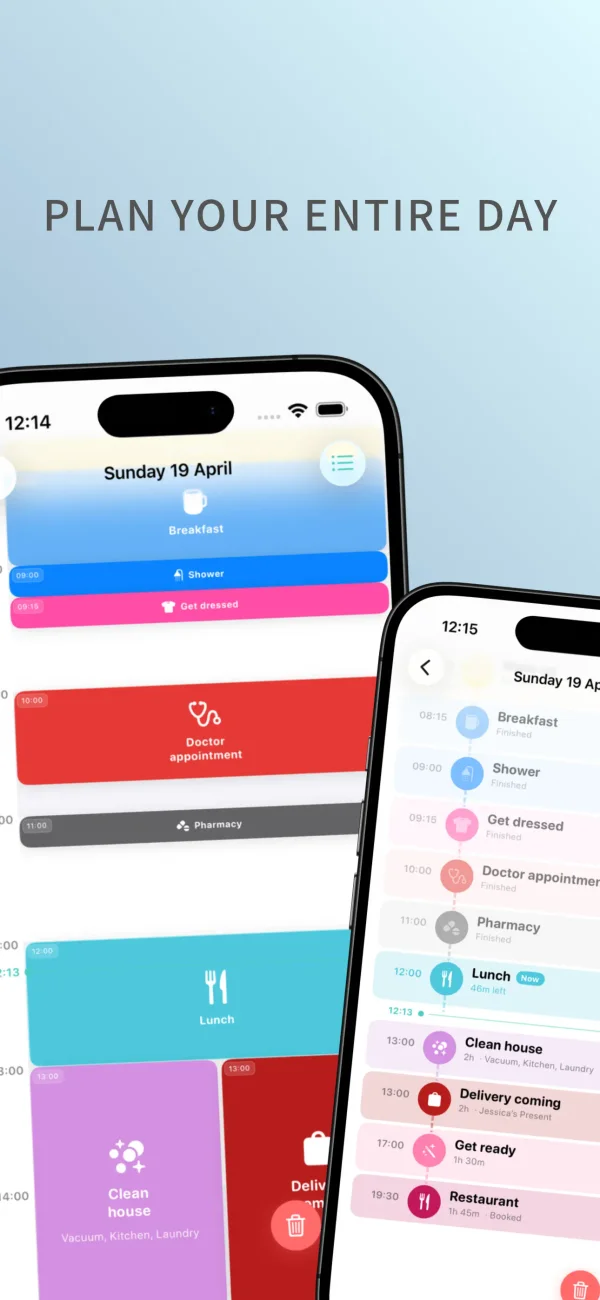
Plan Your Day with Precision
– Full 24-hour timeline for complete control
– Tasks shown as visual blocks, scaled to their duration
– Overlapping tasks automatically organised
– All-day tasks and shifts kept separate and clear
– Add, edit, or clear your day in seconds
No guesswork — just a clear structure from morning to night.
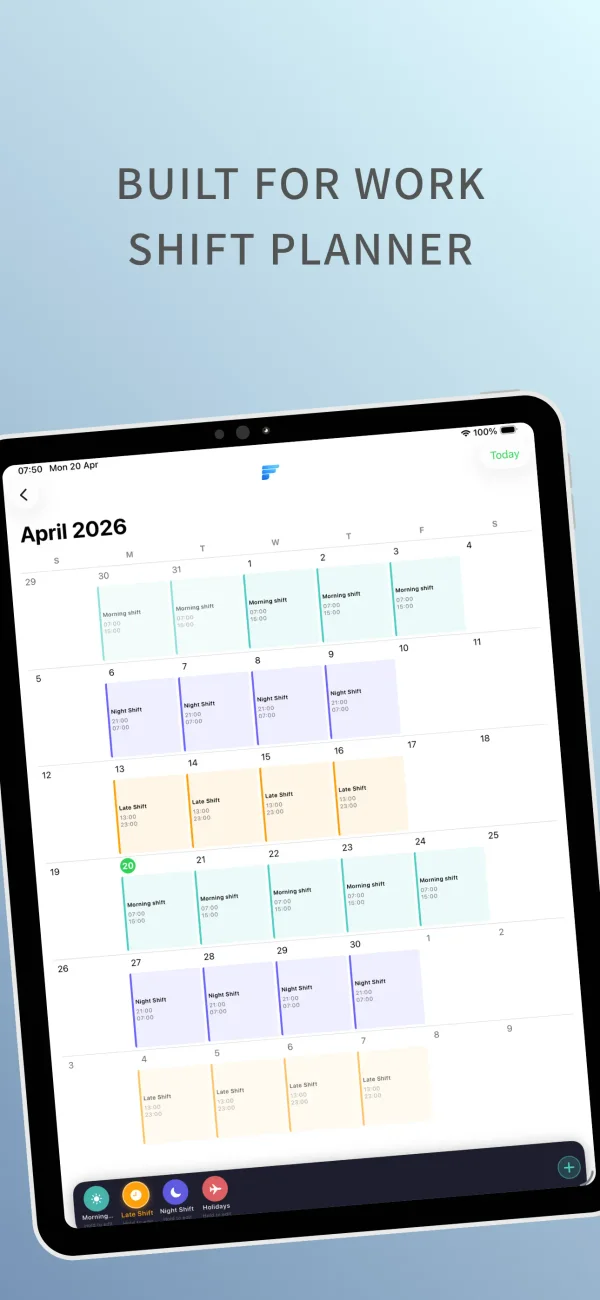
Built for Real Life (Including Shift Work)
– Create custom shift types with roles, times, colours, and icons
– Assign shifts to any day in seconds
– View shifts alongside your daily tasks
– Adjust your schedule at any time
Balance work and life — without the stress.
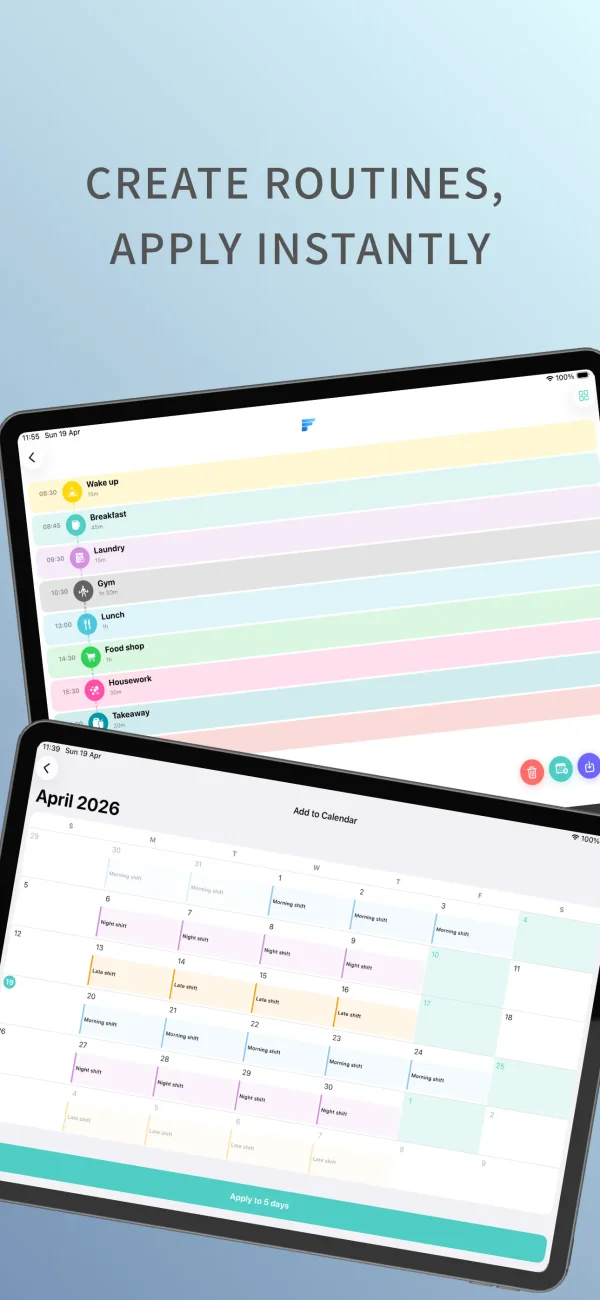
Routines That Save You Time
– Build your ideal day once
– Apply it to any date instantly
– Manage and edit all saved routines
Spend less time planning, more time doing.
Full Calendar Overview
– Scroll through past and future months
– See all tasks directly inside each day
– Open any day for a full detailed timeline
Always know what’s coming next.
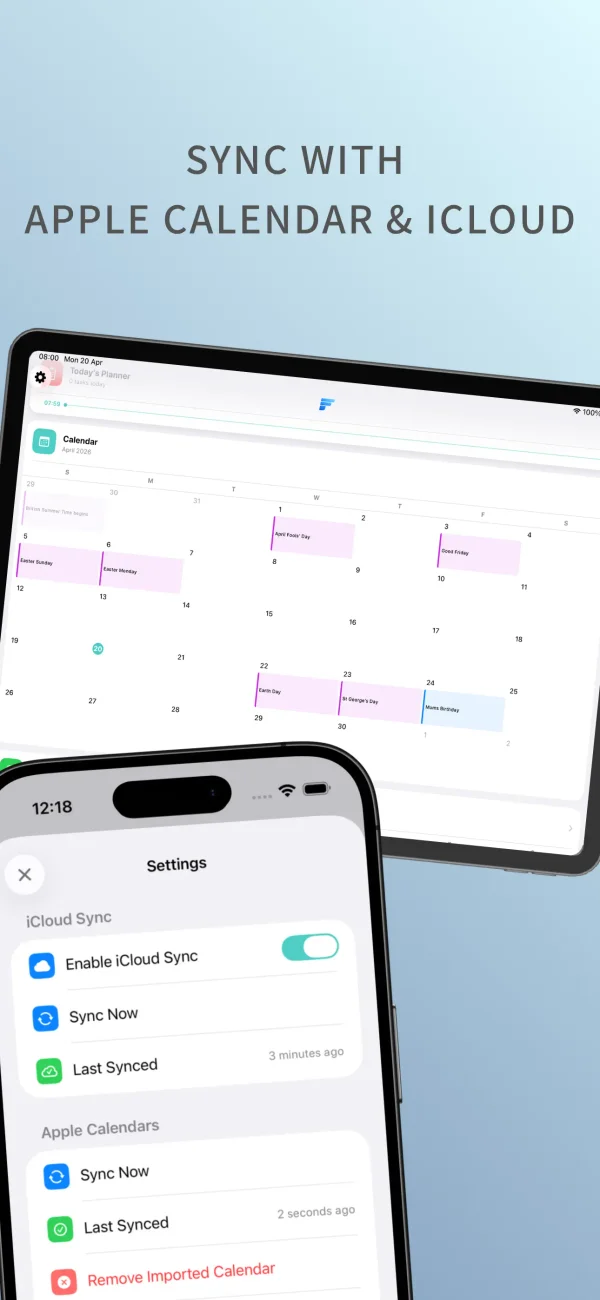
Works with Apple
– Import Apple Calendar events (read-only)
– Export your tasks and shifts to a dedicated calendar
– Full control over what syncs
Optional iCloud Sync keeps everything updated across your devices — privately and securely.
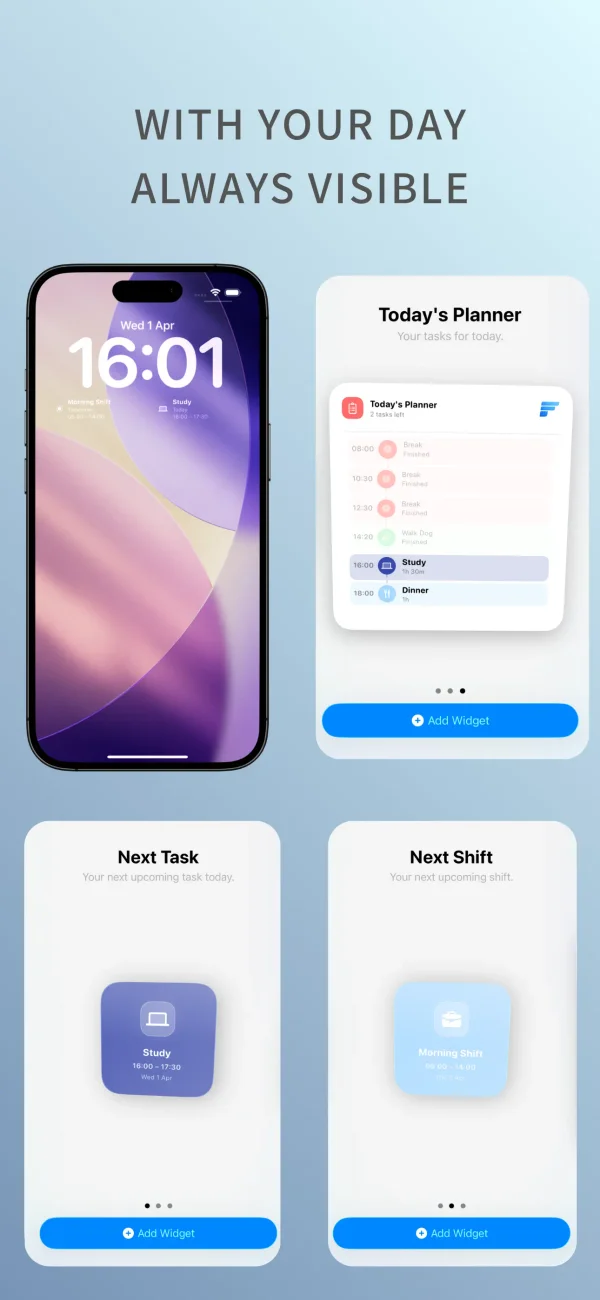
Widgets That Keep You on Track
– See your day at a glance from your Home Screen or Lock Screen
– View upcoming tasks and shifts instantly
– Stay updated without opening the app
– Clean, minimal designs that match your planner perfectly
Your schedule — always within reach.
Stay on Track
– Set reminders for any task
– Choose alert or silent notifications
– See your next task or shift at a glance
Built Around You
– 12 or 24-hour time format
– Custom start day of the week
– Light, Dark, or System appearance
– Full control over your data
No Subscriptions. No Lock-ins.
Framework is a one-time purchase.
Everything is included — no monthly fees, no locked features.
Pay once. Plan forever.
Your data stays yours.
Có gì mới
Phiên bản 1.5 · 11/10/2026
Framework has been redesigned from the ground up. It's cleaner and softer, and your day is easier to take in at a glance.
New Home screen
• Swipe through your weeks, with coloured dots for each task
• The Next Up card shows what's on now and what's coming
• Focus Score ring, plus your Free Time and Planned Time
• A timeline of your day that expands to show everything
• Tick off tasks with a new animation, and get a little celebration when you finish them all
This Week
• See your whole week in one place, with tasks, shifts, events and planned time
• Open any day to see and tick off its tasks
Work Schedule
• Switch between Week and Month views
• See your total hours, shift count and a breakdown by shift type
• See your days off alongside your shifts
• Tap a shift to edit it
Improved PDF export
• A new list layout alongside the calendar
• Full-screen preview that turns with your phone
• Holidays no longer count towards your shift totals
Everything else
• New designs for creating and editing tasks, shifts, shift types and routines
• Icons are suggested from the name you type, and you can still pick your own
• Tap a tab again to jump back to today
• Haptics throughout the app
• Now available in 17 languages
• Bug fixes and performance improvements
Quyền riêng tư của ứng dụng
Những gì Samuel Ogden khai báo trên App Store về cách ứng dụng này xử lý dữ liệu.
-
Dữ liệu không được thu thập
Nhà phát triển không thu thập bất kỳ dữ liệu nào từ ứng dụng này.
Phương thức đảm bảo quyền riêng tư có thể khác nhau, chẳng hạn như tuỳ theo các tính năng bạn sử dụng hoặc độ tuổi của bạn.
Thông tin
- Người bán
- Samuel Ogden
- Danh mục
- Hiệu Suất
- Phiên bản
- 1.5
- Cập nhật
- 11/10/2026
- Phát hành
- 24/04/2026
- Kích thước
- 5,2 MB
- Yêu cầu
- iOS 26.2 trở lên
- Độ tuổi
- 4+
- Giá
- 29.000đ
- Ngôn ngữ
- Tiếng Anh, Tiếng Đan Mạch, Tiếng Hà Lan, Tiếng Phần Lan, Tiếng Pháp, Tiếng Đức, Tiếng Ý, Tiếng Nhật, Tiếng Hàn, Tiếng Bokmål Na Uy, Tiếng Ba Lan, Tiếng Bồ Đào Nha + 6 ngôn ngữ khác
- Bản quyền
- © 2026 Samuel Ogden
Có thể bạn cũng thích
-
 OK Planner: ADHD TimelineHiệu Suất
-
 Productivity ProHiệu Suất
-
 BPO infraHiệu Suất
-
 Clarity: Voice PlannerHiệu Suất
-
 ToText: AI Ghi âm ra văn bảnChép lời và tóm tắt tiếng Việt
-
 24 Block: Day PlannerHiệu Suất
-
 Time Left - CountdownHiệu Suất
-
 Lineár CalendarHiệu Suất
-
 Statusbrew Companion AppHiệu Suất
-
 swayp - gallery cleanerHiệu Suất