
Framework: Daily Planner
Plan tasks, shifts & routines
iPhone, iPad için tasarlandı
₺49,99
- Yaş sınırı4+
- KategoriÜretkenlik
- GeliştiriciSamuel Ogden
- Dillerİngilizce+ 17 dil daha
- Boyut5,2 MB
Resmi App Store sayfasına bağlanır
Download.org, Framework: Daily Planner için hiçbir dosya barındırmaz. Düğme, uygulamanın App Store üzerindeki sayfasını açar; uygulamayı orada Samuel Ogden yayınlar. Sayfanın son kontrolü: 17.11.2026.
Ekran görüntüleri
Hakkında
Geliştirici bu metni dilinizde sunmamış.
Framework – Daily Planner
Take control of your entire day with one clear timeline.
No subscriptions. No clutter. Just a simple, visual way to plan your time.
Feel in control of your day again.
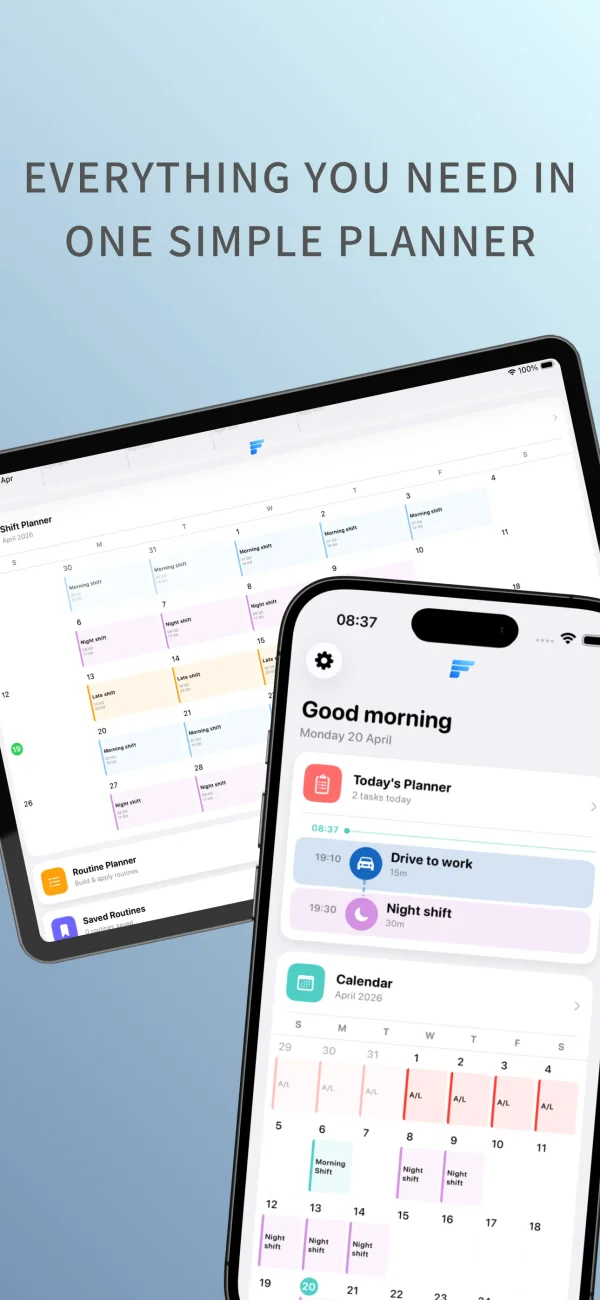
See exactly where you are, what’s next, and how your day flows — all in one place.
Why people choose Framework
– No subscriptions or hidden costs
– Your entire day in one clear timeline
– Built for real life, including shift work
– Works offline, with optional iCloud sync
– Clean, fast, and distraction-free
A Clear View of Your Day
Your Home View brings everything together:
– A live timeline of today that updates in real time
– Instantly see what’s active, what’s next, and what’s done
– Built-in calendars for both tasks and shifts
– Quick access to your routines and saved plans
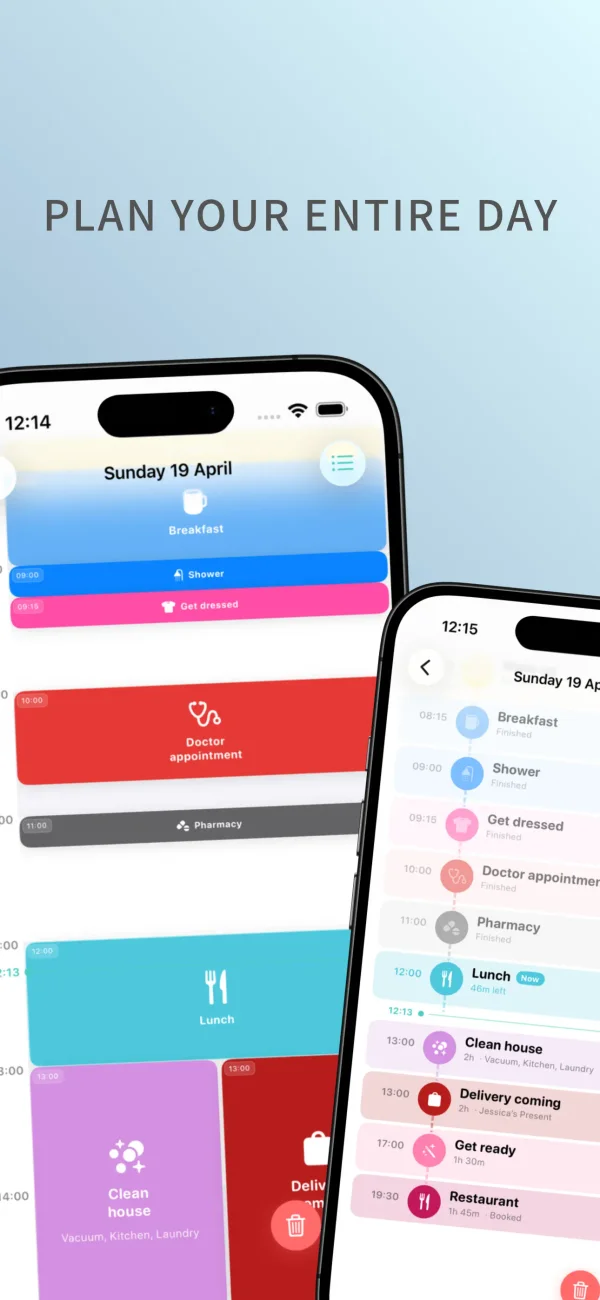
Plan Your Day with Precision
– Full 24-hour timeline for complete control
– Tasks shown as visual blocks, scaled to their duration
– Overlapping tasks automatically organised
– All-day tasks and shifts kept separate and clear
– Add, edit, or clear your day in seconds
No guesswork — just a clear structure from morning to night.
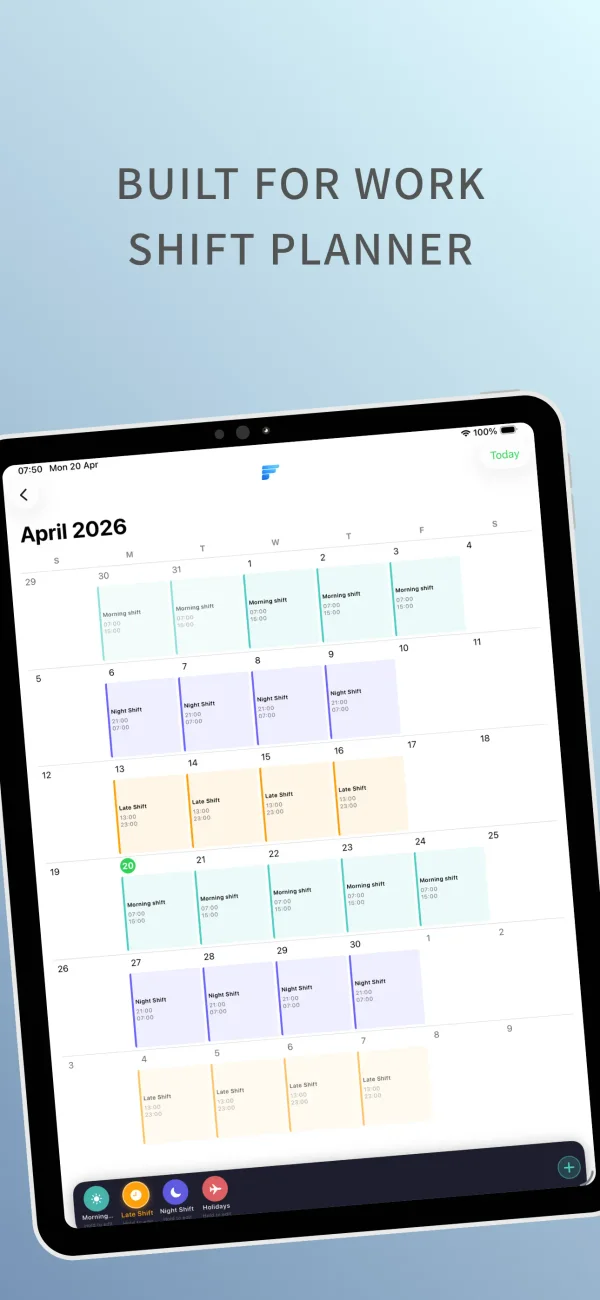
Built for Real Life (Including Shift Work)
– Create custom shift types with roles, times, colours, and icons
– Assign shifts to any day in seconds
– View shifts alongside your daily tasks
– Adjust your schedule at any time
Balance work and life — without the stress.
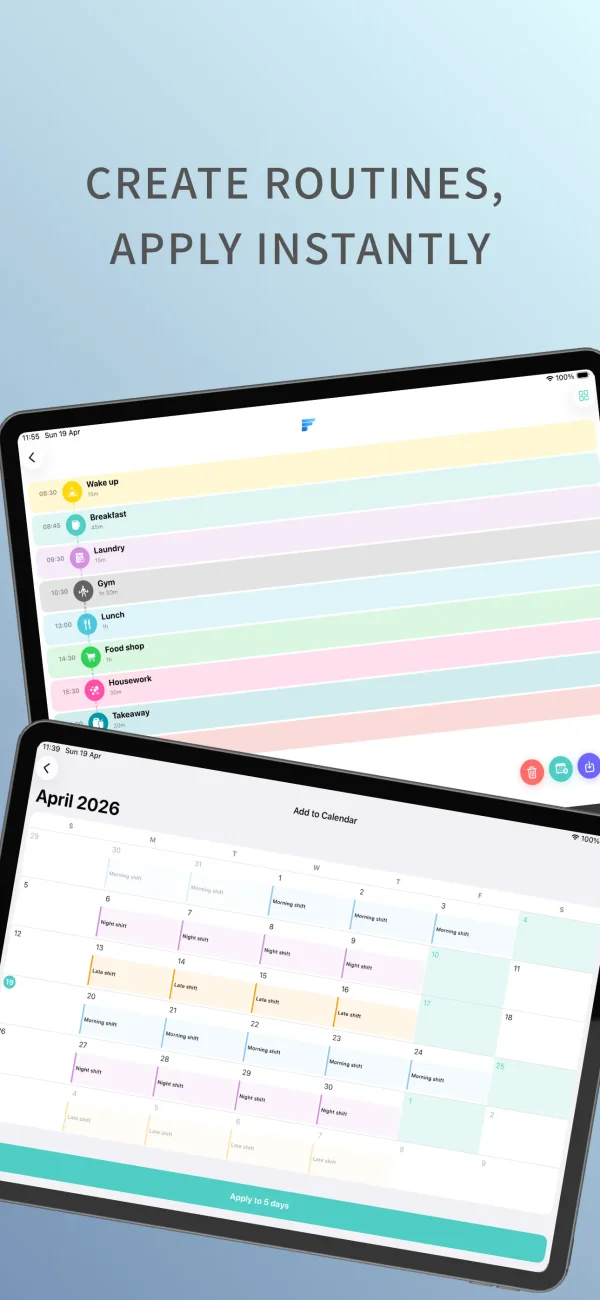
Routines That Save You Time
– Build your ideal day once
– Apply it to any date instantly
– Manage and edit all saved routines
Spend less time planning, more time doing.
Full Calendar Overview
– Scroll through past and future months
– See all tasks directly inside each day
– Open any day for a full detailed timeline
Always know what’s coming next.
Works with Apple
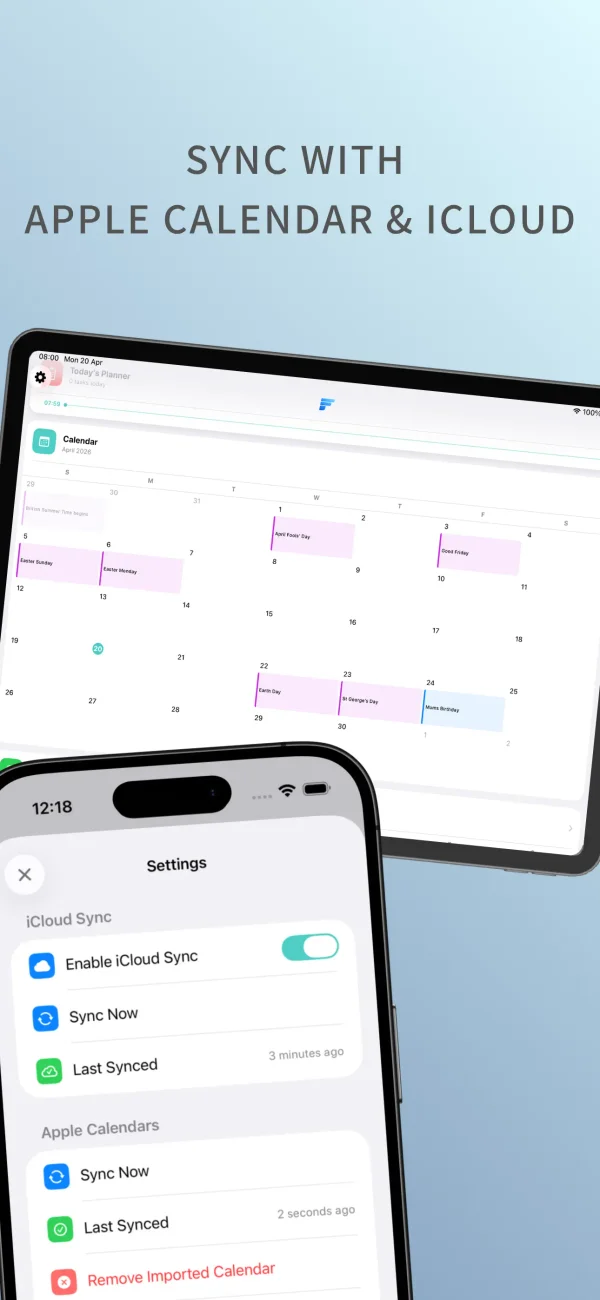
– Import Apple Calendar events (read-only)
– Export your tasks and shifts to a dedicated calendar
– Full control over what syncs
Optional iCloud Sync keeps everything updated across your devices — privately and securely.
Widgets That Keep You on Track
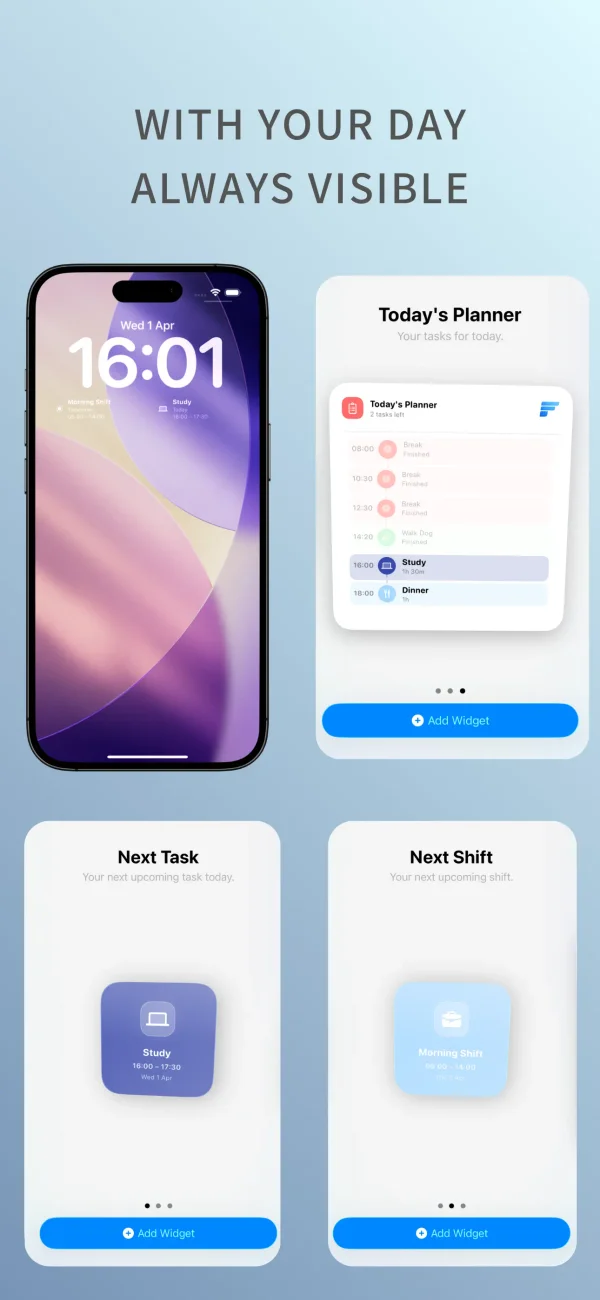
– See your day at a glance from your Home Screen or Lock Screen
– View upcoming tasks and shifts instantly
– Stay updated without opening the app
– Clean, minimal designs that match your planner perfectly
Your schedule — always within reach.
Stay on Track
– Set reminders for any task
– Choose alert or silent notifications
– See your next task or shift at a glance
Built Around You
– 12 or 24-hour time format
– Custom start day of the week
– Light, Dark, or System appearance
– Full control over your data
No Subscriptions. No Lock-ins.
Framework is a one-time purchase.
Everything is included — no monthly fees, no locked features.
Pay once. Plan forever.
Your data stays yours.
Yenilikler
Sürüm 1.5 · 11.10.2026
Framework has been redesigned from the ground up. It's cleaner and softer, and your day is easier to take in at a glance.
New Home screen
• Swipe through your weeks, with coloured dots for each task
• The Next Up card shows what's on now and what's coming
• Focus Score ring, plus your Free Time and Planned Time
• A timeline of your day that expands to show everything
• Tick off tasks with a new animation, and get a little celebration when you finish them all
This Week
• See your whole week in one place, with tasks, shifts, events and planned time
• Open any day to see and tick off its tasks
Work Schedule
• Switch between Week and Month views
• See your total hours, shift count and a breakdown by shift type
• See your days off alongside your shifts
• Tap a shift to edit it
Improved PDF export
• A new list layout alongside the calendar
• Full-screen preview that turns with your phone
• Holidays no longer count towards your shift totals
Everything else
• New designs for creating and editing tasks, shifts, shift types and routines
• Icons are suggested from the name you type, and you can still pick your own
• Tap a tab again to jump back to today
• Haptics throughout the app
• Now available in 17 languages
• Bug fixes and performance improvements
Uygulama gizliliği
Bu uygulamanın verileri nasıl işlediği hakkında Samuel Ogden tarafından App Store üzerinde yapılan beyan.
-
Veri toplanmıyor
Geliştirici bu uygulamadan hiçbir veri toplamıyor.
Gizlilik uygulamaları, örneğin kullandığınız özelliklere veya yaşınıza göre değişiklik gösterebilir.
Bilgiler
- Satıcı
- Samuel Ogden
- Kategori
- Üretkenlik
- Sürüm
- 1.5
- Güncellendi
- 11.10.2026
- Yayın tarihi
- 24.04.2026
- Boyut
- 5,2 MB
- Gereksinim
- iOS 26.2 veya sonrası
- Yaş sınırı
- 4+
- Fiyat
- ₺49,99
- Diller
- İngilizce, Danca, Hollandaca, Fince, Fransızca, Almanca, İtalyanca, Japonca, Korece, Norveççe Bokmål, Lehçe, Portekizce + 6 dil daha
- Telif hakkı
- © 2026 Samuel Ogden
Bunları da beğenebilirsiniz
-
 OK Planner: ADHD TimelineÜretkenlik
-
 Productivity ProÜretkenlik
-
 BPO infraÜretkenlik
-
 Clarity: Voice PlannerÜretkenlik
-
 ToText: AI Sesten MetneTürkçe transkripsiyon
-
 24 Block: Day PlannerÜretkenlik
-
 Time Left - CountdownÜretkenlik
-
 Lineár CalendarÜretkenlik
-
 Statusbrew Companion AppÜretkenlik
-
 swayp - galeri temizleyicikaydır, temizle, yer aç