
Framework: Daily Planner
Plan tasks, shifts & routines
Designed for iPhone, iPad
$0.99
- Age rating4+
- CategoryProductivity
- DeveloperSamuel Ogden
- LanguagesEnglish+ 17 more
- Size5.2 MB
Links to the official App Store page
Download.org hosts no file of Framework: Daily Planner. The button opens its official App Store page, published by Samuel Ogden. Listing last checked on Nov 17, 2026.
Screenshots


About
Framework – Daily Planner
Take control of your entire day with one clear timeline.
No subscriptions. No clutter. Just a simple, visual way to plan your time.
Feel in control of your day again.
See exactly where you are, what’s next, and how your day flows — all in one place.
Why people choose Framework
– No subscriptions or hidden costs
– Your entire day in one clear timeline
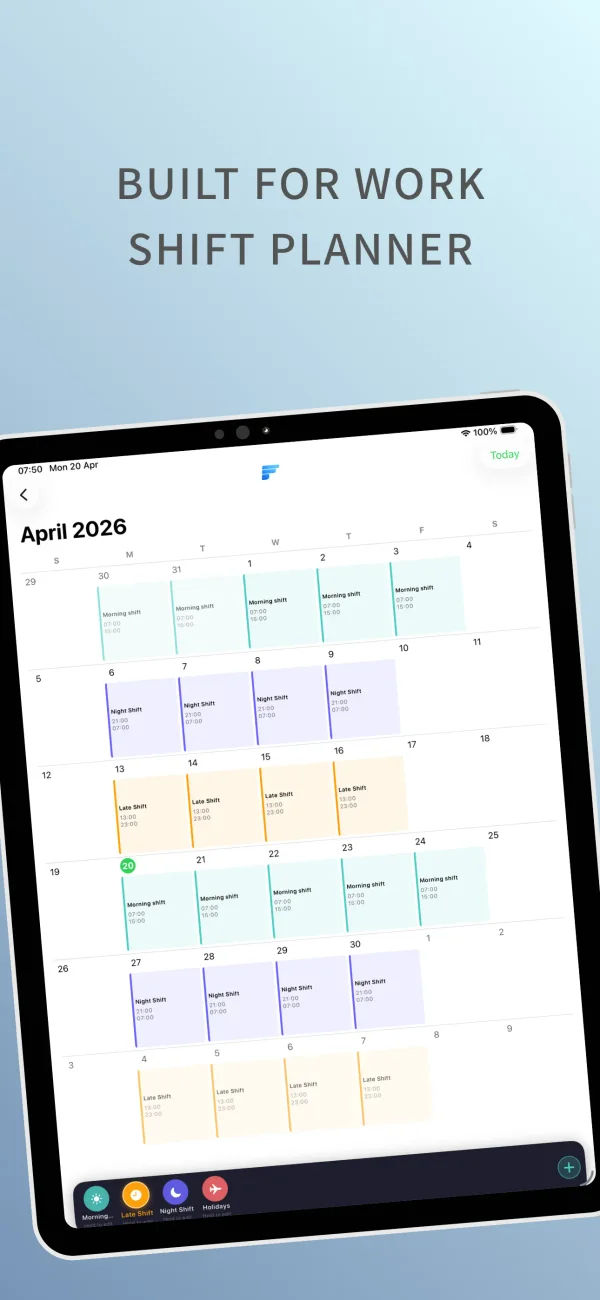
– Built for real life, including shift work
– Works offline, with optional iCloud sync
– Clean, fast, and distraction-free
A Clear View of Your Day
Your Home View brings everything together:
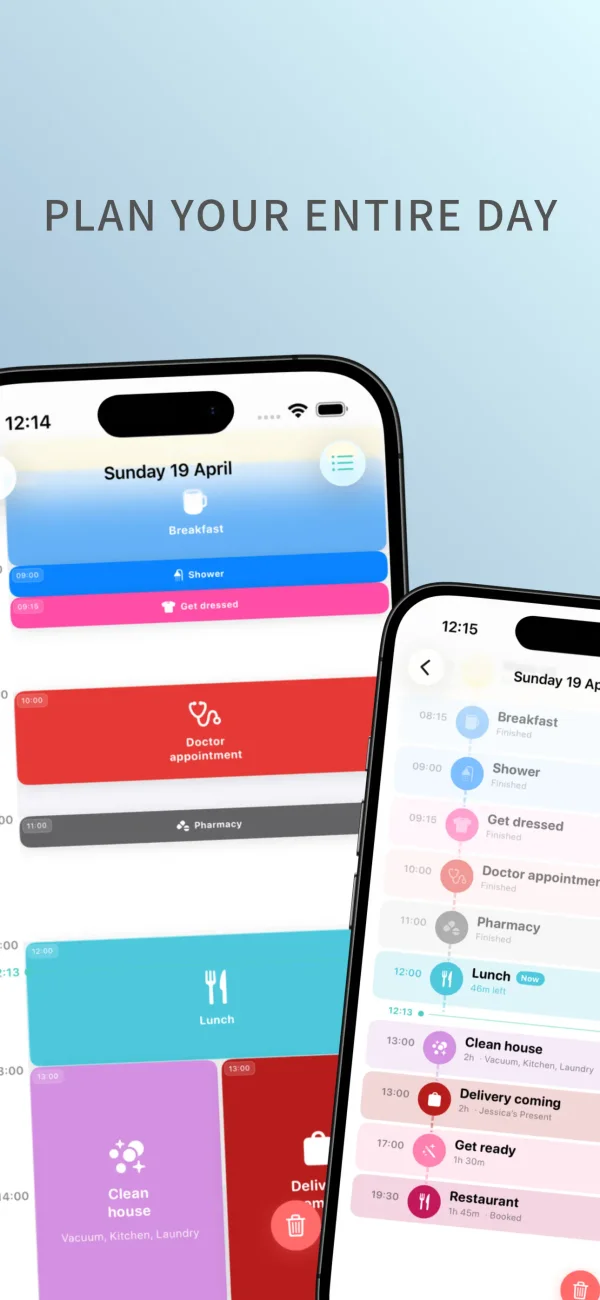
– A live timeline of today that updates in real time
– Instantly see what’s active, what’s next, and what’s done
– Built-in calendars for both tasks and shifts
– Quick access to your routines and saved plans
Plan Your Day with Precision
– Full 24-hour timeline for complete control
– Tasks shown as visual blocks, scaled to their duration
– Overlapping tasks automatically organised
– All-day tasks and shifts kept separate and clear
– Add, edit, or clear your day in seconds
No guesswork — just a clear structure from morning to night.
Built for Real Life (Including Shift Work)
– Create custom shift types with roles, times, colours, and icons
– Assign shifts to any day in seconds
– View shifts alongside your daily tasks
– Adjust your schedule at any time
Balance work and life — without the stress.
Routines That Save You Time
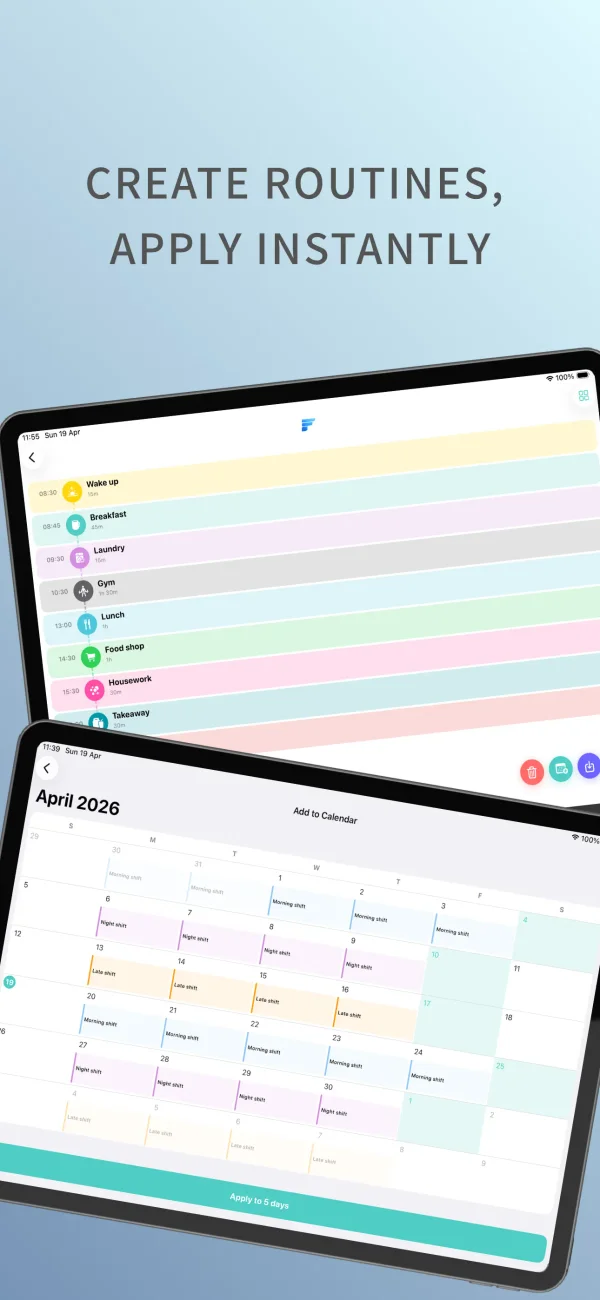
– Build your ideal day once
– Apply it to any date instantly
– Manage and edit all saved routines
Spend less time planning, more time doing.
Full Calendar Overview
– Scroll through past and future months
– See all tasks directly inside each day
– Open any day for a full detailed timeline
Always know what’s coming next.
Works with Apple
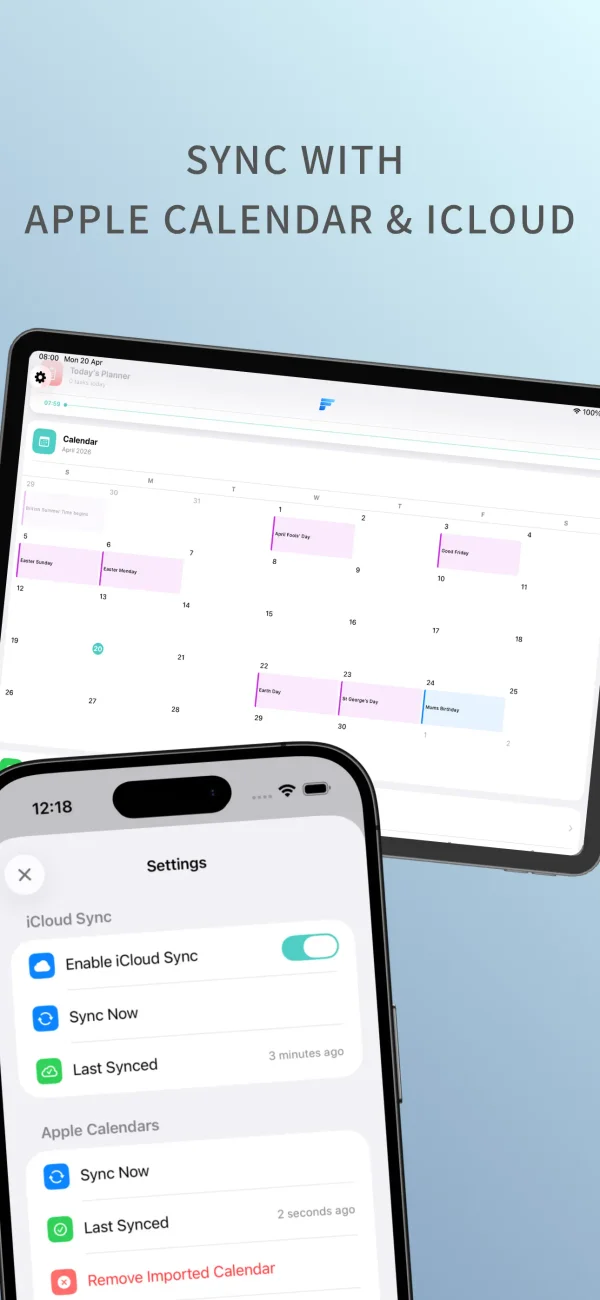
– Import Apple Calendar events (read-only)
– Export your tasks and shifts to a dedicated calendar
– Full control over what syncs
Optional iCloud Sync keeps everything updated across your devices — privately and securely.
Widgets That Keep You on Track
– See your day at a glance from your Home Screen or Lock Screen
– View upcoming tasks and shifts instantly
– Stay updated without opening the app
– Clean, minimal designs that match your planner perfectly
Your schedule — always within reach.
Stay on Track
– Set reminders for any task
– Choose alert or silent notifications
– See your next task or shift at a glance
Built Around You
– 12 or 24-hour time format
– Custom start day of the week
– Light, Dark, or System appearance
– Full control over your data
No Subscriptions. No Lock-ins.
Framework is a one-time purchase.
Everything is included — no monthly fees, no locked features.
Pay once. Plan forever.
Your data stays yours.
What’s new
Version 1.5 · Oct 11, 2026
Framework has been redesigned from the ground up. It's cleaner and softer, and your day is easier to take in at a glance.
New Home screen
• Swipe through your weeks, with coloured dots for each task
• The Next Up card shows what's on now and what's coming
• Focus Score ring, plus your Free Time and Planned Time
• A timeline of your day that expands to show everything
• Tick off tasks with a new animation, and get a little celebration when you finish them all
This Week
• See your whole week in one place, with tasks, shifts, events and planned time
• Open any day to see and tick off its tasks
Work Schedule
• Switch between Week and Month views
• See your total hours, shift count and a breakdown by shift type
• See your days off alongside your shifts
• Tap a shift to edit it
Improved PDF export
• A new list layout alongside the calendar
• Full-screen preview that turns with your phone
• Holidays no longer count towards your shift totals
Everything else
• New designs for creating and editing tasks, shifts, shift types and routines
• Icons are suggested from the name you type, and you can still pick your own
• Tap a tab again to jump back to today
• Haptics throughout the app
• Now available in 17 languages
• Bug fixes and performance improvements
App privacy
What Samuel Ogden declares on the App Store about how this app handles data.
-
Data not collected
The developer does not collect any data from this app.
Privacy practices may vary, for example with the features you use or your age.
Information
- Seller
- Samuel Ogden
- Category
- Productivity
- Version
- 1.5
- Updated
- Oct 11, 2026
- Released
- Apr 24, 2026
- Size
- 5.2 MB
- Requires
- iOS 26.2 or later
- Age rating
- 4+
- Price
- $0.99
- Languages
- English, Danish, Dutch, Finnish, French, German, Italian, Japanese, Korean, Norwegian Bokmål, Polish, Portuguese + 6 more
- Copyright
- © 2026 Samuel Ogden
You might also like
-
 OK Planner: ADHD TimelineVisual Schedule & Gentle Focus
-
 Productivity ProNotes, Schedules & To-Dos
-
 BPO infraProductivity
-
 Clarity: Voice PlannerBrain dump into a to-do list
-
 ToText: AI Transcript SummaryEnglish voice & meeting notes
-
 24 Block: Day PlannerVisual time-block planning
-
 Time Left - CountdownCountdown your events easily!
-
 Lineár CalendarSee the Bigger Picture
-
 Statusbrew Companion AppSocial Media Collaboration App
-
 swayp - gallery cleanerswipe, clean, make space