- Độ tuổi4+
- Danh mụcNhạc
- Nhà phát triểnRamon Smit
- Ngôn ngữTiếng Anh+ 1 ngôn ngữ khác
- Kích thước10,0 MB
Liên kết đến trang App Store chính thức
Download.org không lưu trữ tệp nào của Jeller. Nút này mở trang ứng dụng trên App Store, nơi Ramon Smit phát hành ứng dụng. Trang được kiểm tra lần cuối: 12/11/2026.
Ảnh chụp màn hình



Giới thiệu
Nhà phát triển chưa cung cấp nội dung này bằng ngôn ngữ của bạn.
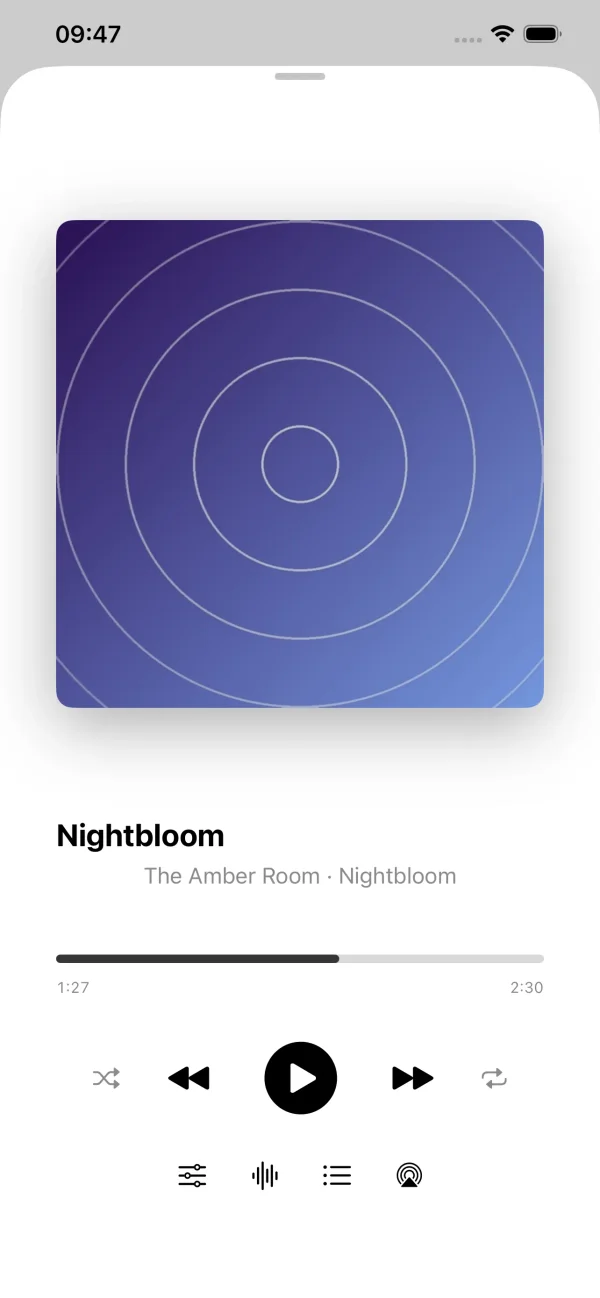
Jeller is a native music client for your own Jellyfin server, built specifically for
iPhone.
Browse your library the way you'd expect from a proper iOS app: Albums, Artists, Songs,
Playlists, Collections and Genres, with fast search and a Now Playing screen that shows
full-resolution cover art, synced lyrics and playback stats.
SOUND
• Built-in equalizer with presets and manual bands
• Loudness normalization using your files' ReplayGain tags, so albums don't jump in volume
• Gapless playback
• AirPlay support
YOUR LIBRARY
• Create and edit playlists and collections
• Favorite songs and albums
• Crop and replace album and artist artwork
• Browse by genre, jump between artists and albums in one tap
• See what's playing on your other devices and pick up where you left off
Jeller connects to a Jellyfin server you already run (or can set up in a few minutes). It
doesn't host or stream any content itself, so you'll need a Jellyfin server with a music
library to get started.
Có gì mới
Phiên bản 1.25 · 01/11/2026
Playback
• Gapless playback: the next track is preloaded. With the EQ on there's still a tiny gap between tracks.
• Queue: Play Next and Add to Queue for songs and albums. In Up Next you can drag to reorder, remove tracks and clear everything.
• ReplayGain: automatic, per track or per album, and it only ever lowers the volume. It now has an on/off switch that brings back your previous mode when you turn it on again.
• Output follows the sample rate of the source file.
• Compressor/limiter: the compressor now works on both stereo channels together with a soft knee, and hard clipping has been replaced by a soft limiter. EQ changes no longer reload the stream.
• Shuffle: the current track stays first, and turning on shuffle mid-album no longer skips tracks. A restored session keeps its shuffle order.
• Large playlists and favorites load page by page instead of stopping at 500 tracks, and scroll smoothly.
• Interruptions (calls, Siri) really pause playback and only resume when iOS asks for it. Playback pauses when your headphones or Bluetooth disconnect.
• The audio session is only activated when you first press play, not at launch.
Formats
• Opus plays directly again.
• Other transcodes (Vorbis, WavPack, APE, DSF…) now go through HLS/FLAC, without EQ and ReplayGain.
• Files above 96 kHz play without EQ.
• AIFF and CAF play directly.
Library
• Format badge
• Sharper artwork
• Search results sorted by relevance
• Album artists and "Appears On"
• No more limits on albums per artist, genre or collection
• Video playlists are hidden
Reliability
• After launch or a network change, Jeller retries loading with backoff instead of showing "offline" right away.
• Pausing while loading is respected.
• An expired session signs you out cleanly with a message.
• Favorite status is consistent across the app.
Quyền riêng tư của ứng dụng
Những gì Ramon Smit khai báo trên App Store về cách ứng dụng này xử lý dữ liệu.
-
Dữ liệu không được thu thập
Nhà phát triển không thu thập bất kỳ dữ liệu nào từ ứng dụng này.
Phương thức đảm bảo quyền riêng tư có thể khác nhau, chẳng hạn như tuỳ theo các tính năng bạn sử dụng hoặc độ tuổi của bạn.
Thông tin
- Người bán
- Ramon Smit
- Danh mục
- Nhạc
- Phiên bản
- 1.25
- Cập nhật
- 01/11/2026
- Phát hành
- 20/10/2026
- Kích thước
- 10,0 MB
- Yêu cầu
- iOS 17.0 trở lên
- Độ tuổi
- 4+
- Giá
- Miễn phí
- Ngôn ngữ
- Tiếng Anh, Tiếng Hà Lan
- Bản quyền
- © 2026 Ramon Smit