
- Độ tuổi4+
- Danh mụcHiệu Suất
- Nhà phát triểnDiego Jenzer
- Ngôn ngữTiếng Anh+ 5 ngôn ngữ khác
- Kích thước34,3 MB
Liên kết đến trang App Store chính thức
Download.org không lưu trữ tệp nào của Local Transcript. Nút này mở trang ứng dụng trên App Store, nơi Diego Jenzer phát hành ứng dụng. Trang được kiểm tra lần cuối: 16/11/2026.
Ảnh chụp màn hình


Giới thiệu
Nhà phát triển chưa cung cấp nội dung này bằng ngôn ngữ của bạn.
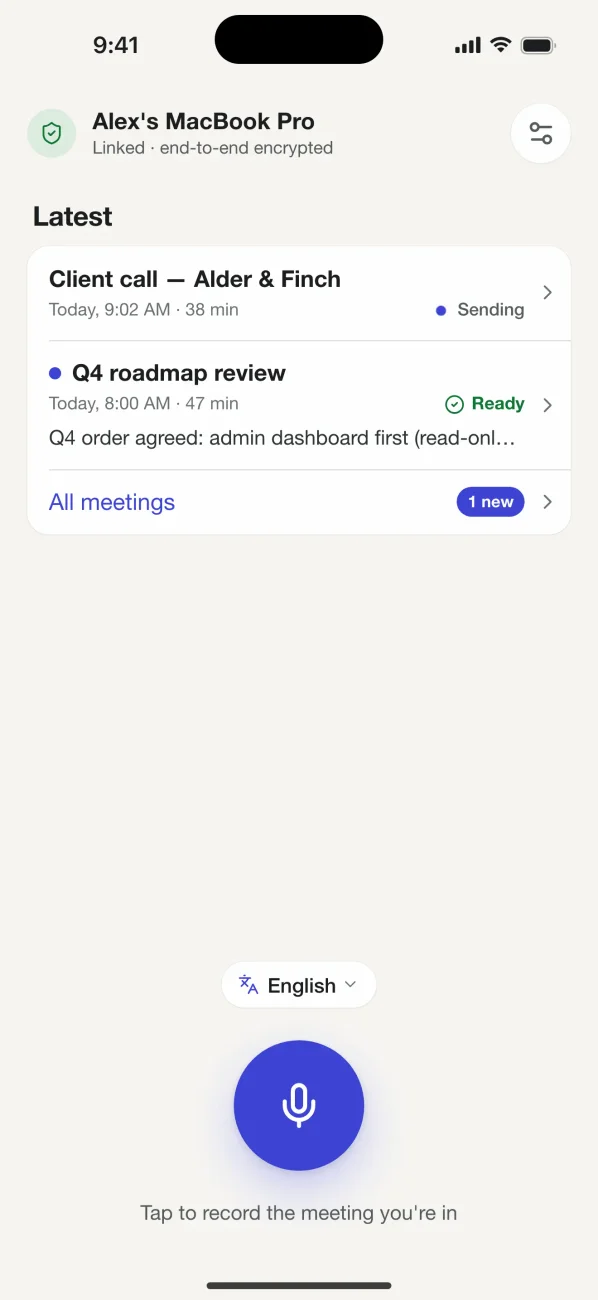
Local Transcript turns your iPhone into the microphone for Local Transcript on your Mac or Windows PC.
Put the phone on the table and record the meeting. The recording goes to your own computer, which transcribes it on its own hardware, and the transcript comes back to your phone.
REQUIRES THE DESKTOP APP
This is a companion app. It pairs with Local Transcript for Mac or Windows, version 0.6.72 or newer, a free download from localtranscript.com. Without it, the iPhone app still records and plays your recordings back, but nothing transcribes them.
WHY IT IS DIFFERENT
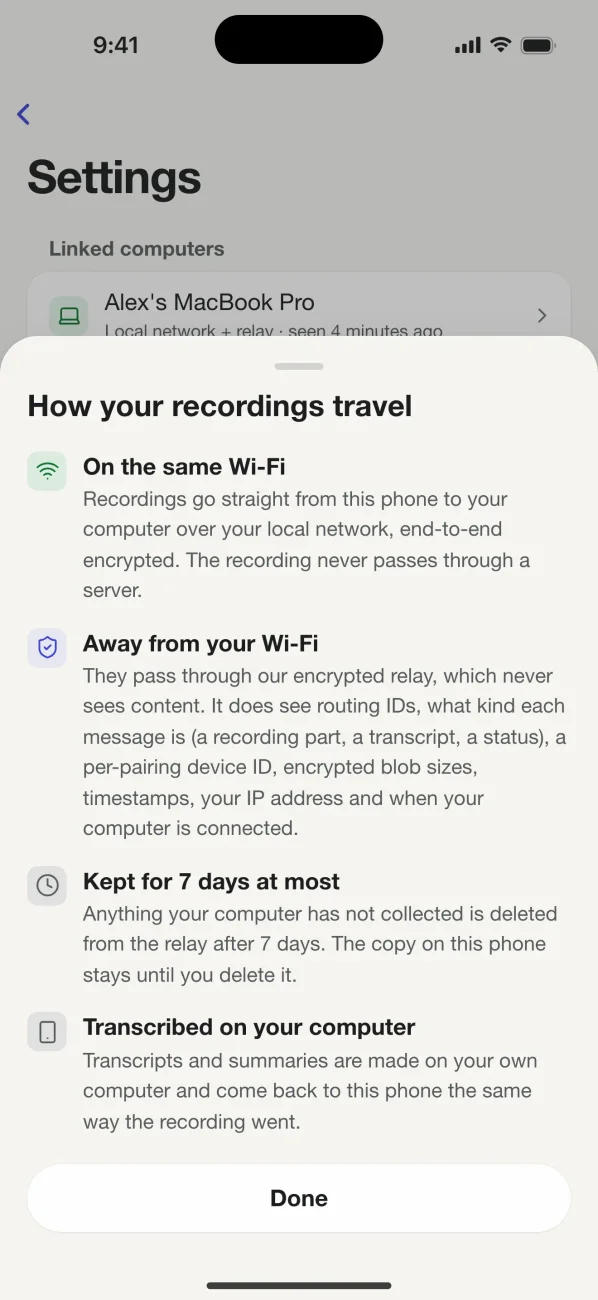
• Your recordings are transcribed on your own computer, with local speech models. They are never sent to a cloud or AI service, and we never run speech recognition on our servers.
• No account, no sign-in, no subscription.
• On the same Wi-Fi, the recording goes straight from your phone to your computer. No server is involved.
• Away from your Wi-Fi, it travels through our relay, end-to-end encrypted with keys only your two devices hold. The relay cannot read it, and anything your computer has not collected is deleted after 7 days.
• No analytics, no crash reporting, no advertising identifier, no tracking.
HOW IT WORKS
1. Install Local Transcript on your computer and switch on the phone companion in Settings › Integrations.
2. Scan the pairing code it shows.
3. Record. When your computer has transcribed the meeting, the transcript appears on your phone.
ON YOUR PHONE
• One-tap recording that keeps going with the screen locked
• A phone call pauses the recording, and it resumes when the call ends
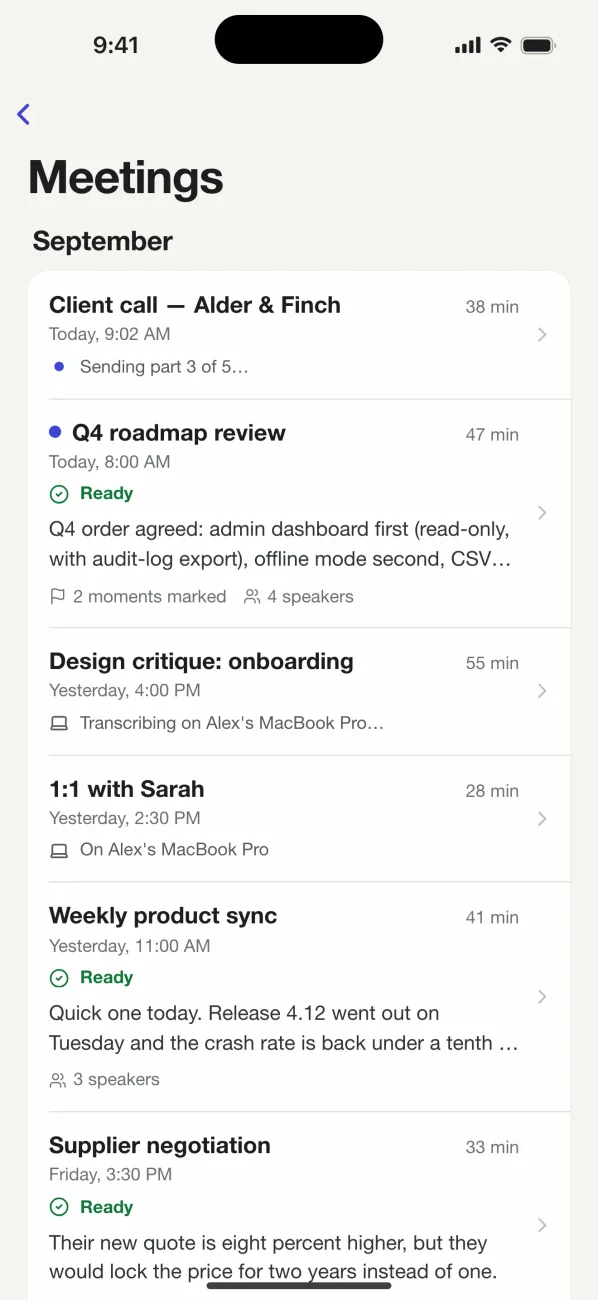
• Mark a moment while you record, and jump straight back to it later
• Choose the meeting's language, or let your computer detect it
• See where every recording is: sending, on your computer, transcribing, ready
• Read the transcript by speaker, play the recording back, and share the text
• If you make a summary on your computer, it comes back with the transcript
• In English, German, French, Italian, Spanish and Portuguese
Built for people who cannot let a cloud service read their meetings: lawyers, doctors, journalists, works councils, and anyone whose conversations have to stay on hardware they control.
Quyền riêng tư của ứng dụng
Những gì Diego Jenzer khai báo trên App Store về cách ứng dụng này xử lý dữ liệu.
-
Dữ liệu không liên kết với bạn
Có thể được thu thập nhưng không liên kết với danh tính của bạn.
- Nội dung của người dùng
- Mã định danh
Phương thức đảm bảo quyền riêng tư có thể khác nhau, chẳng hạn như tuỳ theo các tính năng bạn sử dụng hoặc độ tuổi của bạn.
Thông tin
- Người bán
- Diego Jenzer
- Danh mục
- Hiệu Suất
- Phiên bản
- 1.0.0
- Cập nhật
- 19/10/2026
- Phát hành
- 19/10/2026
- Kích thước
- 34,3 MB
- Yêu cầu
- iOS 16.0 trở lên
- Độ tuổi
- 4+
- Giá
- Miễn phí
- Ngôn ngữ
- Tiếng Anh, Tiếng Pháp, Tiếng Đức, Tiếng Ý, Tiếng Bồ Đào Nha, Tiếng Tây Ban Nha
- Bản quyền
- © 2026 Diego Jenzer
Có thể bạn cũng thích
-
 Apex Voice NotesHiệu Suất
-
 Meeting RecallHiệu Suất
-
 LifeTape:AI Watch RecorderHiệu Suất
-
 Phiên âm · SalbittiÂm thanh thành chữ và tóm tắt
-
 App đọc sách PDF, tài liệuChuyển văn bản thành giọng nói
-
 LocalTranscript: Audio to TextVăn bản · Phụ đề
-
 Zapyso: AI Meeting NotesHiệu Suất
-
 CalcaHiệu Suất
-
 Phonic DictationHiệu Suất
-
 Verbatim IQ: AI Voice to TextHiệu Suất