SpaceCast Display
Mac & PC Screen on iPhone/iPad
Được thiết kế cho iPhone, iPad
Miễn phí · Mua hàng trong ứng dụng
- Độ tuổi4+
- Danh mụcTiện Ích
- Nhà phát triểnTakahiro Endo
- Ngôn ngữTiếng Anh+ 9 ngôn ngữ khác
- Kích thước4,0 MB
Liên kết đến trang App Store chính thức
Download.org không lưu trữ tệp nào của SpaceCast Display. Nút này mở trang ứng dụng trên App Store, nơi Takahiro Endo phát hành ứng dụng. Trang được kiểm tra lần cuối: 17/11/2026.
Ảnh chụp màn hình
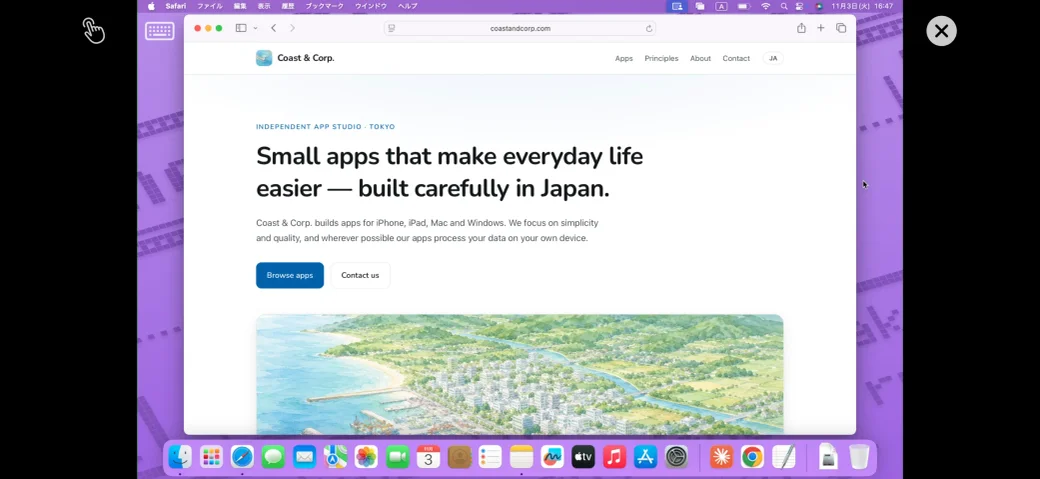
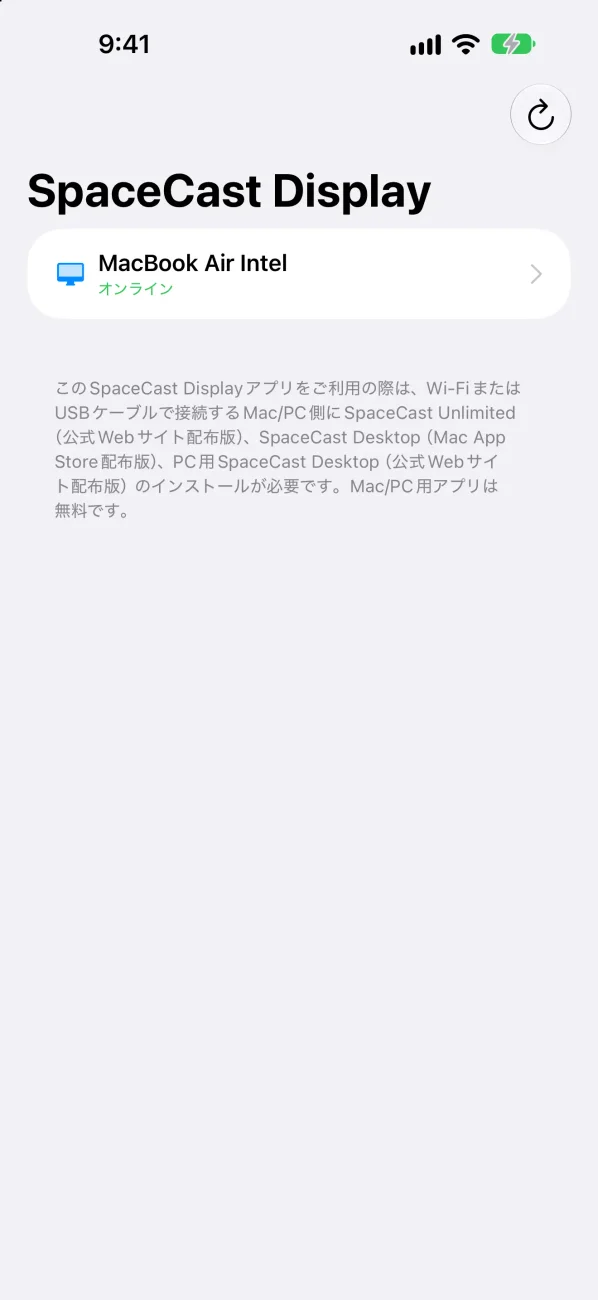
Giới thiệu
Nhà phát triển chưa cung cấp nội dung này bằng ngôn ngữ của bạn.
The simplest way to use your iPhone or iPad as a secondary display for your Mac/PC.
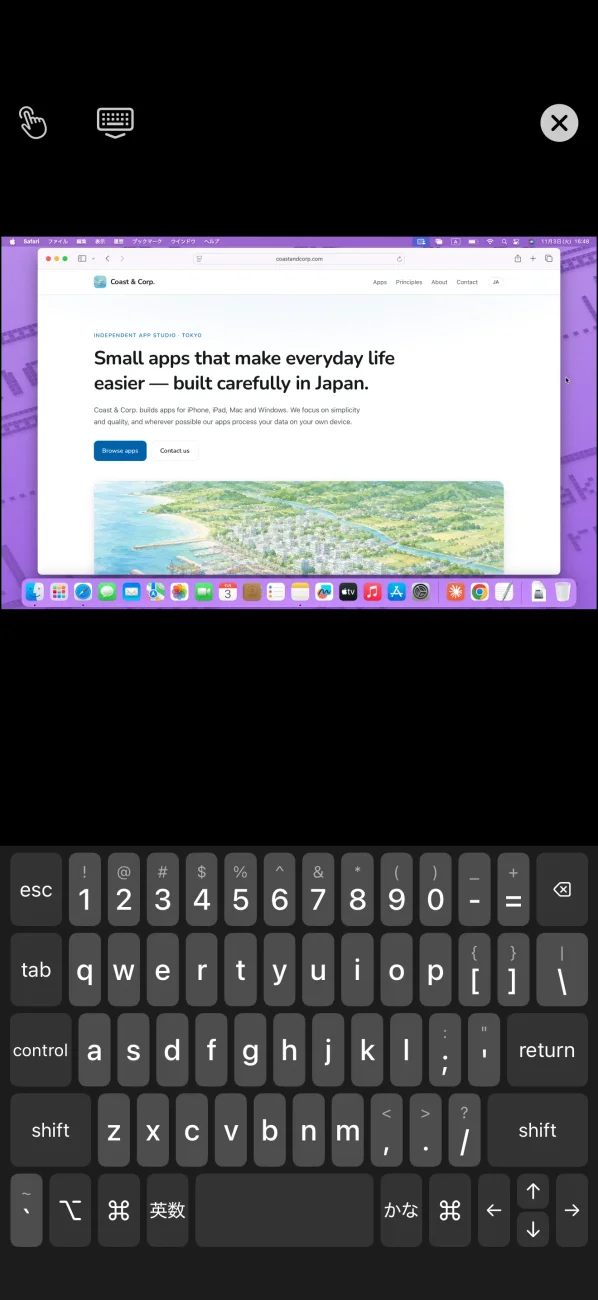
SpaceCast Display streams your Mac/PC screen to your iPhone or iPad via Wi-Fi or USB cable. Unlike Sidecar, it can connect devices with different Apple accounts, allowing for various combinations such as your own Mac/PC with a company-issued iPad or a family member's iPhone.
On a foldable iPhone (iPhone Duo), just fold it halfway: the upper screen shows your Mac/PC and the lower screen becomes a keyboard and trackpad, like a tiny laptop.
----------------------------------
■ Main Features
----------------------------------
【Features Available for Free】
・Real-time display of your Mac/PC screen on iPhone or iPad (first 10 minutes)
・Connection via Wi-Fi (Mac App Store version and official website version) or USB cable (official website version only for Mac)
・Automatic detection of nearby Macs/PCs and one-tap connection
・Secure pairing with a 6-digit PIN
・Automatic reconnection to previously paired Macs/PCs
・Adapts automatically when you fold or unfold a foldable iPhone
【SpaceCast Pro (One-time Purchase)】
・Direct control of your Mac/PC with touch
— Tap: Left click
— Two-finger tap: Right click
— Long press: Right click
— Two-finger scroll
— Pinch: Zoom in/out
— Three-finger swipe: Mission Control / Space switching
・Laptop mode (foldable iPhone): fold it halfway to show your Mac/PC on top and a keyboard and trackpad below
・On-screen Mac keyboard: show it on any iPhone or iPad with one button. Shortcuts with command, option and control work as on a real Mac keyboard, and the Eisu/Kana keys support Japanese input
・Trackpad: move the pointer, tap to click, drag, two-finger scroll, two-finger tap to right-click
・Unlimited connection time
・Transfer hardware keyboard (Magic Keyboard, etc.) input directly to your Mac/PC
・Connect devices with different Apple accounts (no Sidecar restrictions)
----------------------------------
■ How to Use
----------------------------------
1. Install and launch SpaceCast Unlimited (official website version) / SpaceCast Desktop (Mac App Store version) / SpaceCast Desktop for PC (official website version). The Mac/PC app is free.
2. Connect your iPhone or iPad and your Mac/PC to the same Wi-Fi network, or connect them with a USB cable (SpaceCast Unlimited only).
3. Open SpaceCast Display, and nearby Macs/PCs will automatically appear.
4. Tap the Mac/PC name, enter the displayed 6-digit PIN, and complete pairing.
5. Your Mac/PC screen will immediately appear on your iPhone or iPad.
----------------------------------
■ Notes
----------------------------------
• To use this app, you need to install "SpaceCast Unlimited" (official website version) or similar on the Mac connected via Wi-Fi or USB cable. Both Mac and PC apps are free to use.
• "SpaceCast Desktop" from the Mac App Store is view-only. To control your computer with touch, keyboard or trackpad, use "SpaceCast Unlimited" (official website version) on a Mac or "SpaceCast Desktop for PC" on a PC.
• To control a Mac, you need to grant accessibility permissions on the Mac side.
* Uses only local network communication. Video and input data are never sent to external servers.
* "SpaceCast Unlimited" (official website version) allows for Mac screen mirroring and extended desktop display. Please check the official website for details: https://coastandcorp.com/spacecast/mac/
* "SpaceCast Desktop for PC" (official website version) allows for PC screen mirroring. Please check the official website for details: https://coastandcorp.com/spacecast/pc/
* Compatible with iPhone running iOS 17.0 or later and iPad running iPadOS 17.0 or later. Laptop mode requires a foldable iPhone with iOS 27.1 or later.
Có gì mới
Phiên bản 1.1.0 · 03/11/2026
- Now available on iPhone.
- Laptop mode (Pro): fold a foldable iPhone (iPhone Duo) halfway to show your Mac/PC on top and a keyboard and trackpad below.
- On-screen Mac keyboard (Pro) with shortcuts and Japanese Eisu/Kana keys. Show it on any device with the keyboard button.
- When connected to the view-only Mac App Store version of SpaceCast Desktop, control buttons are hidden and a short notice explains why.
- Fixed the app sometimes staying on "Connecting" when a Mac/PC could not be reached.
- The local network permission prompt is now localized.
Quyền riêng tư của ứng dụng
Những gì Takahiro Endo khai báo trên App Store về cách ứng dụng này xử lý dữ liệu.
-
Dữ liệu không được thu thập
Nhà phát triển không thu thập bất kỳ dữ liệu nào từ ứng dụng này.
Phương thức đảm bảo quyền riêng tư có thể khác nhau, chẳng hạn như tuỳ theo các tính năng bạn sử dụng hoặc độ tuổi của bạn.
Thông tin
- Người bán
- Takahiro Endo
- Danh mục
- Tiện Ích
- Phiên bản
- 1.1.0
- Cập nhật
- 03/11/2026
- Phát hành
- 14/05/2026
- Kích thước
- 4,0 MB
- Yêu cầu
- iOS 17.0 trở lên
- Độ tuổi
- 4+
- Giá
- Miễn phí
- Mua hàng trong ứng dụng
- Có
- Ngôn ngữ
- Tiếng Anh, Tiếng Pháp, Tiếng Đức, Tiếng Ý, Tiếng Nhật, Tiếng Hàn, Tiếng Bồ Đào Nha, Tiếng Trung Giản thể, Tiếng Tây Ban Nha, Tiếng Trung Phồn thể
- Bản quyền
- ©️ 2026 Coast&Corp.