
ZapPDF: Merge, Split & Edit
100% Offline Document Utility
Được thiết kế cho iPhone, iPad, Mac
Miễn phí · Mua hàng trong ứng dụng
- Độ tuổi4+
- Danh mụcTiện Ích
- Nhà phát triểnYasar Berker Gungor
- Ngôn ngữTiếng Anh+ 6 ngôn ngữ khác
- Kích thước15,8 MB
Liên kết đến trang App Store chính thức
Download.org không lưu trữ tệp nào của ZapPDF: Merge, Split & Edit. Nút này mở trang ứng dụng trên App Store, nơi Yasar Berker Gungor phát hành ứng dụng. Trang được kiểm tra lần cuối: 15/11/2026.
Ảnh chụp màn hình
Giới thiệu
Nhà phát triển chưa cung cấp nội dung này bằng ngôn ngữ của bạn.
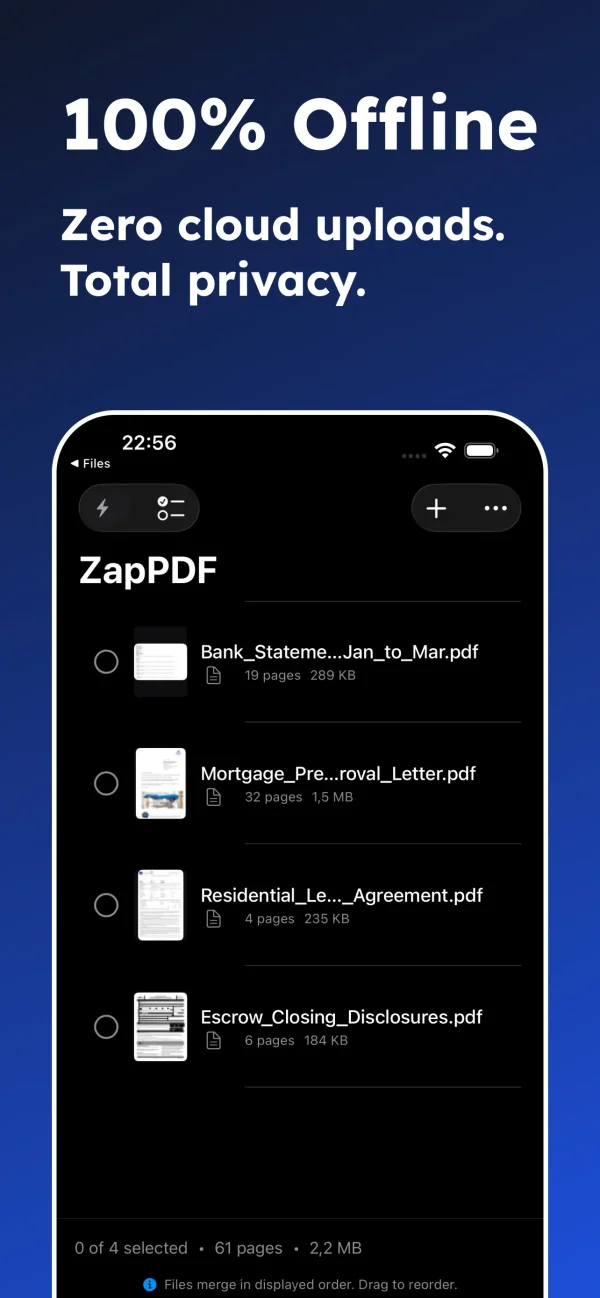
ZapPDF is the ultimate privacy-first PDF utility. Whether you are dealing with sensitive financial documents, legal forms, or heavy study materials, ZapPDF gives you the power to manage them instantly—without ever uploading your private files to a random cloud server.
100% OFFLINE & PRIVATE
All processing happens locally on your device. Zero cloud uploads. Zero data harvesting. Total peace of mind.
POWERFUL FEATURES
• Merge: Combine multiple files into one seamless document.
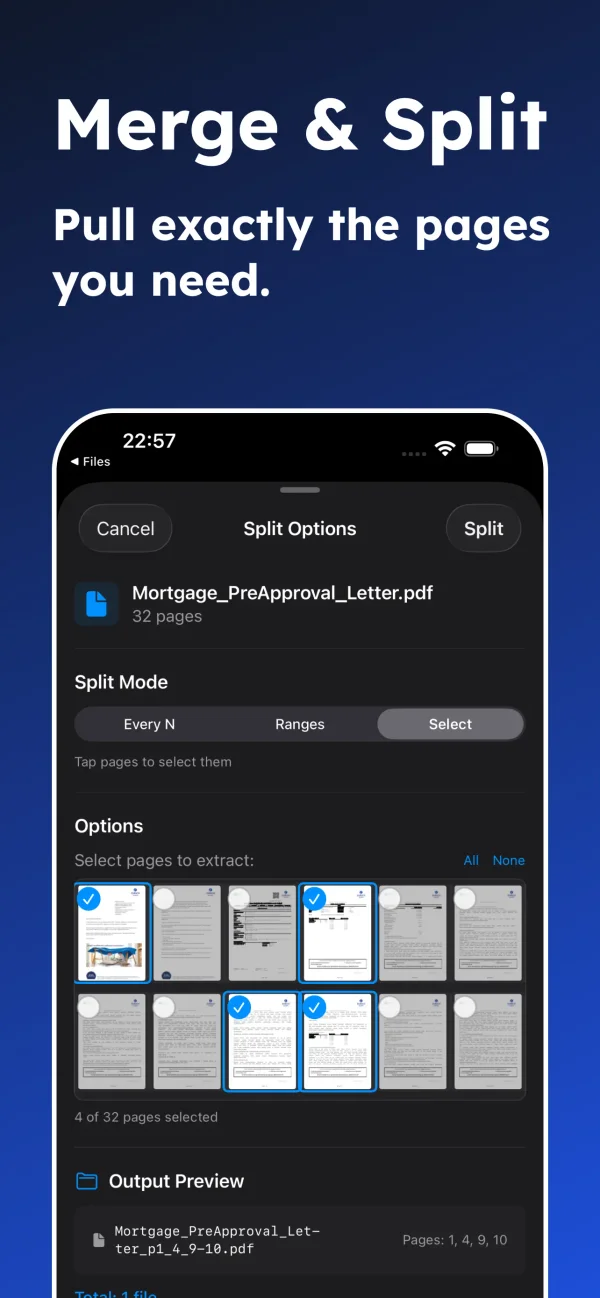
• Split: Extract specific page ranges or break a large file into individual pages.
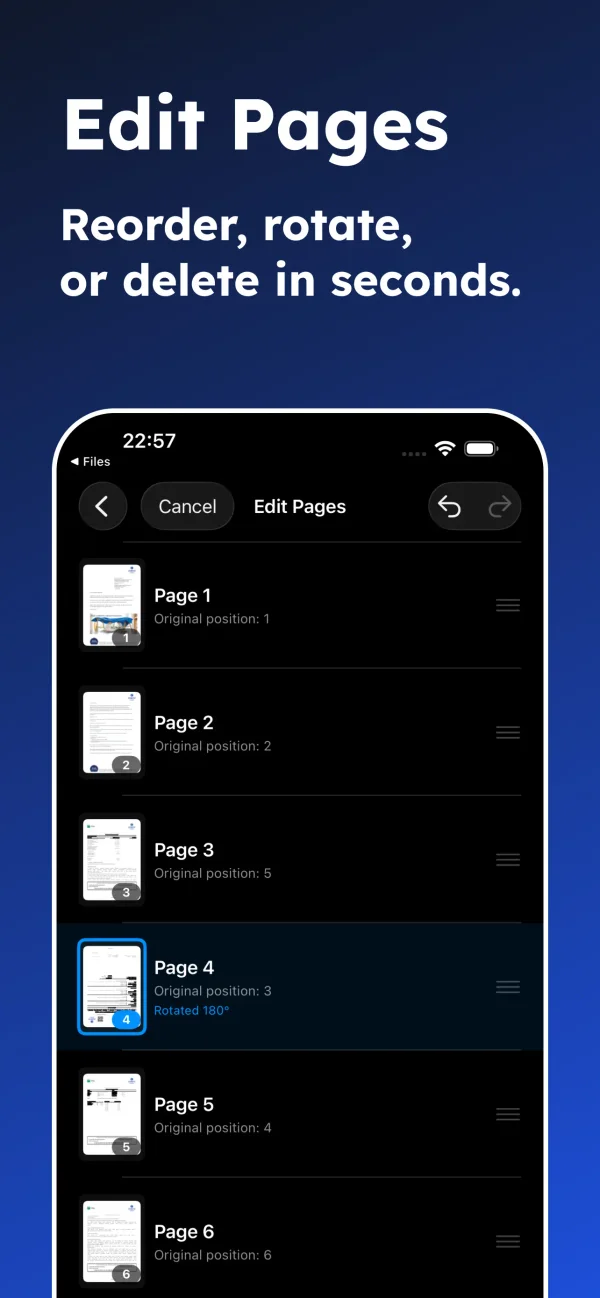
• Edit Pages: Drag to reorder, rotate, or delete pages in seconds.
• Document Scanner: Scan paper documents or import photos directly into a crisp, secure PDF.
• Flatten: Merge annotations and form fields directly into the page content to prevent further editing.
• Seamless Sharing: Open files directly from the Files app, Mail, or other apps using the iOS Share Sheet.
Terms of Use (EULA): https://www.apple.com/legal/internet-services/itunes/dev/stdeula/
Có gì mới
Phiên bản 1.3.1 · 05/11/2026
• ZapPDF now adapts to iPhone Duo and resizable iPad windows.
• A page preview sits beside your editing tools in wider windows.
• Larger text is easier to use throughout setup, PDF tools, and results, with layouts that keep content and controls within reach.
• A more compact iPhone home screen leaves more room for your files, with clearer guidance for adding PDFs and photos.
• Share suggestions or get help more easily. You can also report a problem directly from an error message or a finished result.
Quyền riêng tư của ứng dụng
Những gì Yasar Berker Gungor khai báo trên App Store về cách ứng dụng này xử lý dữ liệu.
-
Dữ liệu liên kết với bạn
Có thể được thu thập và liên kết với danh tính của bạn.
- Mục mua
Phương thức đảm bảo quyền riêng tư có thể khác nhau, chẳng hạn như tuỳ theo các tính năng bạn sử dụng hoặc độ tuổi của bạn.
Thông tin
- Người bán
- Yasar Berker Gungor
- Danh mục
- Tiện Ích
- Phiên bản
- 1.3.1
- Cập nhật
- 05/11/2026
- Phát hành
- 07/03/2026
- Kích thước
- 15,8 MB
- Yêu cầu
- iOS 17.0 trở lên
- Độ tuổi
- 4+
- Giá
- Miễn phí
- Mua hàng trong ứng dụng
- Có
- Ngôn ngữ
- Tiếng Anh, Tiếng Pháp, Tiếng Đức, Tiếng Nhật, Tiếng Trung Giản thể, Tiếng Tây Ban Nha, Tiếng Thổ Nhĩ Kỳ
- Bản quyền
- © 2026 Yasar Berker Gungor
Có thể bạn cũng thích
-
 Split pdf into pagesTiện Ích
-
 Pangi – 2FA AuthenticatorTiện Ích
-
 Reader & Editor - PDFReaderTiện Ích
-
 PDF Chapter SplitChia nhỏ PDF theo chương
-
 Tách PDF PageLiftTrích xuất, xóa & xuất trang
-
 extractall: Extract PDF PagesTiện Ích
-
 BandCameraTiện Ích
-
 PDF Merger - Join DocumentTiện Ích
-
 WellKept: Your Well On RecordTiện Ích
-
 PDF Merge : Split & CombineTiện Ích