
File Labs 1.0.75 for Windows
Dual-pane file manager with conflict-first transfers
Screenshots
Description
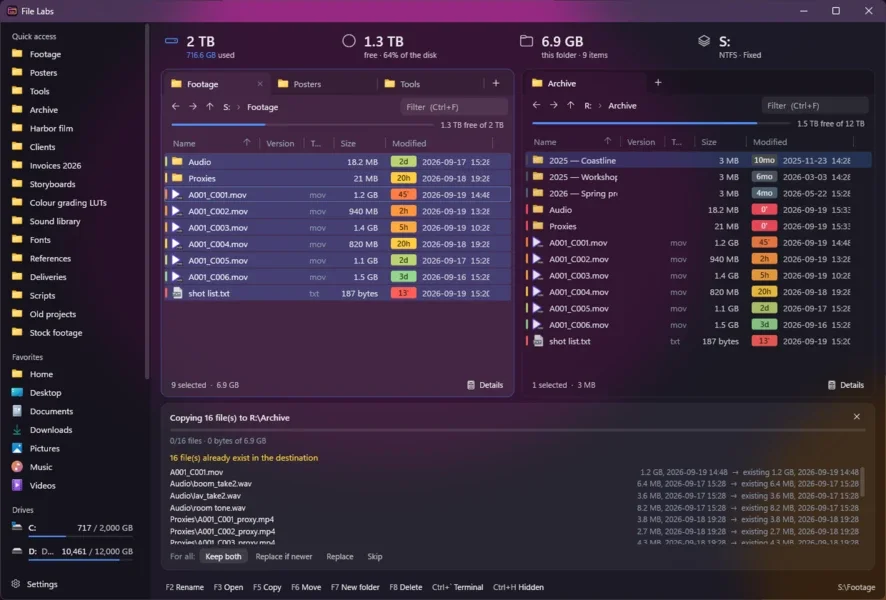
File Labs copies and moves files between two panes, checking the whole job before any file moves. It is a dual-pane Windows file manager from Protagonist Labs. The scan comes first: conflicts get listed up front, and you pick keep both, replace if newer, or skip before the transfer begins. Copies and moves can be paused and cancelled while they run.
Tabs sit alongside the dual panes, so several locations stay open at once. Folder sizes show in the file list, and Quick View previews a file without opening it. Live charts track transfer speed as data moves. After a move or copy, xxHash3 verifies the data. Most of the load lands on the preflight scan and on the transfer itself; the scanning model cuts repeated I/O when a job is interrupted. There is no account to create. Update checks go through GitHub only, and no telemetry is collected. Running it takes no background services, and it installs for one user at a time. Each user who wants it as their default file manager sets it that way. Its design is meant to stay light and to travel well on portable setups.
The tabbed dual-pane model and the conflict-first workflow take a short while to get used to. Casual users may find the extra steps unnecessary.
Download files
fe7f3134235a268eccde019b59c95250f25ddd02ad23eb5b774a808bfe73aca8
No digital signatureaca54088202bca626caf0cd0acea288304bb0d05cc51ddc3b6800a0853e9aabf
No digital signatureSystem requirements
Available on:
Minimum OS:
Windows XP or later
Additional information
Developer
Latest release
Size
Category
File type
SHA-256
fe7f3134235a268eccde019b59c95250f25ddd02ad23eb5b774a808bfe73aca8





