
Folder Marker 4.9 for Windows
SHA-256 listed
Changes folder icons and colors from the right-click menu or the app
All ages
Age rating
Screenshots
Description
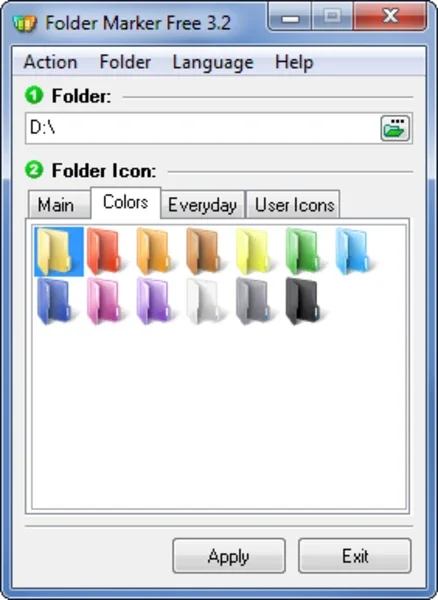
Folders get their icon and color changed with Folder Marker. Pick the folder, then pick the color to apply. The colors include black, orange, red and green.
How you change a folder
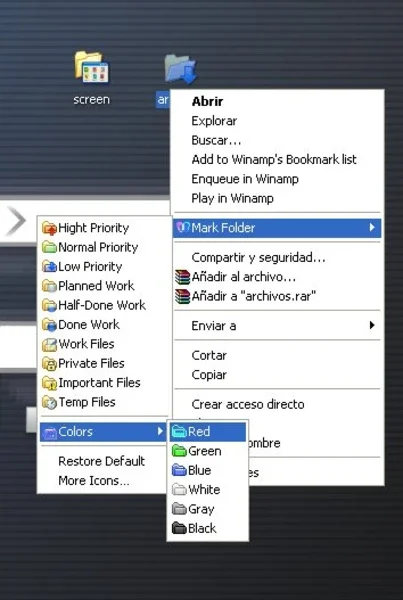
Every change starts from the folder's right-click menu, where the options sit in the contextual menu. The program's own interface works too. From either place you can swap the standard icon for one of the icons included in the program, or point at a custom colorful icon found elsewhere.
Download files
File4.9EXE
Version4.9
ReleasedOct 14, 2025
Size14.4 MB
SHA-256
Get
0f7b09301c72aa9dacd233eb8321f9f4fc3c9fc27b9b40ec406a2c7b188caf87
Signed by ArcticLine Software · valid until Oct 9, 2025Filefolder-marker-4.8.exeEXE
Version4.8
ReleasedJun 27, 2023
Size10.4 MB
SHA-256
Get
b163d2509d5837b2c4bc43f97df0a9c2a1257da1a7f8262a9edcb335f478f4c9
Filefolder-marker-4.5.exeEXE
Version4.5
ReleasedAug 7, 2021
Size9.3 MB
SHA-256
Get
d4ffbcaa376094ad755f965a067722a5f42d57f20dbb7fa88658abc2ca328512
Filefolder-marker-4.2.exeEXE
Version4.2
ReleasedAug 23, 2013
Size6.6 MB
SHA-256
Get
1a57005f8bbf7674626636ae215ffc8dc10e8c4f77aef5f5ec90d007a22e5ce7
Filefolder-marker-4.1.exeEXE
Version4.1
ReleasedAug 12, 2013
Size4.3 MB
SHA-256
Get
7ea955a0276f29068b684cd54b5bba3de867e3c2ce4074d144c30aa182a2dfaf
System requirements
Available on:
Minimum OS:
Windows XP or later
Additional information
Developer
Latest release
4.9 · Oct 14, 2025
Size
14.4 MB
File type
EXE
SHA-256
0f7b09301c72aa9dacd233eb8321f9f4fc3c9fc27b9b40ec406a2c7b188caf87
Digital signature
Signed by ArcticLine Software · valid until Oct 9, 2025