
Free Hide Folder 5.3.0.1865 for Windows
Hides selected folders from the computer behind a password
Screenshots
Description
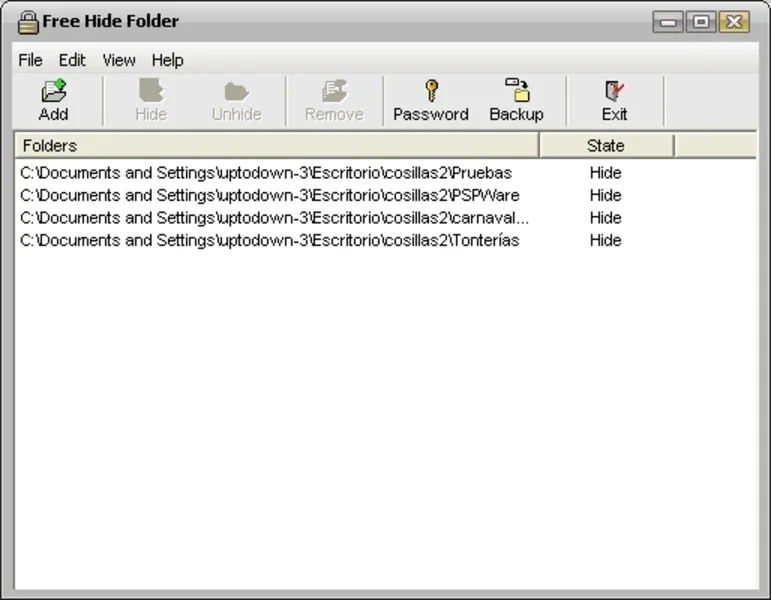
Free Hide Folder lets you pick a list of folders to protect and make them vanish from the computer. You select the folders in the program, then click the Hide button in the main menu and they disappear. The program has a pre-selected password for entry, and access to hidden folders requires going through the program.
To bring a hidden folder back, double-clicking it in the program's window does not restore it. You have to use the right button in the application's right-click menu. Adding a folder also has a specific route: the right-click menu cannot hide a folder, so you must use the Add function of the program. The Start menu link can be deleted, but then there is no direct access to the folders. Icons placed in the Start menu by the program let other users know something is being hidden, and a key combination to launch the application might have been more effective.
It is a free application. It runs on Windows.
Download files
734e44ece416e968d4dbec53a4ed10113ef63fb84476eed15458de8b4b31c999
Signed by WinAbility Software Corp. · valid until Jun 5, 20142c28adfbdd5beebc3e107c48c6352391d5fa90171df557a85b4163d0c05d1ae3
No digital signature0caa5a39f35cdcab3589c8484324f6b8ab33960664bc8fb578cc83b61f232836
No digital signatureeabfbee1239e20d90fab017e119f214e751d33035b347cdca889b0ba25fd481f
No digital signature0ccb7bd11777a23aefb0b72457536c2d364810ed91056d9e18f78a45a8047a38
No digital signatureSystem requirements
Available on:
Minimum OS:
Windows Windows 98 SE or later
Additional information
Developer
Latest release
Size
Category
File type
SHA-256
734e44ece416e968d4dbec53a4ed10113ef63fb84476eed15458de8b4b31c999





