KeyboardTest 4.0.1003 for Windows
SHA-256 listed
Lights each key green as you press it and times your keystrokes
All ages
Age rating
Screenshots
Description
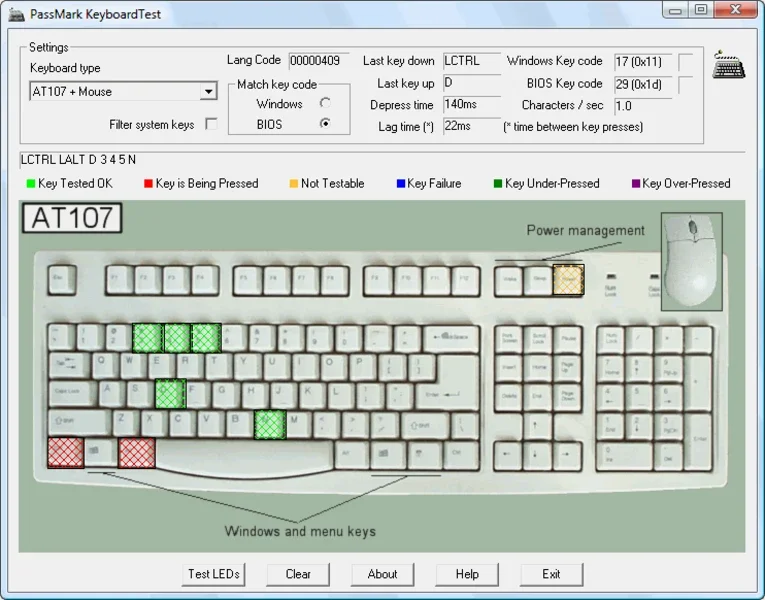
Press a key and KeyboardTest lights it green on the on-screen keyboard image, so a dead key shows up straight away. Keys you have not touched stay yellow, which makes it easy to see what is left. Each key can be tested on its own.
The program reports keystrokes per second and the delay between key presses, and it shows the pressed key's value for Windows and for BIOS. It checks whether a keyboard works correctly, and batch tests can be run through the command line.
Multiple keyboard models and colors are available, and you can create personalized keyboard layouts.
Download files
File4.0.1003EXE
Version4.0.1003
ReleasedOct 25, 2024
Size11.5 MB
SHA-256
Get
0d99528ce7520e3ef329ce405fcb3a9542509bb823ddbcd6eb204730487c357b
Signed by PassMark Software Pty Ltd · valid until Jan 17, 2027Filekeyboardtest-4.0.exeEXE
Version4.0 4.0
ReleasedFeb 3, 2022
Size11.0 MB
SHA-256
Get
751d9bec32c92e746e3aeb56747d93336ece78f373af3f80ae90a7aa0701d9fb
Filekeyboardtest-3.2.exeEXE
Version3.2
ReleasedJun 4, 2021
Size2.2 MB
SHA-256
Get
f568c3729a925d8b6976d0d2d561980fcc9b8c4ea7ebab25f5d2c9b6d1192f00
Filekeyboardtest-3.1-Build-1000.exeEXE
Version3.1 Build 1000
ReleasedFeb 5, 2015
Size2.5 MB
SHA-256
Get
fe888af506b10bf1f1cddef92ee4b3afdc8a019d8361e2b4748dbd18c6ce54c1
Filekeyboardtest-3.0-Build-1005.exeEXE
Version3.0 Build 1005
ReleasedFeb 5, 2014
Size2.4 MB
SHA-256
Get
87a03b116960bb1f34993816a019d41f8b2a303e795fbfef77504f48cbeeaa13
System requirements
Available on:
Minimum OS:
Windows XP or later
Additional information
Developer
Latest release
4.0.1003 · Oct 25, 2024
Size
11.5 MB
File type
EXE
SHA-256
0d99528ce7520e3ef329ce405fcb3a9542509bb823ddbcd6eb204730487c357b
Digital signature
Signed by PassMark Software Pty Ltd · valid until Jan 17, 2027





