Screenshots
Description
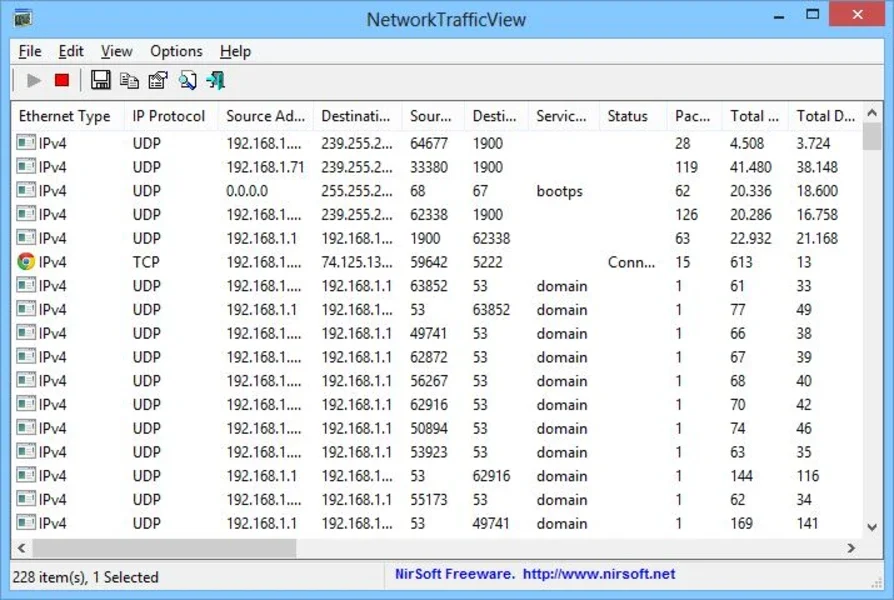
You pick the network to watch and NetworkTrafficView starts capturing packets right away. There is nothing to install beyond a capture driver, so it runs on any computer you copy it to. The tool is lightweight and portable.
What each capture shows
Each entry lists the packet size, transmission speed, and the source and destination IP addresses. Other data is collected alongside those items.
Download files
File2.43ZIP
Version2.43
ReleasedFeb 6, 2023
Size145.9 KB
SHA-256
Get
5fcb50821a699163aca831409a4c4e296c901daa197afd60cb9c57ea802a2e9b
Filenetworktrafficview-2.42.zipZIP
Version2.42
ReleasedOct 24, 2022
Size145.8 KB
SHA-256
Get
596665c3f7af49a3daa0eeb146c6ade266a9dd59d59a17ab4ff1e09ee17a4716
Filenetworktrafficview-2.41.zipZIP
Version2.41
ReleasedDec 30, 2021
Size145.7 KB
SHA-256
Get
1ec419404d0545ecce98d1c37a3210b8163c7be038ebfdfdf20531972f333ef1
Filenetworktrafficview-2.01.zipZIP
Version2.01
ReleasedNov 13, 2015
Size105.9 KB
SHA-256
Get
53b7e968f743999dcd43878c327920199c1e2129e3fb1c2bbe0a49352537cc35
Filenetworktrafficview-2.00.zipZIP
Version2.00
ReleasedSep 25, 2015
Size105.6 KB
SHA-256
Get
257575cc1cd142f8ac10559e145cc75487779c45c260fc6b4603ee5f59f05c98
System requirements
Available on:
Minimum OS:
Windows XP or later
Additional information
Developer
Latest release
2.43 · Feb 6, 2023
Size
145.9 KB
File type
ZIP
SHA-256
5fcb50821a699163aca831409a4c4e296c901daa197afd60cb9c57ea802a2e9b