Open-source Windows tool for controlling RGB lighting on PC components
You are on macOS — this is the Windows version. See the macOS version
Screenshots
Description
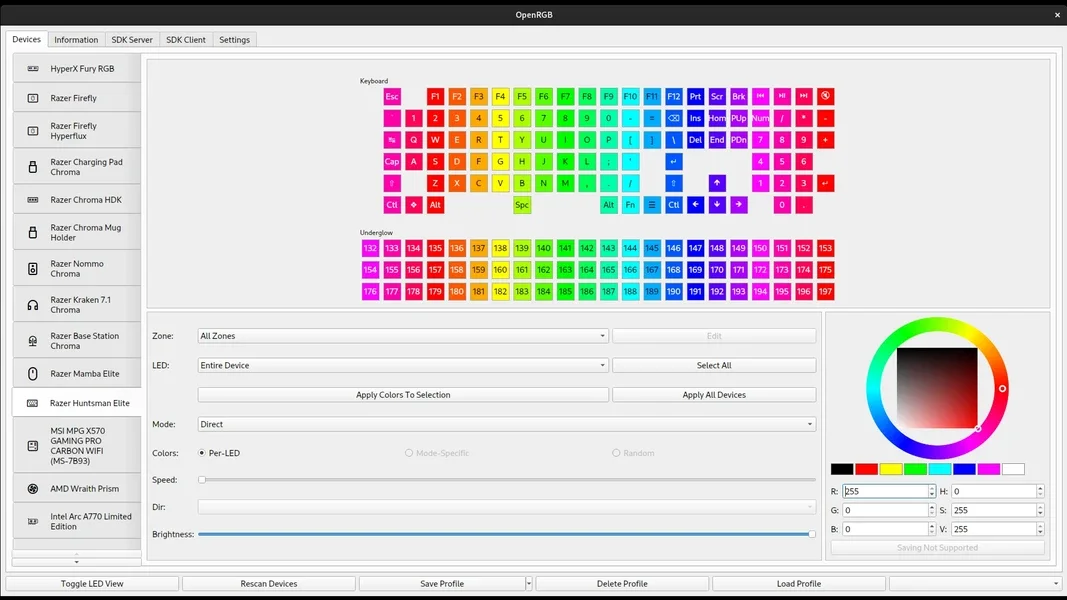
OpenRGB is an open-source program for controlling RGB lighting on a PC. It runs on Windows, and the first thing it asks is how many LED lights each piece of hardware has. You select each component that has lighting elements, then set up each RGB module individually.
Colors and transitions are changed through a simple setup, and the interface is described as easy to use. Favorite light designs can be saved and reused later for faster re-sequencing.
Free plug-ins can be downloaded from the official OpenRGB website to add new uses. One of them, OpenRGB Effects, adds movements and transitions to the lighting.
Download files
a4ce48a5e1532750ad4f5248424d42f7f2c710775cee88db070ccdb63c549caa
No digital signature63291726c6fc84eb479ef2ee752e97e1187f6ce9c49fd27eee40ded588a8172a
27cd65546ea321eb61403825af494bb5caf2a212bafdbd55de7a061b0c3ef553
No digital signature6c656fca447b9bc0f360f13ec67691d685e35455ee7933e30ed5d09f8f06cf8f
3801b194c5b4a2c7b9a0f4cf40bf73dca38c07ef817402a060f447a3ca746c76
System requirements
Available on:
Additional information
Developer
Latest release
Size
File type
SHA-256
a4ce48a5e1532750ad4f5248424d42f7f2c710775cee88db070ccdb63c549caa