
Universal Android Debloater Next Generation 1.3.1 for Windows
Removes pre-installed Android apps from a PC over USB
Screenshots
Description
Universal Android Debloater Next Generation, or UAD-ng, removes bloatware and pre-installed system apps from an Android device. The phone connects to the PC with a USB cable, and USB debugging has to be on in the device settings first. Getting to developer options on the phone takes some prior knowledge.
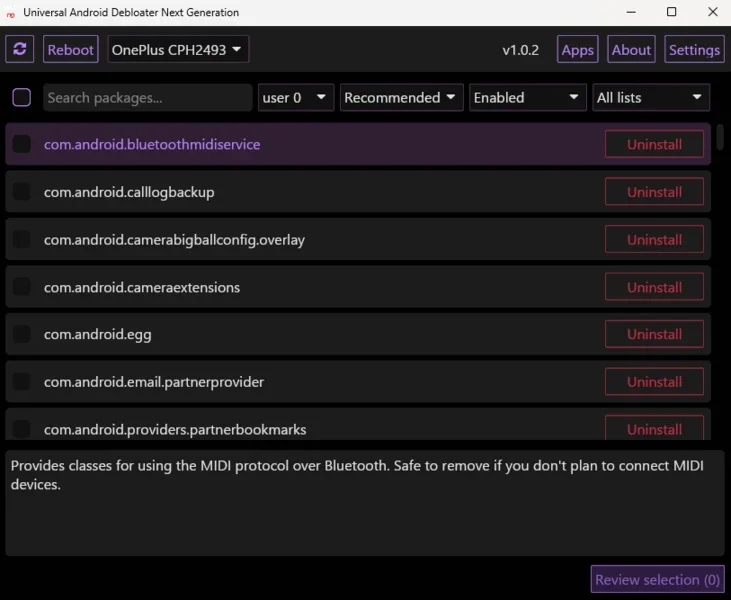
Once connected, the interface, which is dark, shows every installed package. A search bar finds a specific process, and a drop-down menu sorts the processes into security lists. Those lists let you filter for the items recommended for safe deletion. Select a name from the list and a lower information panel tells you what that package is for. The description box spells out what each chosen package does in practice. The red uninstall button removes it.
With unnecessary services gone, the tool can improve energy consumption, speed and memory. Cutting factory software can also help privacy and device security, lowering the chance of malicious attacks. UAD-ng is a separate project that forked from the original UAD; its premise resembles console-based management alternatives such as ADB AppControl. Every change is made at your own risk, and removing packages that are not recommended is entirely on you. It is free and open source, released under GPL 3.0 by the Universal Debloater Alliance, with version 1.2.0 the current build.
Download files
fd0a0cf3fa9b3b1c3b0bac8f93c4a6f79b7e53b2860fc6bb1dfc5a75cd3afb67
No digital signaturef58666d5f54fad19ddb317978019437a6f7b2e67fb869157df9bd40965296600
No digital signatureSystem requirements
Available on:
Architecture:
Universal
Additional information
Latest release
Size
Category
File type
SHA-256
fd0a0cf3fa9b3b1c3b0bac8f93c4a6f79b7e53b2860fc6bb1dfc5a75cd3afb67