Chronos Watch Face
SkyMax Watch Faces- EveryoneAge rating
- PersonalizationCategory
- Sep 6, 2026Updated
- $0.99Price
Links to the official Google Play listing of com.skymax.watchface.chronos. Last checked on Nov 13, 2026.
About this app
A modern, customizable experience Wear OS watch
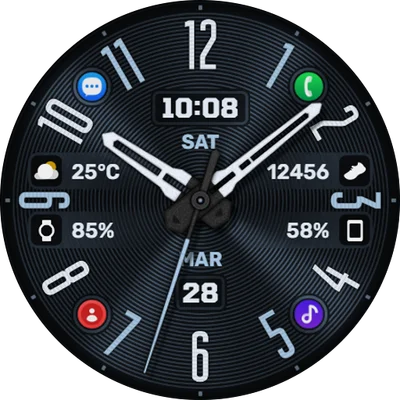
SkyMax «Chronos» Watch Face — analog watch face for Wear OS smartwatch. Enjoy the minimalist design on your wrist. Colors, background and various indicators can be customized, allowing you to create the perfect layout for you!
Compatible with devices running Wear OS 5.0 API 33+ and later.
This app is designed for most Wear OS devices.
** Install > Select only the clock from the Install drop-down menu. If you see a "Your devices are not compatible" message or have any other installation issues, try using our companion app to install the app on your smartwatch. As a last resort, go to the Play Store in your browser to install.
FUNCTIONS:
› 12 hour time format
› Date, day of the week
› Always On Display (AOD) supported
PERSONALIZATION:
** For full functionality, please enable required permissions for shortcuts and complications!
› 3 background images
› 30 color options
› 4 custom application shortcuts
› 4 custom complications (add-ons) of your choice - weather, battery, calendar and others
› 5 variants of sets of minute, hour and second hands of watches
› 6 AOD screen brightness options
NOTES:
** CUSTOMIZE WEATHER CONDITIONS. Touch and hold your watch display → Customize → select your main complication and select your weather complication provider. A weather app must have a weather location installed before it can install a complication.
ADDITIONAL APPLICATIONS:
** If you want to see on the screen of your watch “the remaining battery charge of your smartphone” and other additions (complications) that are not on your watch, install additional applications from the developer of these applications - amoledwatchfaces™ (all credits belong to the creator of the original application)
• Phone Battery Complication
https://play.google.com/store/apps/details?id=com.weartools.phonebattcomp
• Complications Suite - Wear OS
https://play.google.com/store/apps/details?id=com.weartools.weekdayutccomp
• Heart Rate Complication
https://play.google.com/store/apps/details?id=com.weartools.heartratecomp
• Health Services Complications
https://play.google.com/store/apps/details?id=com.weartools.hscomplications
Join us for live support and discussion:
Telegram https://t.me/skymaxwatchfaces
Instagram https://www.instagram.com/skymaxwatchfaces
Data safety
What SkyMax Watch Faces declares on Google Play about the data this app collects and shares.
- No data shared with third partiesLearn more about how developers declare sharing
- No data collectedLearn more about how developers declare collection
Developer contact
- Emailskymax.watchfaces@gmail.com
- Privacy policysites.google.com
- Addressул. Карла Маркса, дом 10, кв. 43 Хойники Гомельская область 247622 Belarus
Information
- Offered by
- SkyMax Watch Faces
- Category
- Personalization
- Updated
- Sep 6, 2026
- Released
- Mar 19, 2026
- Age rating
- Everyone
- Price
- $0.99
- Package name
- com.skymax.watchface.chronos