Chronos Watch Face
SkyMax Watch Faces- PEGI 3Yaş sınırı
- KişiselleştirmeKategori
- 06.09.2026Güncellendi
- ₺46,99Fiyat
com.skymax.watchface.chronos için resmi Google Play sayfasına bağlanır. Son kontrol: 13.11.2026.
Bu uygulama hakkında
Google tarafından otomatik çeviri. Orijinal dil: İngilizce (Amerika Birleşik Devletleri).
Modern, kişiselleştirilebilir bir deneyim sunan Wear OS saati.
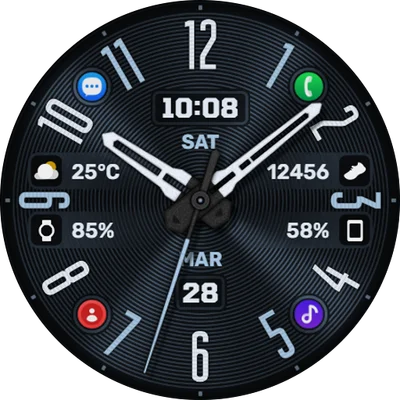
SkyMax «Chronos» Saat Kadranı — Wear OS akıllı saatler için analog saat kadranı. Bileğinizde minimalist tasarımın keyfini çıkarın. Renkler, arka plan ve çeşitli göstergeler özelleştirilebilir, böylece sizin için mükemmel düzeni oluşturabilirsiniz!
Wear OS 5.0 API 33+ ve üzeri sürümlerini çalıştıran cihazlarla uyumludur.
Bu uygulama çoğu Wear OS cihazı için tasarlanmıştır.
** Yükle > Yükle açılır menüsünden yalnızca saati seçin. "Cihazlarınız uyumlu değil" mesajı görürseniz veya başka yükleme sorunları yaşarsanız, uygulamayı akıllı saatinize yüklemek için yardımcı uygulamamızı kullanmayı deneyin. Son çare olarak, yüklemek için tarayıcınızdaki Play Store'a gidin.
FONKSİYONLAR:
› 12 saatlik zaman formatı
› Tarih, haftanın günü
› Always On Display (AOD) desteklenir
KİŞİSELLEŞTİRME:
** Tam işlevsellik için lütfen kısayollar ve komplikasyonlar için gerekli izinleri etkinleştirin!
› 3 arka plan resmi
› 30 renk seçeneği
› 4 özel uygulama kısayolu
› Seçtiğiniz 4 özel komplikasyon (eklenti) - hava durumu, pil, takvim ve diğerleri
› Saatin dakika, saat ve saniye ibrelerinin 5 farklı varyantı
› 6 AOD ekran parlaklığı seçeneği
NOTLAR:
** HAVA DURUMUNU ÖZELLEŞTİRİN. Saatinizin ekranına dokunup basılı tutun → Özelleştir → ana komplikasyonunuzu ve hava durumu komplikasyon sağlayıcınızı seçin. Bir hava durumu uygulamasının bir komplikasyon yükleyebilmesi için önce bir hava durumu konumunun yüklü olması gerekir.
EK UYGULAMALAR:
** Saatinizin ekranında “akıllı telefonunuzun kalan pil şarjını” ve saatinizde bulunmayan diğer ek özellikleri (komplikasyonları) görmek istiyorsanız, bu uygulamaların geliştiricisi olan amoledwatchfaces™'ten ek uygulamalar yükleyin (tüm telif hakları orijinal uygulamanın yaratıcısına aittir).
• Telefon Pil Komplikasyonu
https://play.google.com/store/apps/details?id=com.weartools.phonebattcomp
• Komplikasyonlar Paketi - Wear OS
https://play.google.com/store/apps/details?id=com.weartools.weekdayutccomp
• Kalp Atış Hızı Komplikasyonu
https://play.google.com/store/apps/details?id=com.weartools.heartratecomp
• Sağlık Hizmetleri Komplikasyonları
https://play.google.com/store/apps/details?id=com.weartools.hscomplications
Canlı destek ve tartışma için bize katılın:
Telegram https://t.me/skymaxwatchfaces
Instagram https://www.instagram.com/skymaxwatchfaces
Orijinal metni göster
SkyMax «Chronos» Watch Face — analog watch face for Wear OS smartwatch. Enjoy the minimalist design on your wrist. Colors, background and various indicators can be customized, allowing you to create the perfect layout for you!
Compatible with devices running Wear OS 5.0 API 33+ and later.
This app is designed for most Wear OS devices.
** Install > Select only the clock from the Install drop-down menu. If you see a "Your devices are not compatible" message or have any other installation issues, try using our companion app to install the app on your smartwatch. As a last resort, go to the Play Store in your browser to install.
FUNCTIONS:
› 12 hour time format
› Date, day of the week
› Always On Display (AOD) supported
PERSONALIZATION:
** For full functionality, please enable required permissions for shortcuts and complications!
› 3 background images
› 30 color options
› 4 custom application shortcuts
› 4 custom complications (add-ons) of your choice - weather, battery, calendar and others
› 5 variants of sets of minute, hour and second hands of watches
› 6 AOD screen brightness options
NOTES:
** CUSTOMIZE WEATHER CONDITIONS. Touch and hold your watch display → Customize → select your main complication and select your weather complication provider. A weather app must have a weather location installed before it can install a complication.
ADDITIONAL APPLICATIONS:
** If you want to see on the screen of your watch “the remaining battery charge of your smartphone” and other additions (complications) that are not on your watch, install additional applications from the developer of these applications - amoledwatchfaces™ (all credits belong to the creator of the original application)
• Phone Battery Complication
https://play.google.com/store/apps/details?id=com.weartools.phonebattcomp
• Complications Suite - Wear OS
https://play.google.com/store/apps/details?id=com.weartools.weekdayutccomp
• Heart Rate Complication
https://play.google.com/store/apps/details?id=com.weartools.heartratecomp
• Health Services Complications
https://play.google.com/store/apps/details?id=com.weartools.hscomplications
Join us for live support and discussion:
Telegram https://t.me/skymaxwatchfaces
Instagram https://www.instagram.com/skymaxwatchfaces
Veri güvenliği
Bu uygulamanın topladığı ve paylaştığı veriler hakkında SkyMax Watch Faces tarafından Google Play üzerinde yapılan beyan.
- Üçüncü taraflarla veri paylaşımı yokGeliştiricilerin, veri paylaşımını nasıl beyan ettikleri hakkında daha fazla bilgi edinin
- Veri toplanamadıGeliştiricilerin, veri toplamayı nasıl beyan ettikleri hakkında daha fazla bilgi edinin
Geliştirici iletişim bilgileri
- E-postaskymax.watchfaces@gmail.com
- Gizlilik politikasısites.google.com
- Adresул. Карла Маркса, дом 10, кв. 43 Хойники Гомельская область 247622 Belarus
Bilgiler
- Sunan
- SkyMax Watch Faces
- Kategori
- Kişiselleştirme
- Güncellendi
- 06.09.2026
- Yayın tarihi
- 19.03.2026
- Yaş sınırı
- PEGI 3
- Fiyat
- ₺46,99
- Paket adı
- com.skymax.watchface.chronos