Chronos Watch Face
SkyMax Watch Faces- USK ab 0 JahrenAltersfreigabe
- PersonalisierungKategorie
- 06.09.2026Aktualisiert
- 0,89 €Preis
Verlinkt auf den offiziellen Google Play-Eintrag von com.skymax.watchface.chronos. Zuletzt geprüft am 13.11.2026.
Über diese App
Automatische Übersetzung von Google. Originalsprache: Englisch (Vereinigte Staaten).
Ein modernes, individuell anpassbares Erlebnis mit der Wear OS-Uhr
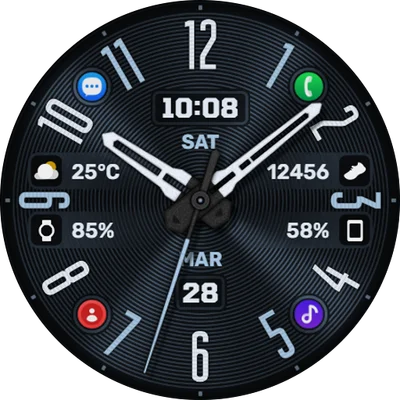
SkyMax „Chronos“ Zifferblatt – ein analoges Zifferblatt für Wear OS Smartwatches. Genießen Sie das minimalistische Design an Ihrem Handgelenk. Farben, Hintergrund und verschiedene Indikatoren lassen sich individuell anpassen, sodass Sie Ihr perfektes Layout erstellen können!
Kompatibel mit Geräten ab Wear OS 5.0 API 33.
Diese App ist für die meisten Wear OS Geräte geeignet.
** Installation > Wählen Sie im Dropdown-Menü „Installieren“ nur die Uhr aus. Sollten Sie die Meldung „Ihre Geräte sind nicht kompatibel“ erhalten oder andere Installationsprobleme auftreten, versuchen Sie, die App mithilfe unserer Begleit-App auf Ihrer Smartwatch zu installieren. Alternativ können Sie die App auch über den Play Store in Ihrem Browser installieren.
FUNKTIONEN:
› 12-Stunden-Zeitformat
› Datum, Wochentag
› Always-On-Display (AOD) wird unterstützt
PERSONALISIERUNG:
** Für den vollen Funktionsumfang aktivieren Sie bitte die erforderlichen Berechtigungen für Verknüpfungen und Komplikationen!
• 3 Hintergrundbilder
30 Farboptionen
4 benutzerdefinierte App-Verknüpfungen
4 benutzerdefinierte Komplikationen (Add-ons) Ihrer Wahl – Wetter, Akku, Kalender und mehr
5 Varianten von Minuten-, Stunden- und Sekundenzeigern
6 Optionen für die Always-on-Display-Helligkeit
HINWEISE:
** WETTERBEDINGUNGEN ANPASSEN. Berühren und halten Sie das Display Ihrer Uhr → Anpassen → wählen Sie Ihre Hauptkomplikation und Ihren Wetterkomplikationsanbieter. Eine Wetter-App benötigt einen installierten Wetterstandort, bevor sie eine Komplikation installieren kann.
ZUSÄTZLICHE ANWENDUNGEN:
** Wenn Sie auf dem Display Ihrer Uhr die verbleibende Akkuladung Ihres Smartphones und weitere, nicht auf Ihrer Uhr verfügbare Komplikationen sehen möchten, installieren Sie zusätzliche Anwendungen des Entwicklers dieser Anwendungen – amoledwatchfaces™ (alle Rechte liegen beim Entwickler der Originalanwendung).
• Akku-Komplikation
https://play.google.com/store/apps/details?id=com.weartools.phonebattcomp
• Komplikations-Suite – Wear OS
https://play.google.com/store/apps/details?id=com.weartools.weekdayutccomp
• Herzfrequenz-Komplikation
https://play.google.com/store/apps/details?id=com.weartools.heartratecomp
• Gesundheitsdienst-Komplikationen
https://play.google.com/store/apps/details?id=com.weartools.hscomplications
Nehmen Sie an unserem Live-Support und der Diskussion teil:
Telegram https://t.me/skymaxwatchfaces
Instagram https://www.instagram.com/skymaxwatchfaces
Originaltext anzeigen
SkyMax «Chronos» Watch Face — analog watch face for Wear OS smartwatch. Enjoy the minimalist design on your wrist. Colors, background and various indicators can be customized, allowing you to create the perfect layout for you!
Compatible with devices running Wear OS 5.0 API 33+ and later.
This app is designed for most Wear OS devices.
** Install > Select only the clock from the Install drop-down menu. If you see a "Your devices are not compatible" message or have any other installation issues, try using our companion app to install the app on your smartwatch. As a last resort, go to the Play Store in your browser to install.
FUNCTIONS:
› 12 hour time format
› Date, day of the week
› Always On Display (AOD) supported
PERSONALIZATION:
** For full functionality, please enable required permissions for shortcuts and complications!
› 3 background images
› 30 color options
› 4 custom application shortcuts
› 4 custom complications (add-ons) of your choice - weather, battery, calendar and others
› 5 variants of sets of minute, hour and second hands of watches
› 6 AOD screen brightness options
NOTES:
** CUSTOMIZE WEATHER CONDITIONS. Touch and hold your watch display → Customize → select your main complication and select your weather complication provider. A weather app must have a weather location installed before it can install a complication.
ADDITIONAL APPLICATIONS:
** If you want to see on the screen of your watch “the remaining battery charge of your smartphone” and other additions (complications) that are not on your watch, install additional applications from the developer of these applications - amoledwatchfaces™ (all credits belong to the creator of the original application)
• Phone Battery Complication
https://play.google.com/store/apps/details?id=com.weartools.phonebattcomp
• Complications Suite - Wear OS
https://play.google.com/store/apps/details?id=com.weartools.weekdayutccomp
• Heart Rate Complication
https://play.google.com/store/apps/details?id=com.weartools.heartratecomp
• Health Services Complications
https://play.google.com/store/apps/details?id=com.weartools.hscomplications
Join us for live support and discussion:
Telegram https://t.me/skymaxwatchfaces
Instagram https://www.instagram.com/skymaxwatchfaces
Datensicherheit
Was SkyMax Watch Faces bei Google Play zu den Daten angibt, die diese App erfasst und weitergibt.
- Keine Daten werden mit Drittunternehmen oder -organisationen geteiltWeitere Informationen dazu, wie Entwickler Angaben zur Weitergabe von Daten machen
- Keine Daten erhobenWeitere Informationen dazu, wie Entwickler Angaben zur Datenerhebung machen
Kontakt zum Entwickler
- E-Mailskymax.watchfaces@gmail.com
- Datenschutzerklärungsites.google.com
- Adresseул. Карла Маркса, дом 10, кв. 43 Хойники Гомельская область 247622 Belarus
Informationen
- Angeboten von
- SkyMax Watch Faces
- Kategorie
- Personalisierung
- Aktualisiert
- 06.09.2026
- Veröffentlicht
- 19.03.2026
- Altersfreigabe
- USK ab 0 Jahren
- Preis
- 0,89 €
- Paketname
- com.skymax.watchface.chronos