Chronos Watch Face
SkyMax Watch Faces- 3 歳以上対象年齢
- カスタマイズカテゴリ
- 2026/9/6更新日
- ¥150価格
com.skymax.watchface.chronosのGoogle Play公式ページにリンクしています。最終確認:2026/11/13。
このアプリについて
Googleによる英語 (アメリカ合衆国)からの自動翻訳です。
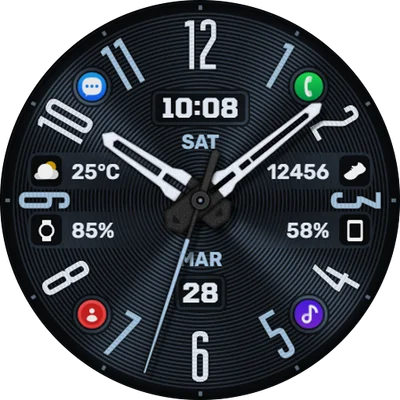
現代的でカスタマイズ可能な体験を提供するWear OSウォッチ
SkyMax「Chronos」ウォッチフェイス — Wear OSスマートウォッチ用のアナログウォッチフェイス。手首でミニマルなデザインをお楽しみください。色、背景、各種インジケーターをカスタマイズして、自分だけの完璧なレイアウトを作成できます!
Wear OS 5.0 API 33以降を搭載したデバイスに対応しています。
このアプリは、ほとんどのWear OSデバイス向けに設計されています。
** インストール > インストールドロップダウンメニューから時計のみを選択してください。「お使いのデバイスは互換性がありません」というメッセージが表示される場合、またはその他のインストールに関する問題が発生した場合は、コンパニオンアプリを使用してスマートウォッチにアプリをインストールしてみてください。最終手段として、ブラウザでPlayストアにアクセスしてインストールしてください。
機能:
› 12時間表示
› 日付、曜日
› 常時表示(AOD)対応
パーソナライズ:
** すべての機能を使用するには、ショートカットとコンプリケーションに必要な権限を有効にしてください。
› 背景画像3種類
› カラーオプション30種類
› カスタムアプリショートカット4種類
› お好みのカスタムコンプリケーション(アドオン)4種類(天気、バッテリー残量、カレンダーなど)
› 時針、分針、秒針のデザインバリエーション5種類
› AOD(常時表示ディスプレイ)画面の明るさ調整6種類
注:
** 天気情報をカスタマイズするには、時計のディスプレイを長押し → カスタマイズ → メインコンプリケーションを選択し、天気情報を提供するアプリを選択してください。天気アプリは、コンプリケーションをインストールする前に、天気予報の位置情報をインストールしておく必要があります。
追加アプリ:
** スマートウォッチの画面に「スマートフォンのバッテリー残量」や、スマートウォッチに搭載されていないその他の機能(コンプリケーション)を表示したい場合は、これらのアプリの開発元である amoledwatchfaces™ から追加アプリをインストールしてください(すべての著作権はオリジナルアプリの制作者に帰属します)。
• 電話バッテリーコンプリケーション
https://play.google.com/store/apps/details?id=com.weartools.phonebattcomp
• コンプリケーションスイート - Wear OS
https://play.google.com/store/apps/details?id=com.weartools.weekdayutccomp
• 心拍数コンプリケーション
https://play.google.com/store/apps/details?id=com.weartools.heartratecomp
• ヘルスケアサービスコンプリケーション
https://play.google.com/store/apps/details?id=com.weartools.hscomplications
ライブサポートとディスカッションにご参加ください:
Telegram https://t.me/skymaxwatchfaces
Instagram https://www.instagram.com/skymaxwatchfaces
原文を表示
SkyMax «Chronos» Watch Face — analog watch face for Wear OS smartwatch. Enjoy the minimalist design on your wrist. Colors, background and various indicators can be customized, allowing you to create the perfect layout for you!
Compatible with devices running Wear OS 5.0 API 33+ and later.
This app is designed for most Wear OS devices.
** Install > Select only the clock from the Install drop-down menu. If you see a "Your devices are not compatible" message or have any other installation issues, try using our companion app to install the app on your smartwatch. As a last resort, go to the Play Store in your browser to install.
FUNCTIONS:
› 12 hour time format
› Date, day of the week
› Always On Display (AOD) supported
PERSONALIZATION:
** For full functionality, please enable required permissions for shortcuts and complications!
› 3 background images
› 30 color options
› 4 custom application shortcuts
› 4 custom complications (add-ons) of your choice - weather, battery, calendar and others
› 5 variants of sets of minute, hour and second hands of watches
› 6 AOD screen brightness options
NOTES:
** CUSTOMIZE WEATHER CONDITIONS. Touch and hold your watch display → Customize → select your main complication and select your weather complication provider. A weather app must have a weather location installed before it can install a complication.
ADDITIONAL APPLICATIONS:
** If you want to see on the screen of your watch “the remaining battery charge of your smartphone” and other additions (complications) that are not on your watch, install additional applications from the developer of these applications - amoledwatchfaces™ (all credits belong to the creator of the original application)
• Phone Battery Complication
https://play.google.com/store/apps/details?id=com.weartools.phonebattcomp
• Complications Suite - Wear OS
https://play.google.com/store/apps/details?id=com.weartools.weekdayutccomp
• Heart Rate Complication
https://play.google.com/store/apps/details?id=com.weartools.heartratecomp
• Health Services Complications
https://play.google.com/store/apps/details?id=com.weartools.hscomplications
Join us for live support and discussion:
Telegram https://t.me/skymaxwatchfaces
Instagram https://www.instagram.com/skymaxwatchfaces
データ セーフティ
このアプリが収集・共有するデータについて、SkyMax Watch FacesがGoogle Playで申告している内容です。
- 第三者と共有されるデータはありません詳しくは、デベロッパーが共有を申告する方法についての説明をご覧ください
- データは収集されません詳しくは、デベロッパーが収集を申告する方法についての説明をご覧ください
開発元の連絡先
- メールskymax.watchfaces@gmail.com
- プライバシーポリシーsites.google.com
- 住所ул. Карла Маркса, дом 10, кв. 43 Хойники Гомельская область 247622 Belarus
情報
- 提供元
- SkyMax Watch Faces
- カテゴリ
- カスタマイズ
- 更新日
- 2026/9/6
- リリース
- 2026/3/19
- 対象年齢
- 3 歳以上
- 価格
- ¥150
- パッケージ名
- com.skymax.watchface.chronos