File Manager - File Explorer
Imagination AIContains ads · In-app purchases
- EveryoneAge rating
- ToolsCategory
- Nov 12, 2026Updated
- FreePrice
Links to the official Google Play listing of com.filemanager.managefile.fileexplorer.fileextractor. Last checked on Nov 18, 2026.
Screenshots




About this app
File Manager – File Explorer app. Manage, clean & organize files at one place
File Manager - File Explorer
Looking for a powerful File Manager and user-friendly File Explorer for your Android device? Look no further than Manage Files All in One! This comprehensive files manager app is designed to streamline your file organization and provide you with effortless control over all your files and folders.
🗃 File Management - file organizer app
"Manage Files All in One" - The Ultimate File Manager App for Android. Simplify Your File Management with Manage Files All in One
📂 Manage files with Best File Manager App for Android:-
With Manage Files All in One, you can easily navigate through your device's storage and external SD cards, making it a breeze to locate and manage with files app. The intuitive File Explorer interface allows you to search, and sort files effortlessly, ensuring that you can find what you need in seconds.
☞ Key Features File Manager - File Explorer App:-
✏️ File Manager Effortlessly manage all your files and folders, including moving, copying, renaming, deleting, and sharing files.
✏️ File Organizer for android Support for Various File Formats: Open and view documents, play media files, and extract compressed archives, as Manage Files All in One supports a wide range of file formats.
✏️ File Explorer: Save storage space on your device by compressing files and folders into ZIP archives directly.
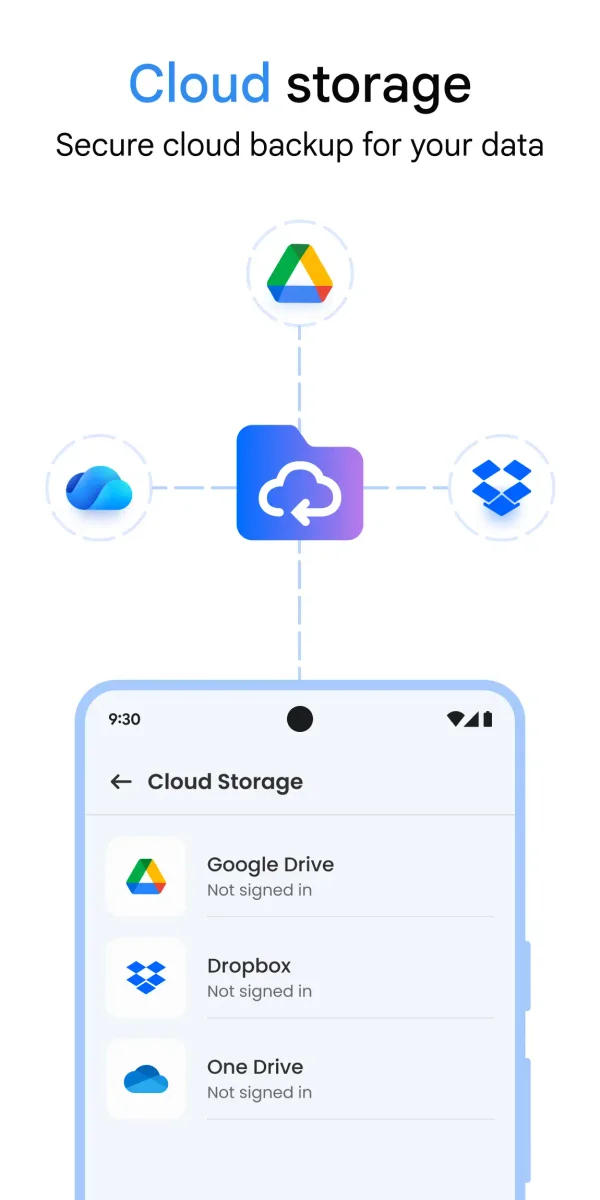
✏️ Manage Files All in One: Seamlessly access and manage files from popular cloud storage services such as Google Drive, Dropbox, and OneDrive, eliminating the need to switch between multiple apps.
✏️ Built-in Tools: Music Player, Document Viewer, Image Viewer, Video Player & File Extractor
✏️ Secure File Management: Protect your sensitive files by setting up password-protected folders within the app, adding an extra layer of security to your file management.
✏️ Storage Space Analyzer: Get insights into your device's storage usage with a built-in storage space analyzer, allowing you to identify and manage large files or unnecessary data.
🔎 Full-Featured File Manager - File Explorer Tool
File Explorer Efficiency is key when it comes to file management, and Manage Files All in One excels in this aspect. It offers a variety of features that make organizing your files a seamless experience. Whether you want to move, copy, rename, delete, or share files, this files manager app provides you with the tools you need to do so with just a few taps.
Are you tired of cluttered file directories and disorganized storage? Manage Files All in One has got you covered. The advanced file organizer feature allows you to categorize your files into folders, making it easier to find specific documents, photos, videos, and more. Say goodbye to endless scrolling and embrace a neat and tidy file structure.
★ Easy-to-use File Explorer Tool
With File Manager All in One, you have full control over your file management app. File Explorer - File Organizer supports a wide range of file formats, enabling you to open and view documents, play media files, and even extract compressed archives. Additionally, you can compress files and folders into ZIP archives, saving precious storage space on your device.
We understand that convenience is crucial, so File Manager App in One integrates seamlessly with other apps. You can directly access files from your favorite cloud storage services, such as Google Drive, Dropbox, and OneDrive, and manage them effortlessly within the app. No more switching between multiple apps - everything you need is right at your fingertips with File Organizer.
The best part? File Manager App is completely free and easily accessible on the Play Store. Experience the ultimate file management app for Android with Manage Files App and take control of your files like never before. Download File Manager - File Explorer today and unlock a world of file organization possibilities!
Data safety
What Imagination AI declares on Google Play about the data this app collects and shares.
- No data shared with third partiesLearn more about how developers declare sharing
- No data collectedLearn more about how developers declare collection
- Data is encrypted in transit
- Data can’t be deleted
What’s new
Version 3.5.1 · Nov 12, 2026
What's new:
• Get a notification when a new file arrives on your phone: downloads, screenshots, camera photos
• Videos now play one after another from the folder you opened
• Google Docs, Sheets and Slides now open from Google Drive
• You can now preview files in Trash before restoring them
• New Recent tab and a redesigned Home screen
• Set File Manager as your default viewer for photos, videos, music and PDFs
• Faster search, bug fixes and stability improvements
Developer contact
- Websiteimaginationai.net
- Emailapps@imaginationai.net
- Privacy policyimaginationai.net
- Address111 North Bridge Road #20-05 Peninsula Plaza Singapore 179098
Information
- Offered by
- Imagination AI
- Category
- Tools
- Version
- 3.5.1
- Updated
- Nov 12, 2026
- Released
- Oct 17, 2024
- Requires
- Android 7.0 or later
- Age rating
- Everyone
- Price
- Free
- In-app purchases
- $4.99 - $69.99 per item
- Package name
- com.filemanager.managefile.fileexplorer.fileextractor
Similar apps
-
 Files by Google
Tools
-
 File Manager
Productivity
-
 Google Photos
Photography
-
 Photo Gallery - Album, Vault
Photography
-
 RAR
Tools
-
 File Manager
Tools
-
 File Manager
Tools
-
 EX File Manager
Tools
-
 Gallery - Album, Photo Vault
Tools
-
 ZArchiver
Tools
-
 RS File Manager: File Explorer
Productivity
-
 ZX File Manager
Tools