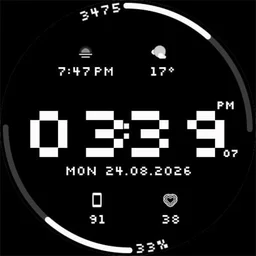
GRBL Nothing Watch Face
Grubel- EveryoneAge rating
- PersonalizationCategory
- Oct 8, 2026Updated
- $1.49Price
Links to the official Google Play listing of com.grubel.grblnothingwatchface. Last checked on Nov 20, 2026.
About this app
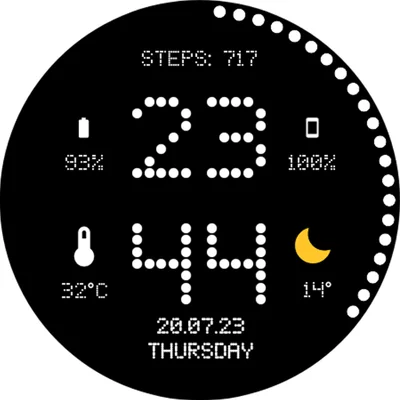
Sleek & Minimal: GRBL Nothing Watch Face Designed for Wear OS
Features:
Designed for Wear OS
1. Supports AM/PM and 12H/24H format
2. Steps counter
3. Dotted seconds
4. Date
5. Four changeable complications
6. AOD with all complications visible
7. 30 themes
PLEASE KEEP IN MIND THAT THE COMPANION APP DOESN'T INSTALL WATCHFACE ON THE WATCH. PLEASE READ INSTRUCTIONS BELOW.
There are two ways to install this watchaface to your WearOS device:
From PLAY STORE APP:
1. Use the drop-down menu and select the target
device on the PLAY STORE APP:
after a few minutes the watch face will transferred on
watch.
2- ACTIVATE WATCH FACE:
Once installed, you need to activate the watch face.
Long press screen, swipe left and tap "ADD WATCH
FACE" to activate it.
From PLAY STORE WEBSITE:
1 - Go to the watch face link through a Web Browser on
PC / Mac such as Chrome, Safari (etc.). You can search
the watch face name on Play Store.
Click on "Install on more devices" and select the target
device:
after a few minutes the watch face will transferred on
watch.
2- ACTIVATE WATCH FACE:
Once installed, you need to activate the watch face.
Long press screen, swipe left and tap "ADD WATCH
FACE" to activate it.
Before drop a negative feedback (1 star) on Play Store
for these reasons, please read the guide carefully or
contact me:
grubel.watchfaces@gmail.com
for API 33+
Remember , if you want your watch to show phone's battery status, you should install Phone Battery Complication app
Data safety
What Grubel declares on Google Play about the data this app collects and shares.
- No data shared with third partiesLearn more about how developers declare sharing
- No data collectedLearn more about how developers declare collection
Developer contact
- Emailgrubel.watchfaces@gmail.com
- Privacy policysites.google.com
- AddressJuliana Tuwima 20/8a 90-002 Łódź Poland
Information
- Offered by
- Grubel
- Category
- Personalization
- Updated
- Oct 8, 2026
- Released
- Jul 25, 2023
- Age rating
- Everyone
- Price
- $1.49
- Package name
- com.grubel.grblnothingwatchface
Similar apps
-
 GRBL Nothing Weather Watchface
Personalization
-
 LCD Watch face
Personalization
-
 GRBL Nothing (2) Watchface
Personalization
-
 Nothing Inspired 2A Watch Face
Personalization
-
 MW44 Digital Watch
Personalization
-
 BRN119 Dot-matrix Watch Face
Personalization
-
 AI Thin D
Personalization
-
 Nothing Animated 3 Watch Face
Personalization
-
 GRBL Nothing Weather 2 NLZ
Personalization
-
 GRBL Nothing 2 Watch Face
Personalization
-
 GRBL Retro Pixel
Personalization
-
 HMKWatch Digital 050
Personalization