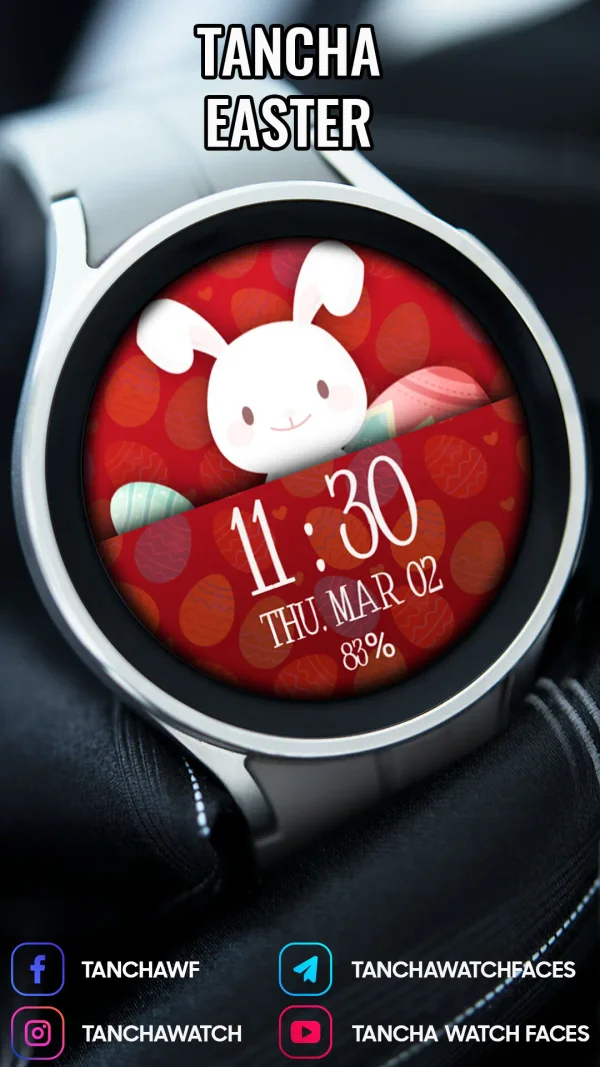
Tancha Easter Watch Face
Tancha Watch Faces- EveryoneAge rating
- PersonalizationCategory
- Oct 25, 2026Updated
- FreePrice
Links to the official Google Play listing of com.watchfacestudio.tanchaeaster. Last checked on Nov 21, 2026.

Screenshots



About this app
Easter-themed watch face. Perfect for adding a festive touch to your smartwatch.
Tancha Easter Watch Face for Wear OS devices.
FEATURES:
Easter digital watch face
* Red and green background colors
* Digital time format
* Date information
* Battery status
* Always-on view
FAQ :
1- The watch face is installed on your watch but does not appear in the catalog?
FOLLOW THESE STEPS:
Press and hold your watch screen.
Swipe right until you see the text 'Add watch face.'
Press the '+ Add watch face' button.
Find and activate the watch face you installed.
2- If the companion app is installed but the watch face is not, follow the steps below:
FOLLOW THESE STEPS:
Open the companion app on your phone (ensure that your smartwatch is connected to your phone).
Next, tap the 'INSTALL WATCH FACE ON WATCH' button at the bottom of the app.
This will open the Play Store on your WEAR OS smartwatch, displaying the purchased watch face and allowing you to install it directly.
If you have any questions or requests, please don't hesitate to get in touch with me at tanchawatch@gmail.com.
Thank you sincerely for your support.
Best regards,
Tancha Watch Faces
Data safety
What Tancha Watch Faces declares on Google Play about the data this app collects and shares.
- No data shared with third partiesLearn more about how developers declare sharing
- No data collectedLearn more about how developers declare collection
Developer contact
- Websitetanchawatch.com
- Emailtanchawatch@gmail.com
- Privacy policytanchawatch.com
- Address13 STRATSIN str., 4th floor, apartment 8 6000 Stara Zagora Bulgaria
Information
- Offered by
- Tancha Watch Faces
- Category
- Personalization
- Updated
- Oct 25, 2026
- Released
- Apr 12, 2022
- Age rating
- Everyone
- Price
- Free
- Package name
- com.watchfacestudio.tanchaeaster