Data Strata Watch Face
Watcholate- USK ab 0 JahrenAltersfreigabe
- PersonalisierungKategorie
- 19.10.2026Aktualisiert
- KostenlosPreis
Verlinkt auf den offiziellen Google Play-Eintrag von com.watcholate.datastrata. Zuletzt geprüft am 27.11.2026.
Über diese App
Automatische Übersetzung von Google. Originalsprache: Englisch (Vereinigte Staaten).
Eine große Uhr, vier Datenanschlüsse, die Sie auf jede beliebige Quelle ausrichten können. 23 Hintergründe, 10 Schriftarten.
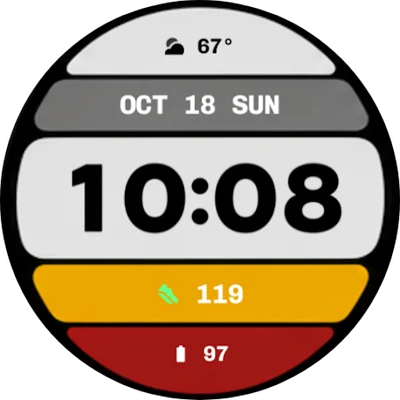
Data Strata ist ein digitales Zifferblatt für Wear OS im Watch Face Format. Fünf horizontale Streifen durchziehen das Display: ein großes Zifferblatt im mittleren Streifen und vier Datenfelder in den äußeren Streifen. Jedes Feld ist ein Komplikationsfeld – ein Standard-Datenfeld von Wear OS – sodass Sie selbst bestimmen, was in den einzelnen Streifen angezeigt wird.
VIER ANPASSBARE DATENFELDER
- Feld 1 (oberer Streifen), Feld 2 (über der Uhr), Feld 3 (unter der Uhr) und Feld 4 (unterer Streifen) akzeptieren jeweils jede Kurztext-Komplikation, die Ihre Uhr bietet: Datum, Wochentag, Wetter, Sonnenaufgang und Sonnenuntergang, Schritte, Herzfrequenz, Akkustand, Kalender, Timer, Alarme und alle Informationen, die von Drittanbieter-Apps bereitgestellt werden.
- Standardmäßig zeigen die Felder Datum, Sonnenaufgang und Sonnenuntergang, Ihre Schrittzahl und Ihre Herzfrequenz an – dies ist ein Ausgangspunkt, keine feste Anordnung. Ändern Sie die Anzeige in den Einstellungen Ihrer Uhr oder lassen Sie ein Feld leer.
- Neben jedem Wert wird das Symbol der zugehörigen Datenquelle angezeigt, sodass die Zahl immer eindeutig ist. Wenn eine Quelle einen Titel sendet (z. B. eine Wettermeldung oder einen Kalendereintrag), wird dieser ebenfalls im entsprechenden Slot angezeigt.
Jeder Slot ist ein Tippziel: Tippen Sie auf das Armband, um die zugehörige App zu öffnen. Ein Slot kann auch eine App enthalten: Wählen Sie die App-Verknüpfung (Apps auf Galaxy) aus, und das zugehörige Symbol erscheint auf dem Zifferblatt.
- Jeder Slot hat seine eigene Farbe und kann in normaler oder fetter Schrift dargestellt werden.
DIE UHR
- Stunde und Minute werden im mittleren Bereich angezeigt, wahlweise in zehn verschiedenen Schriftarten und zwanzig Farben.
- 12- oder 24-Stunden-Anzeige mit einer führenden Null, damit die Uhrzeit immer zentriert ist.
- Always-on-Display: Das Zifferblatt zeigt die Uhrzeit und die vier Slots weiß auf schwarzem Hintergrund an und beleuchtet nur einen kleinen Teil des Bildschirms, wodurch der Akku geschont wird.
DREIUNDZWANZIG HINTERGRÜNDE UND ZEHN SCHRIFTARTEN, DABEI FÜNF UND DREI DAVON IN IHRER AUSWAHL
Obsidian, Graphite, Retro Stripe, Midnight und Deep Sea sind die mit diesem Zifferblatt enthaltenen Hintergründe, Keen, Outline und Fillet die enthaltenen Schriftarten. Mit allen zwanzig Farben, allen vier Slots und beiden Schriftstärken handelt es sich um vollständige, dauerhafte Designs – keine Testversion, die zeitlich unbegrenzt verfügbar sind. Die vier Datenspeicherplätze sind immer Premium: Jede Quelle, Farbe und Berührung funktioniert mit den enthaltenen Designs.
Das Premium-Set umfasst 18 zusätzliche Hintergründe – Sorbet, Zuckerwatte, Opal, Amethyst, Glut, Lagune, Kobalt, Ultraviolett, Textmarker, Spektrum, Regenwald, Flammenrot, Gebürstetes Gold, Kupfer, Bronze, Pflaumennacht, Ochsenblut und Espresso – sowie 7 weitere Uhren-Schriftarten: Chubby, Schablone, Neonröhre, Pinsel, Streifen, Punktmatrix und Pixelglow. Eine einmalige Zahlung von 1,99 US-Dollar schaltet alle Inhalte sofort frei. Es gibt kein Abonnement und keine wiederkehrenden Kosten.
Ein Premium-Hintergrund oder eine Premium-Schriftart, die Sie noch nicht freigeschaltet haben, wird beim Tragen der Uhr mit einem Vorhängeschloss angezeigt. Ihre vier Speicherplätze bleiben darüber sichtbar, sodass Sie immer genau sehen, was Sie kaufen, bevor Sie sich entscheiden.
SO schalten Sie das Premium-Design frei:
1. Installieren Sie die kostenlose Watcholate Watch Faces App von Google Play auf Ihrem Smartphone.
2. Installieren Sie die Watcholate Watch Faces App auch auf Ihrer Smartwatch. Die Smartphone-App öffnet automatisch die richtige Seite auf Ihrer Smartwatch.
3. Öffnen Sie Data Strata in der Smartphone-App und tätigen Sie den einmaligen Kauf. Die Zahlung erfolgt über Google Play.
4. Die Premium-Hintergründe und -Schriftarten werden in der Regel innerhalb von ein bis zwei Sekunden auf Ihrer Smartwatch freigeschaltet. Sie müssen das Zifferblatt nicht neu laden.
Der Kauf ist mit Ihrem Google-Konto verknüpft und gilt daher für jede Smartwatch, mit der Sie sich anmelden. Er wird auch nach dem Zurücksetzen Ihrer Smartwatch oder dem Kauf einer neuen Smartwatch wiederhergestellt.
VORAUSSETZUNGEN
- Eine Wear OS Smartwatch mit Wear OS 5 oder höher (Android 14 oder höher)
- Die Watcholate Watch Faces App auf Ihrem Smartphone und Ihrer Smartwatch für den Premium-Stil. Die fünf enthaltenen Hintergründe, drei enthaltenen Schriftarten und alle vier Datenplätze benötigen außer diesem Zifferblatt nichts weiter.
DATENSCHUTZ
Dieses Zifferblatt enthält keinen Code und sammelt keine Daten. Alles, was Sie in die vier Felder eingeben – Datum, Wetter, Schritte, Herzfrequenz oder Ähnliches – wird von Wear OS selbst erfasst und dargestellt und verlässt Ihre Uhr nicht. Auch die Watcholate Watch Faces App sammelt keinerlei Daten. Beide Apps enthalten keinen Tracking-Code. Die vollständigen Datenschutzbestimmungen finden Sie hier: https://watcholate.com/privacy
Von Watcholate.
Originaltext anzeigen
Data Strata is a digital watch face for Wear OS, built in Watch Face Format. Five horizontal bands cross the display: a big clock in the middle band, and four data slots in the bands around it. Each slot is a complication slot - a standard Wear OS data slot - so you decide what every band shows.
FOUR CUSTOMIZABLE DATA SLOTS
- Slot 1 (top band), slot 2 (above the clock), slot 3 (below the clock) and slot 4 (bottom band) each accept any short-text complication your watch offers: date, weekday, weather, sunrise and sunset, steps, heart rate, battery, calendar, timers, alarms, and anything a third-party app publishes
- Out of the box the slots show the date, sunrise and sunset, your step count and your heart rate - a starting point, not a fixed layout. Change any of them in Customize on the watch, or leave a slot empty
- Each slot draws its source's icon beside the value, so a bare number always says what it is; when a source sends a title (a weather condition, a calendar event), the slot shows it too
- Every slot is a tap target: tap the band and its app opens. A slot can also hold an app: pick App shortcut (Apps on Galaxy) and its own icon sits on the band
- Each slot has its own color, and regular or bold text
THE CLOCK
- Hour and minute in the center band, in your choice of ten clock fonts and twenty colors
- 12-hour or 24-hour, with a zero-padded hour so the time is always centered on the disc
- Always-on display: the face keeps the time and the four slots in white on a black plate and lights only a small fraction of the screen, so it costs your battery very little
TWENTY-THREE BACKGROUNDS AND TEN FONTS, FIVE AND THREE OF THEM YOURS
Obsidian, Graphite, Retro Stripe, Midnight and Deep Sea are the backgrounds included with this watch face, and Keen, Outline and Fillet are the included clock fonts. With all twenty colors, all four slots and both text weights, they are complete, permanent styles - not a trial, and they do not expire. The four data slots are never premium: every source, color and tap works on the included styles.
The premium set is 18 more backgrounds - Sorbet, Cotton Candy, Opal, Amethyst, Ember, Lagoon, Cobalt, Ultraviolet, Highlighter, Spectrum, Rainforest, Blaze, Brushed Gold, Copper, Bronze, Plum Night, Oxblood and Espresso - and 7 more clock fonts: Chubby, Stencil, Neon Tube, Brush, Striped, Dot Matrix and Pixelglow. One single payment of US$1.99 unlocks all of them at once. There is no subscription and nothing recurring.
A premium background or font you have not unlocked shows a padlock over the clock when you wear it, with your four slots still live on top, so you always see exactly what you would be buying before you decide.
HOW TO UNLOCK THE PREMIUM STYLE
1. Install the free Watcholate Watch Faces app on your phone from Google Play.
2. Install the Watcholate Watch Faces app on your watch as well - the phone app will offer to open the right page on your watch for you.
3. Open Data Strata in the phone app and make the one-time purchase. Payment is handled by Google Play.
4. The premium backgrounds and fonts unlock on your watch, usually within a second or two. You do not need to reload the face.
The purchase is tied to your Google account, so it applies to every watch you sign in to, and it comes back if you reset your watch or buy a new one.
REQUIREMENTS
- A Wear OS watch running Wear OS 5 or later (Android 14 or later)
- The Watcholate Watch Faces app, on both your phone and your watch, for the premium style. The five included backgrounds, three included fonts and all four data slots need nothing but this watch face.
PRIVACY
This watch face contains no code and collects nothing. Whatever you put in the four slots - date, weather, steps, heart rate or anything else - is read and drawn by Wear OS itself and never leaves your watch. The Watcholate Watch Faces app collects nothing either. There is no tracking code in either one. Full policy: https://watcholate.com/privacy
From Watcholate.
Datensicherheit
Was Watcholate bei Google Play zu den Daten angibt, die diese App erfasst und weitergibt.
- Keine Daten werden mit Drittunternehmen oder -organisationen geteiltWeitere Informationen dazu, wie Entwickler Angaben zur Weitergabe von Daten machen
- Keine Daten erhobenWeitere Informationen dazu, wie Entwickler Angaben zur Datenerhebung machen
Neue Funktionen
Version 1.0.6 · 19.10.2026
Every band shows its source's icon beside the value again, as in the watch face editor. A smaller download.
Kontakt zum Entwickler
- Websitewatcholate.com
- E-Mailsupport@watcholate.com
- Datenschutzerklärungwatcholate.com
- Adresse14727 Cypress Creek Landing Houston, TX 77068-2527 United States
Informationen
- Angeboten von
- Watcholate
- Kategorie
- Personalisierung
- Version
- 1.0.6
- Aktualisiert
- 19.10.2026
- Veröffentlicht
- 09.09.2026
- Altersfreigabe
- USK ab 0 Jahren
- Preis
- Kostenlos
- Paketname
- com.watcholate.datastrata