Data Strata Watch Face
Watcholate- Classificação 14 anosClassificação etária
- PersonalizaçãoCategoria
- 19/10/2026Atualizado
- GrátisPreço
Leva à página oficial de com.watcholate.datastrata na Google Play. Última verificação em 27/11/2026.
Sobre este app
Tradução automática do Google. Idioma original: Inglês (Estados Unidos).
Um relógio grande, quatro entradas de dados que você pode apontar para qualquer fonte. 23 planos de fundo, 10 fontes.
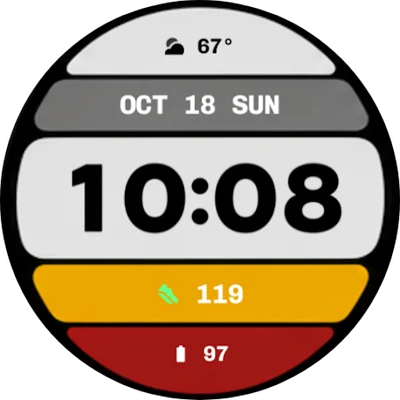
O Data Strata é um mostrador de relógio digital para Wear OS, criado no formato Watch Face Format. Cinco faixas horizontais cruzam a tela: um relógio grande na faixa central e quatro espaços para dados nas faixas ao redor. Cada espaço é um espaço para complicação — um espaço para dados padrão do Wear OS — então você decide o que cada faixa exibe.
QUATRO ESPAÇOS PARA DADOS PERSONALIZÁVEIS
- Os espaços 1 (faixa superior), 2 (acima do relógio), 3 (abaixo do relógio) e 4 (faixa inferior) aceitam qualquer complicação de texto curto que seu relógio ofereça: data, dia da semana, previsão do tempo, nascer e pôr do sol, passos, frequência cardíaca, bateria, calendário, cronômetros, alarmes e qualquer informação publicada por um aplicativo de terceiros.
- Por padrão, os espaços exibem a data, o nascer e o pôr do sol, sua contagem de passos e sua frequência cardíaca — um ponto de partida, não um layout fixo. Altere qualquer um deles em Personalizar no relógio ou deixe um espaço vazio.
- Cada espaço exibe o ícone da sua fonte ao lado do valor, portanto, um número simples sempre indica o que ele representa. Quando uma fonte envia um título (uma condição climática, um evento de calendário), o slot também o exibe.
- Cada slot é um alvo clicável: toque na faixa e o aplicativo correspondente será aberto. Um espaço também pode conter um aplicativo: selecione Atalho do aplicativo (Aplicativos no Galaxy) e seu próprio ícone aparecerá na faixa.
- Cada espaço tem sua própria cor e texto normal ou em negrito.
O RELÓGIO
- Hora e minuto na faixa central, com dez fontes e vinte cores à sua escolha.
- Formato de 12 ou 24 horas, com zeros à esquerda para que a hora esteja sempre centralizada no mostrador.
- Tela sempre ativa: o mostrador exibe a hora e os quatro espaços em branco sobre um fundo preto e ilumina apenas uma pequena fração da tela, consumindo pouca bateria.
VINTE E TRÊS FUNDOS E DEZ FONTES, CINCO E TRÊS DELAS PERSONALIZÁVEIS
Obsidian, Graphite, Retro Stripe, Midnight e Deep Sea são os fundos incluídos neste mostrador, e Keen, Outline e Fillet são as fontes inclusas. Com todas as vinte cores, os quatro espaços e as duas espessuras de texto, são estilos completos e permanentes – não são uma versão de teste e não expiram. Os quatro espaços para dados nunca são premium: todas as fontes, cores e toques funcionam nos estilos incluídos.
O conjunto premium inclui 18 fundos adicionais — Sorbet, Cotton Candy, Opal, Amethyst, Ember, Lagoon, Cobalt, Ultraviolet, Highlighter, Spectrum, Rainforest, Blaze, Brushed Gold, Copper, Bronze, Plum Night, Oxblood e Espresso — e 7 fontes adicionais para o relógio: Chubby, Stencil, Neon Tube, Brush, Striped, Dot Matrix e Pixelglow. Um único pagamento de US$ 1,99 desbloqueia todos eles de uma só vez. Não há assinatura nem recorrência.
Um fundo ou fonte premium que você não desbloqueou exibe um cadeado sobre o relógio quando você o usa, com seus quatro espaços para dados ainda disponíveis na parte superior, para que você sempre veja exatamente o que estaria comprando antes de decidir.
COMO DESBLOQUEAR O ESTILO PREMIUM
1. Instale o aplicativo gratuito Watcholate Watch Faces no seu celular pela Google Play.
2. Instale também o aplicativo Watcholate Watch Faces no seu relógio - o aplicativo para celular oferecerá a opção de abrir a página correta no seu relógio.
3. Abra o Data Strata no aplicativo para celular e faça a compra única. O pagamento é processado pelo Google Play.
4. Os planos de fundo e fontes premium são desbloqueados no seu relógio, geralmente em um ou dois segundos. Você não precisa recarregar o mostrador.
A compra está vinculada à sua conta do Google, portanto, aplica-se a todos os relógios nos quais você fizer login e será renovada se você redefinir o relógio ou comprar um novo.
REQUISITOS
- Um relógio Wear OS com Wear OS 5 ou posterior (Android 14 ou posterior)
- O aplicativo Watcholate Watch Faces, tanto no seu celular quanto no seu relógio, para o estilo premium. Os cinco planos de fundo incluídos, as três fontes incluídas e todos os quatro slots de dados não precisam de nada além deste mostrador.
PRIVACIDADE
Este mostrador não contém nenhum código e não coleta nenhum dado. Tudo o que você inserir nos quatro campos — data, previsão do tempo, passos, frequência cardíaca ou qualquer outra coisa — será lido e exibido pelo próprio Wear OS e nunca sairá do seu relógio. O aplicativo Watcholate Watch Faces também não coleta nada. Não há código de rastreamento em nenhum dos dois. Política completa: https://watcholate.com/privacy
Da Watcholate.
Mostrar o texto original
Data Strata is a digital watch face for Wear OS, built in Watch Face Format. Five horizontal bands cross the display: a big clock in the middle band, and four data slots in the bands around it. Each slot is a complication slot - a standard Wear OS data slot - so you decide what every band shows.
FOUR CUSTOMIZABLE DATA SLOTS
- Slot 1 (top band), slot 2 (above the clock), slot 3 (below the clock) and slot 4 (bottom band) each accept any short-text complication your watch offers: date, weekday, weather, sunrise and sunset, steps, heart rate, battery, calendar, timers, alarms, and anything a third-party app publishes
- Out of the box the slots show the date, sunrise and sunset, your step count and your heart rate - a starting point, not a fixed layout. Change any of them in Customize on the watch, or leave a slot empty
- Each slot draws its source's icon beside the value, so a bare number always says what it is; when a source sends a title (a weather condition, a calendar event), the slot shows it too
- Every slot is a tap target: tap the band and its app opens. A slot can also hold an app: pick App shortcut (Apps on Galaxy) and its own icon sits on the band
- Each slot has its own color, and regular or bold text
THE CLOCK
- Hour and minute in the center band, in your choice of ten clock fonts and twenty colors
- 12-hour or 24-hour, with a zero-padded hour so the time is always centered on the disc
- Always-on display: the face keeps the time and the four slots in white on a black plate and lights only a small fraction of the screen, so it costs your battery very little
TWENTY-THREE BACKGROUNDS AND TEN FONTS, FIVE AND THREE OF THEM YOURS
Obsidian, Graphite, Retro Stripe, Midnight and Deep Sea are the backgrounds included with this watch face, and Keen, Outline and Fillet are the included clock fonts. With all twenty colors, all four slots and both text weights, they are complete, permanent styles - not a trial, and they do not expire. The four data slots are never premium: every source, color and tap works on the included styles.
The premium set is 18 more backgrounds - Sorbet, Cotton Candy, Opal, Amethyst, Ember, Lagoon, Cobalt, Ultraviolet, Highlighter, Spectrum, Rainforest, Blaze, Brushed Gold, Copper, Bronze, Plum Night, Oxblood and Espresso - and 7 more clock fonts: Chubby, Stencil, Neon Tube, Brush, Striped, Dot Matrix and Pixelglow. One single payment of US$1.99 unlocks all of them at once. There is no subscription and nothing recurring.
A premium background or font you have not unlocked shows a padlock over the clock when you wear it, with your four slots still live on top, so you always see exactly what you would be buying before you decide.
HOW TO UNLOCK THE PREMIUM STYLE
1. Install the free Watcholate Watch Faces app on your phone from Google Play.
2. Install the Watcholate Watch Faces app on your watch as well - the phone app will offer to open the right page on your watch for you.
3. Open Data Strata in the phone app and make the one-time purchase. Payment is handled by Google Play.
4. The premium backgrounds and fonts unlock on your watch, usually within a second or two. You do not need to reload the face.
The purchase is tied to your Google account, so it applies to every watch you sign in to, and it comes back if you reset your watch or buy a new one.
REQUIREMENTS
- A Wear OS watch running Wear OS 5 or later (Android 14 or later)
- The Watcholate Watch Faces app, on both your phone and your watch, for the premium style. The five included backgrounds, three included fonts and all four data slots need nothing but this watch face.
PRIVACY
This watch face contains no code and collects nothing. Whatever you put in the four slots - date, weather, steps, heart rate or anything else - is read and drawn by Wear OS itself and never leaves your watch. The Watcholate Watch Faces app collects nothing either. There is no tracking code in either one. Full policy: https://watcholate.com/privacy
From Watcholate.
Segurança dos dados
O que Watcholate declara na Google Play sobre os dados que este app coleta e compartilha.
- Os dados não são compartilhados com terceirosSaiba mais sobre como os desenvolvedores declaram o compartilhamento
- Nenhum dado foi coletadoSaiba mais sobre como os desenvolvedores declaram a coleta
Novidades
Versão 1.0.6 · 19/10/2026
Every band shows its source's icon beside the value again, as in the watch face editor. A smaller download.
Contato do desenvolvedor
- Sitewatcholate.com
- E-mailsupport@watcholate.com
- Política de privacidadewatcholate.com
- Endereço14727 Cypress Creek Landing Houston, TX 77068-2527 United States
Informações
- Oferecido por
- Watcholate
- Categoria
- Personalização
- Versão
- 1.0.6
- Atualizado
- 19/10/2026
- Lançamento
- 09/09/2026
- Classificação etária
- Classificação 14 anos
- Preço
- Grátis
- Nome do pacote
- com.watcholate.datastrata