Data Strata Watch Face
Watcholate- 3 歳以上対象年齢
- カスタマイズカテゴリ
- 2026/10/19更新日
- 無料価格
com.watcholate.datastrataのGoogle Play公式ページにリンクしています。最終確認:2026/11/27。
このアプリについて
Googleによる英語 (アメリカ合衆国)からの自動翻訳です。
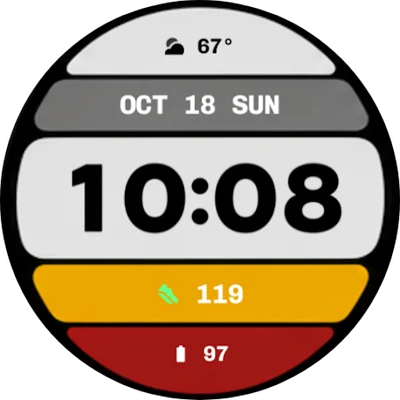
大きな時計、任意のデータソースを指定できる4つのデータスロット。23種類の背景、10種類のフォント。
Data Strataは、Wear OS用のデジタルウォッチフェイスで、ウォッチフェイスフォーマットで作成されています。ディスプレイには5本の水平バンドが配置され、中央のバンドには大きな時計、その周囲のバンドには4つのデータスロットがあります。各スロットはコンプリケーションスロット(標準的なWear OSデータスロット)なので、各バンドに表示する内容を自由に設定できます。
カスタマイズ可能な4つのデータスロット
- スロット1(上部バンド)、スロット2(時計の上)、スロット3(時計の下)、スロット4(下部バンド)には、日付、曜日、天気、日の出と日の入り、歩数、心拍数、バッテリー残量、カレンダー、タイマー、アラームなど、お使いのウォッチが提供するあらゆるショートテキストコンプリケーションを表示できます。サードパーティ製アプリが提供する情報も表示可能です。
- 初期設定では、日付、日の出と日の入り、歩数、心拍数が表示されます。これはあくまで初期設定であり、固定レイアウトではありません。ウォッチのカスタマイズ画面で表示内容を変更したり、スロットを空のままにしておくこともできます。
- 各スロットには、値の横にその情報源のアイコンが表示されるため、数値だけが表示されていても、それが何であるかが一目でわかります。ソースからタイトル(天気予報、カレンダーイベントなど)が送信されると、スロットにもそれが表示されます。
- 各スロットはタップ対象です。バンドをタップすると、そのアプリが開きます。スロットにはアプリも配置できます。Galaxyのアプリ一覧からアプリのショートカットを選択すると、バンド上に専用アイコンが表示されます。
- 各スロットにはそれぞれ異なる色と、標準または太字のテキストを設定できます。
時計
- 中央のバンドには時と分が表示され、10種類のフォントと20種類のカラーから選択できます。
- 12時間表示または24時間表示に対応し、ゼロパディングにより常に時刻がディスクの中央に表示されます。
- 常時表示:文字盤は黒いプレート上に白で時刻と4つのスロットを表示し、画面のごく一部のみを点灯させるため、バッテリー消費は最小限に抑えられます。
23種類の背景と10種類のフォント(うち5種類と3種類はカスタマイズ可能)
このウォッチフェイスには、オブシディアン、グラファイト、レトロストライプ、ミッドナイト、ディープシーの背景が付属しています。また、キーン、アウトライン、フィレットの3種類のフォントが付属しています。20種類のカラー、4つのスロット、2種類のテキストウェイトはすべて完全な永久スタイルで、試用版ではなく、有効期限もありません。 4つのデータスロットはプレミアム機能ではありません。付属のスタイルであれば、どのソース、色、タップ操作でも問題なく使用できます。
プレミアムセットには、ソルベ、コットンキャンディ、オパール、アメジスト、エンバー、ラグーン、コバルト、ウルトラバイオレット、ハイライター、スペクトラム、レインフォレスト、ブレイズ、ブラッシュドゴールド、カッパー、ブロンズ、プラムナイト、オックスブラッド、エスプレッソの18種類の背景と、チャビー、ステンシル、ネオンチューブ、ブラシ、ストライプ、ドットマトリックス、ピクセルグローの7種類の時計フォントが含まれています。1.99米ドルの1回限りの支払いで、これらすべてが一度にアンロックされます。サブスクリプションや定期購入はありません。
アンロックしていないプレミアム背景やフォントを使用すると、時計に南京錠のアイコンが表示されます。4つのデータスロットは上部に表示されるため、購入前に内容を正確に確認できます。
プレミアムスタイルをアンロックする方法
1. Google Playから無料のWatcholate Watch Facesアプリをスマートフォンにインストールしてください。
2. Watcholate Watch Facesアプリをスマートウォッチにもインストールしてください。スマートフォンアプリからスマートウォッチで適切なページを開くよう促されます。
3. スマートフォンアプリでData Strataを開き、一度限りの購入手続きを行ってください。支払いはGoogle Playで行われます。
4. プレミアム背景とフォントがスマートウォッチでアンロックされます。通常、1~2秒で完了します。ウォッチフェイスを再読み込みする必要はありません。
購入はGoogleアカウントに紐付けられるため、ログインしたすべてのスマートウォッチに適用され、スマートウォッチをリセットしたり、新しいスマートウォッチを購入したりしても、プレミアムスタイルは復元されます。
必要条件
- Wear OS 5以降(Android 14以降)を搭載したWear OSスマートウォッチ
- プレミアムスタイルを使用するには、スマートフォンとスマートウォッチの両方にWatcholate Watch Facesアプリがインストールされている必要があります。付属の背景5種類、フォント3種類、データスロット4つすべてを使用するには、このウォッチフェイスが必要です。プライバシーポリシー
このウォッチフェイスにはコードは一切含まれておらず、個人情報も一切収集しません。日付、天気、歩数、心拍数など、4つの入力欄に入力した情報はすべてWear OSによって読み取られ、表示されるだけで、ウォッチから外部に送信されることはありません。Watcholate Watch Facesアプリも同様に個人情報を一切収集しません。どちらにもトラッキングコードは含まれていません。プライバシーポリシー全文はこちら:https://watcholate.com/privacy
Watcholateより
原文を表示
Data Strata is a digital watch face for Wear OS, built in Watch Face Format. Five horizontal bands cross the display: a big clock in the middle band, and four data slots in the bands around it. Each slot is a complication slot - a standard Wear OS data slot - so you decide what every band shows.
FOUR CUSTOMIZABLE DATA SLOTS
- Slot 1 (top band), slot 2 (above the clock), slot 3 (below the clock) and slot 4 (bottom band) each accept any short-text complication your watch offers: date, weekday, weather, sunrise and sunset, steps, heart rate, battery, calendar, timers, alarms, and anything a third-party app publishes
- Out of the box the slots show the date, sunrise and sunset, your step count and your heart rate - a starting point, not a fixed layout. Change any of them in Customize on the watch, or leave a slot empty
- Each slot draws its source's icon beside the value, so a bare number always says what it is; when a source sends a title (a weather condition, a calendar event), the slot shows it too
- Every slot is a tap target: tap the band and its app opens. A slot can also hold an app: pick App shortcut (Apps on Galaxy) and its own icon sits on the band
- Each slot has its own color, and regular or bold text
THE CLOCK
- Hour and minute in the center band, in your choice of ten clock fonts and twenty colors
- 12-hour or 24-hour, with a zero-padded hour so the time is always centered on the disc
- Always-on display: the face keeps the time and the four slots in white on a black plate and lights only a small fraction of the screen, so it costs your battery very little
TWENTY-THREE BACKGROUNDS AND TEN FONTS, FIVE AND THREE OF THEM YOURS
Obsidian, Graphite, Retro Stripe, Midnight and Deep Sea are the backgrounds included with this watch face, and Keen, Outline and Fillet are the included clock fonts. With all twenty colors, all four slots and both text weights, they are complete, permanent styles - not a trial, and they do not expire. The four data slots are never premium: every source, color and tap works on the included styles.
The premium set is 18 more backgrounds - Sorbet, Cotton Candy, Opal, Amethyst, Ember, Lagoon, Cobalt, Ultraviolet, Highlighter, Spectrum, Rainforest, Blaze, Brushed Gold, Copper, Bronze, Plum Night, Oxblood and Espresso - and 7 more clock fonts: Chubby, Stencil, Neon Tube, Brush, Striped, Dot Matrix and Pixelglow. One single payment of US$1.99 unlocks all of them at once. There is no subscription and nothing recurring.
A premium background or font you have not unlocked shows a padlock over the clock when you wear it, with your four slots still live on top, so you always see exactly what you would be buying before you decide.
HOW TO UNLOCK THE PREMIUM STYLE
1. Install the free Watcholate Watch Faces app on your phone from Google Play.
2. Install the Watcholate Watch Faces app on your watch as well - the phone app will offer to open the right page on your watch for you.
3. Open Data Strata in the phone app and make the one-time purchase. Payment is handled by Google Play.
4. The premium backgrounds and fonts unlock on your watch, usually within a second or two. You do not need to reload the face.
The purchase is tied to your Google account, so it applies to every watch you sign in to, and it comes back if you reset your watch or buy a new one.
REQUIREMENTS
- A Wear OS watch running Wear OS 5 or later (Android 14 or later)
- The Watcholate Watch Faces app, on both your phone and your watch, for the premium style. The five included backgrounds, three included fonts and all four data slots need nothing but this watch face.
PRIVACY
This watch face contains no code and collects nothing. Whatever you put in the four slots - date, weather, steps, heart rate or anything else - is read and drawn by Wear OS itself and never leaves your watch. The Watcholate Watch Faces app collects nothing either. There is no tracking code in either one. Full policy: https://watcholate.com/privacy
From Watcholate.
データ セーフティ
このアプリが収集・共有するデータについて、WatcholateがGoogle Playで申告している内容です。
- 第三者と共有されるデータはありません詳しくは、デベロッパーが共有を申告する方法についての説明をご覧ください
- データは収集されません詳しくは、デベロッパーが収集を申告する方法についての説明をご覧ください
新機能
バージョン 1.0.6 · 2026/10/19
Every band shows its source's icon beside the value again, as in the watch face editor. A smaller download.
開発元の連絡先
- ウェブサイトwatcholate.com
- メールsupport@watcholate.com
- プライバシーポリシーwatcholate.com
- 住所14727 Cypress Creek Landing Houston, TX 77068-2527 United States
情報
- 提供元
- Watcholate
- カテゴリ
- カスタマイズ
- バージョン
- 1.0.6
- 更新日
- 2026/10/19
- リリース
- 2026/9/9
- 対象年齢
- 3 歳以上
- 価格
- 無料
- パッケージ名
- com.watcholate.datastrata