Data Strata Watch Face
Watcholate- PEGI 3Yaş sınırı
- KişiselleştirmeKategori
- 19.10.2026Güncellendi
- ÜcretsizFiyat
com.watcholate.datastrata için resmi Google Play sayfasına bağlanır. Son kontrol: 27.11.2026.
Bu uygulama hakkında
Google tarafından otomatik çeviri. Orijinal dil: İngilizce (Amerika Birleşik Devletleri).
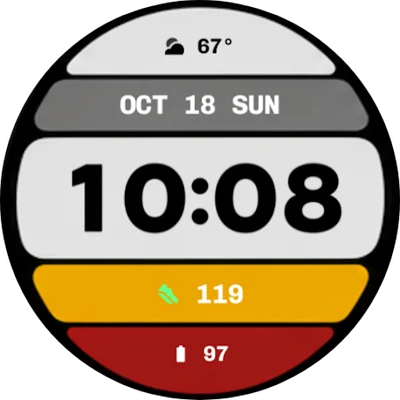
Büyük bir saat, herhangi bir kaynağa yönlendirebileceğiniz dört veri yuvası. 23 arka plan, 10 yazı tipi.
Data Strata, Wear OS için tasarlanmış, Watch Face Format'ta yerleşik bir dijital saat kadranıdır. Ekranı beş yatay bant keser: orta bantta büyük bir saat ve etrafındaki bantlarda dört veri yuvası. Her yuva bir komplikasyon yuvasıdır - standart bir Wear OS veri yuvası - bu nedenle her bantta ne gösterileceğine siz karar verirsiniz.
DÖRT ÖZELLEŞTİRİLEBİLİR VERİ YUVASI
- Yuva 1 (üst bant), yuva 2 (saatin üstünde), yuva 3 (saatin altında) ve yuva 4 (alt bant) saatinizin sunduğu herhangi bir kısa metin komplikasyonunu kabul eder: tarih, hafta içi, hava durumu, gün doğumu ve gün batımı, adımlar, kalp atış hızı, pil, takvim, zamanlayıcılar, alarmlar ve üçüncü taraf bir uygulamanın yayınladığı her şey.
- Varsayılan olarak yuvalar tarih, gün doğumu ve gün batımı, adım sayınız ve kalp atış hızınızı gösterir - bir başlangıç noktası, sabit bir düzen değil. Saatteki Özelleştirme bölümünde bunlardan herhangi birini değiştirebilir veya bir yuvayı boş bırakabilirsiniz.
- Her yuva, değerin yanına kaynağının simgesini çizer, böylece yalın bir sayı her zaman ne olduğunu gösterir; Bir kaynak bir başlık gönderdiğinde (hava durumu, takvim etkinliği), bu başlık da ekranda görünür.
- Her ekran bir dokunma hedefidir: ekrana dokunduğunuzda ilgili uygulama açılır. Bir yuva ayrıca bir uygulamayı da barındırabilir: Uygulama kısayolunu (Galaxy'deki Uygulamalar) seçin ve kendi simgesi bant üzerinde yer alır.
- Her yuvanın kendi rengi ve normal veya kalın metni vardır.
SAAT
- Orta bantta saat ve dakika, on farklı saat yazı tipi ve yirmi renk seçeneğiyle.
- 12 saatlik veya 24 saatlik, sıfırla doldurulmuş saat ile zaman her zaman diskin ortasında görünür.
- Sürekli açık ekran: Kadran, zamanı ve dört yuvayı siyah bir plaka üzerinde beyaz renkte gösterir ve ekranın yalnızca küçük bir bölümünü aydınlatır, böylece pilinizi çok az tüketir.
YİRMİ ÜÇ ARKA PLAN VE ON YAZI TİPİ, BEŞİ VE ÜÇÜ SİZİN
Obsidian, Graphite, Retro Stripe, Midnight ve Deep Sea, bu saat kadranıyla birlikte gelen arka planlardır ve Keen, Outline ve Fillet, birlikte gelen saat yazı tipleridir. Yirmi rengin tamamı, dört veri yuvası ve her iki yazı tipi kalınlığıyla birlikte, bunlar eksiksiz, kalıcı stillerdir - deneme sürümü değildir ve süresi dolmaz. Dört veri yuvası asla premium değildir: her kaynak, renk ve dokunuş, dahil edilen stillerde çalışır.
Premium set, 18 arka plan daha içerir: Sorbet, Cotton Candy, Opal, Amethyst, Ember, Lagoon, Cobalt, Ultraviolet, Highlighter, Spectrum, Rainforest, Blaze, Brushed Gold, Copper, Bronze, Plum Night, Oxblood ve Espresso - ve 7 saat yazı tipi daha: Chubby, Stencil, Neon Tube, Brush, Striped, Dot Matrix ve Pixelglow. 1,99 ABD doları tutarındaki tek bir ödeme ile hepsini birden açabilirsiniz. Abonelik veya tekrar eden bir ödeme yoktur.
Henüz kilidini açmadığınız bir premium arka plan veya yazı tipi, taktığınızda saatin üzerinde bir kilit simgesi gösterir; dört veri yuvanız da üstte aktif kalır, böylece karar vermeden önce tam olarak ne satın alacağınızı her zaman görürsünüz.
PREMIUM STİLİ NASIL AÇARSINIZ?
1. Google Play'den telefonunuza ücretsiz Watcholate Watch Faces uygulamasını yükleyin.
2. Saatinize de Watcholate Watch Faces uygulamasını yükleyin - telefon uygulaması, saatinizde doğru sayfayı sizin için açmayı teklif edecektir.
3. Telefon uygulamasında Data Strata'yı açın ve tek seferlik satın alma işlemini gerçekleştirin. Ödeme Google Play tarafından yapılır.
4. Premium arka planlar ve yazı tipleri genellikle bir veya iki saniye içinde saatinizde açılır. Saat kadranını yeniden yüklemenize gerek yoktur.
Satın alma işlemi Google hesabınıza bağlıdır, bu nedenle oturum açtığınız her saat için geçerlidir ve saatinizi sıfırlarsanız veya yeni bir saat satın alırsanız geri gelir.
GEREKLİLİKLER
- Wear OS 5 veya üzeri (Android 14 veya üzeri) çalıştıran bir Wear OS saati
- Premium stil için hem telefonunuzda hem de saatinizde Watcholate Watch Faces uygulaması. Beş farklı arka plan, üç farklı yazı tipi ve dört veri yuvasının tamamı için bu saat kadranından başka hiçbir şeye ihtiyaç duymazsınız.
GİZLİLİK
Bu saat kadranı hiçbir kod içermez ve hiçbir veri toplamaz. Dört yuvaya ne koyarsanız koyun - tarih, hava durumu, adım sayısı, kalp atış hızı veya başka herhangi bir şey - Wear OS tarafından okunur ve çizilir ve asla saatinizden ayrılmaz. Watcholate Saat Kadranları uygulaması da hiçbir veri toplamaz. İkisinde de izleme kodu yoktur. Tam politika: https://watcholate.com/privacy
Watcholate'den.
Orijinal metni göster
Data Strata is a digital watch face for Wear OS, built in Watch Face Format. Five horizontal bands cross the display: a big clock in the middle band, and four data slots in the bands around it. Each slot is a complication slot - a standard Wear OS data slot - so you decide what every band shows.
FOUR CUSTOMIZABLE DATA SLOTS
- Slot 1 (top band), slot 2 (above the clock), slot 3 (below the clock) and slot 4 (bottom band) each accept any short-text complication your watch offers: date, weekday, weather, sunrise and sunset, steps, heart rate, battery, calendar, timers, alarms, and anything a third-party app publishes
- Out of the box the slots show the date, sunrise and sunset, your step count and your heart rate - a starting point, not a fixed layout. Change any of them in Customize on the watch, or leave a slot empty
- Each slot draws its source's icon beside the value, so a bare number always says what it is; when a source sends a title (a weather condition, a calendar event), the slot shows it too
- Every slot is a tap target: tap the band and its app opens. A slot can also hold an app: pick App shortcut (Apps on Galaxy) and its own icon sits on the band
- Each slot has its own color, and regular or bold text
THE CLOCK
- Hour and minute in the center band, in your choice of ten clock fonts and twenty colors
- 12-hour or 24-hour, with a zero-padded hour so the time is always centered on the disc
- Always-on display: the face keeps the time and the four slots in white on a black plate and lights only a small fraction of the screen, so it costs your battery very little
TWENTY-THREE BACKGROUNDS AND TEN FONTS, FIVE AND THREE OF THEM YOURS
Obsidian, Graphite, Retro Stripe, Midnight and Deep Sea are the backgrounds included with this watch face, and Keen, Outline and Fillet are the included clock fonts. With all twenty colors, all four slots and both text weights, they are complete, permanent styles - not a trial, and they do not expire. The four data slots are never premium: every source, color and tap works on the included styles.
The premium set is 18 more backgrounds - Sorbet, Cotton Candy, Opal, Amethyst, Ember, Lagoon, Cobalt, Ultraviolet, Highlighter, Spectrum, Rainforest, Blaze, Brushed Gold, Copper, Bronze, Plum Night, Oxblood and Espresso - and 7 more clock fonts: Chubby, Stencil, Neon Tube, Brush, Striped, Dot Matrix and Pixelglow. One single payment of US$1.99 unlocks all of them at once. There is no subscription and nothing recurring.
A premium background or font you have not unlocked shows a padlock over the clock when you wear it, with your four slots still live on top, so you always see exactly what you would be buying before you decide.
HOW TO UNLOCK THE PREMIUM STYLE
1. Install the free Watcholate Watch Faces app on your phone from Google Play.
2. Install the Watcholate Watch Faces app on your watch as well - the phone app will offer to open the right page on your watch for you.
3. Open Data Strata in the phone app and make the one-time purchase. Payment is handled by Google Play.
4. The premium backgrounds and fonts unlock on your watch, usually within a second or two. You do not need to reload the face.
The purchase is tied to your Google account, so it applies to every watch you sign in to, and it comes back if you reset your watch or buy a new one.
REQUIREMENTS
- A Wear OS watch running Wear OS 5 or later (Android 14 or later)
- The Watcholate Watch Faces app, on both your phone and your watch, for the premium style. The five included backgrounds, three included fonts and all four data slots need nothing but this watch face.
PRIVACY
This watch face contains no code and collects nothing. Whatever you put in the four slots - date, weather, steps, heart rate or anything else - is read and drawn by Wear OS itself and never leaves your watch. The Watcholate Watch Faces app collects nothing either. There is no tracking code in either one. Full policy: https://watcholate.com/privacy
From Watcholate.
Veri güvenliği
Bu uygulamanın topladığı ve paylaştığı veriler hakkında Watcholate tarafından Google Play üzerinde yapılan beyan.
- Üçüncü taraflarla veri paylaşımı yokGeliştiricilerin, veri paylaşımını nasıl beyan ettikleri hakkında daha fazla bilgi edinin
- Veri toplanamadıGeliştiricilerin, veri toplamayı nasıl beyan ettikleri hakkında daha fazla bilgi edinin
Yenilikler
Sürüm 1.0.6 · 19.10.2026
Every band shows its source's icon beside the value again, as in the watch face editor. A smaller download.
Geliştirici iletişim bilgileri
- Web sitesiwatcholate.com
- E-postasupport@watcholate.com
- Gizlilik politikasıwatcholate.com
- Adres14727 Cypress Creek Landing Houston, TX 77068-2527 United States
Bilgiler
- Sunan
- Watcholate
- Kategori
- Kişiselleştirme
- Sürüm
- 1.0.6
- Güncellendi
- 19.10.2026
- Yayın tarihi
- 09.09.2026
- Yaş sınırı
- PEGI 3
- Fiyat
- Ücretsiz
- Paket adı
- com.watcholate.datastrata