Hearts Animated
StarWatchfaces- USK ab 0 JahrenAltersfreigabe
- PersonalisierungKategorie
- 21.08.2026Aktualisiert
- 1,99 €Preis
Verlinkt auf den offiziellen Google Play-Eintrag von com.starwatchfaces.heartsanimated. Zuletzt geprüft am 25.11.2026.
Über diese App
Automatische Übersetzung von Google. Originalsprache: Englisch (Vereinigte Staaten).
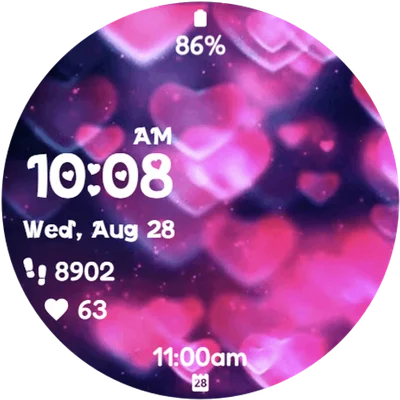
Verlieben Sie sich in unser entzückendes Valentinstag-Zifferblatt Hearts Animated!
Verlieben Sie sich in unser neues bezauberndes Valentinstag-Zifferblatt, Hearts Animated! Mit verspielten animierten Herzen im Hintergrund und einer niedlichen, skurrilen Schriftart für Uhrzeit und Datum zaubert dieses Zifferblatt mit Sicherheit ein Lächeln auf Ihr Gesicht. Perfekt, um das ganze Jahr über Liebe zu verbreiten.
Hearts Animated for Wear OS verfügt über eine Reihe von Funktionen, die Ihnen dabei helfen, organisiert und auf dem Laufenden zu bleiben, darunter eine digitale 12/24-Stunden-Zeitanzeige, Datum in Ihrer Uhrensprache, Schritt- und Herzfrequenzverfolgung sowie ein benutzerdefiniertes Always On Display, das für einen geringen Batterieverbrauch optimiert ist sowie zwei anpassbare Komplikationen und Verknüpfungen.
Passen Sie es nach Ihren Wünschen an und wählen Sie aus 20 verschiedenen Farbthemen. Und wenn Sie jemals Batterie sparen müssen, können Sie die Hintergrundanimation ganz einfach über das Menü „Anpassen“ der Uhr stoppen.
Hearts Animated ist nicht nur für den Valentinstag, sondern perfekt für das ganze Jahr und somit das perfekte Accessoire für Ihre Smartwatch. Lassen Sie sich dieses unverzichtbare Zifferblatt nicht entgehen, das Ihnen das Leben leichter macht und Ihrem Tag einen Hauch von Niedlichkeit verleiht.
So passen Sie das Zifferblatt an:
1. Drücken und halten Sie auf dem Display
2. Tippen Sie auf die Schaltfläche „Anpassen“, um den Animationsstatus (ein oder aus), Farben für Uhrzeit, Datum und Statistiken, Daten für anzuzeigende Komplikationen und die Apps auszuwählen, die mit den benutzerdefinierten Verknüpfungen gestartet werden sollen.
Passen Sie das Zifferblatt nach Ihren Wünschen an: Wählen Sie die am besten aussehende Farbe für Uhrzeit, Datum und Statistiken, wählen Sie die gewünschten Daten für die beiden Komplikationen aus, wählen Sie mithilfe der beiden anpassbaren Verknüpfungen die gewünschten Apps zum Starten aus und genießen Sie die Verwendung des Zifferblatts! Sehen Sie sich die Screenshots aus dem Store-Eintrag an, um besser zu verstehen, wo die Verknüpfungen platziert sind.
Vergessen Sie nicht: Nutzen Sie die Begleit-App auf Ihrem Telefon, um weitere tolle Zifferblätter von uns zu entdecken!
Mit der Veröffentlichung von One UI Watch Version 4.5 gibt es neue Schritte zur Installation der Zifferblätter der Galaxy Watch4 und Galaxy Watch5, die sich von früheren One UI-Versionen unterscheiden.
Wenn Sie Probleme bei der Installation des Zifferblatts haben, bietet Samsung hier eine ausführliche Anleitung: https://developer.samsung.com/sdp/blog/en-us/2022/11/15/install-watch-faces-for-galaxy-watch5 -und-eine-ui-watch-45
Die Komplikationen können Folgendes anzeigen*:
- Wetter
- Fühlt sich an wie Temperatur
- Barometer
- Bixby
- Kalender
- Anrufverlauf
- Erinnerung
- Schritte
- Datum und Wetter
- Sonnenaufgang/Sonnenuntergang
- Alarm
- Stoppuhr
- Weltzeituhr
- Batterie
- Ungelesene Benachrichtigungen
Um die gewünschten Daten anzuzeigen, tippen und halten Sie auf dem Display, drücken Sie dann die Schaltfläche „Anpassen“ und wählen Sie die gewünschten Daten für die beiden Komplikationen aus.
* Diese Funktionen sind geräteabhängig und möglicherweise nicht auf allen Uhren verfügbar
Für die anpassbare Verknüpfung haben Sie folgende Optionen*:
- App-Verknüpfung: Alarm, Bixby, Buds-Controller, Rechner, Kalender, Kompass, Kontakte, Mein Telefon suchen, Galerie, Google Pay, Karten, Media Controller, Nachrichten, Musik, Outlook, Telefon, Play Store, Aktuelle Apps, Erinnerung, Samsung Gesundheit, Einstellungen, Stoppuhr, Timer, Stimme
Rekorder, Wetter, Weltzeituhr
- Aktuelle Apps
- Blutsauerstoff
- Körperzusammensetzung
- Atmen
- Verbraucht
- Tägliche Aktivität
- Herzfrequenz
- Schlafen
- Stress
- Zusammen
- Wasser
- Gesundheit der Frau
- Kontakte
- Google Pay
- Übungen: Zirkeltraining, Radfahren, Heimtrainer, Wandern, Laufen, Schwimmen, Walken usw
Um die gewünschte Verknüpfung anzuzeigen, tippen und halten Sie auf dem Display, drücken Sie dann die Schaltfläche „Anpassen“ und wählen Sie die gewünschte Verknüpfung für die drei anpassbaren Verknüpfungsplätze aus.
* Diese Funktionen sind geräteabhängig und möglicherweise nicht auf allen Uhren verfügbar
Weitere Zifferblätter finden Sie auf unserer Website.
Genießen!
Originaltext anzeigen
Fall in love with our new adorable Valentine's Day watchface, Hearts Animated! Featuring playful animated hearts in the background and a cute, whimsical font for the time and date, this watchface is sure to bring a smile to your face. Perfect for spreading the love all year round.
Hearts Animated for Wear OS boasts an array of features to help you stay organized and on track, including a 12/24H digital time display, date in your watch language, step and heart rate tracking, a custom Always On Display optimized for low battery usage, as well as two customizable complications and shortcuts.
Customize it to your liking with 20 different color themes to choose from. And if you ever need to conserve battery, you can easily stop the background animation, from the Customize menu of the watch.
Hearts Animated is not just for Valentine's Day but perfect for all year round, making it the perfect accessory for your smartwatch. Don't miss out on this must-have watchface, designed to make your life easier and add a touch of cuteness to your day.
To customize the watchface:
1. Press and hold on the display
2. Tap the Customize button to select animation state (on or off), colors for time, date and stats, data for complications to display and the apps to launch with the custom shortcuts.
Customize the watchface as you wish: choose the best looking color for time, date and stats, select the data you want for the 2 complications, select your desired apps to launch using the 2 customizable shortcuts and enjoy using the watchface! Check the screenshots from the store listing to better understand where the shortcuts are placed.
Don't forget: use the companion app on your phone to discover other amazing watchfaces made by us!
With the release of One UI Watch version 4.5, there are new steps for installing Galaxy Watch4 and Galaxy Watch5 watch faces that are different from previous One UI versions.
If you have issues installing the watchface, Samsung provided a detailed tutorial here: https://developer.samsung.com/sdp/blog/en-us/2022/11/15/install-watch-faces-for-galaxy-watch5-and-one-ui-watch-45
The complications can display*:
- Weather
- Feels like temp
- Barometer
- Bixby
- Calendar
- Call History
- Reminder
- Steps
- Date and weather
- Sunrise/sunset
- Alarm
- Stopwatch
- World Clock
- Battery
- Unread notifications
To display the data you want, tap and hold on the display, then press the Customize button and choose the data you want for the 2 complications.
* these functions are device dependent and might not be available on all watches
For the customizable shortcut you have these options*:
- App shortcut: Alarm, Bixby, Buds controller, Calculator, Calendar, Compass, Contacts, Find my phone, Gallery, Google Pay, Maps, Media Controller, Messages, Music, Outlook, Phone, Play Store, Recent apps, Reminder, Samsung Health, Settings, Stopwatch, Timer, Voice
Recorder, Weather, World Clock
- Recent apps
- Blood Oxygen
- Body Composition
- Breathe
- Consumed
- Daily Activity
- Heart rate
- Sleep
- Stress
- Together
- Water
- Woman’s health
- Contacts
- Google Pay
- Exercises: Circuit training, Cycling, Exercise bike, Hiking, Running, Swimming, Walking etc
To display the shortcut you want, tap and hold on the display, then press the Customize button and choose the shortcut you want for the 3 customizable shortcut slots.
* these functions are device dependent and might not be available on all watches
For more watchfaces, visit our website.
Enjoy!
Datensicherheit
Was StarWatchfaces bei Google Play zu den Daten angibt, die diese App erfasst und weitergibt.
- Keine Daten werden mit Drittunternehmen oder -organisationen geteiltWeitere Informationen dazu, wie Entwickler Angaben zur Weitergabe von Daten machen
- Keine Daten erhobenWeitere Informationen dazu, wie Entwickler Angaben zur Datenerhebung machen
Kontakt zum Entwickler
- Websitestarwatchfaces.com
- E-MailWearOS@starwatchfaces.com
- Datenschutzerklärungstarwatchfaces.com
- AdresseStrada Carol Davila 8 bloc 118A sc A et 1 ap 5 100462 Ploiești Romania
Informationen
- Angeboten von
- StarWatchfaces
- Kategorie
- Personalisierung
- Version
- 1.0.0
- Aktualisiert
- 21.08.2026
- Veröffentlicht
- 11.01.2023
- Altersfreigabe
- USK ab 0 Jahren
- Preis
- 1,99 €
- Paketname
- com.starwatchfaces.heartsanimated
Ähnliche Apps
-
 PW96 Valentine's Embrace Heart
Personalisierung
-
 Galaxy Universe Space Animated
Personalisierung
-
 Bloom Hearts
Personalisierung
-
 Valentine Hearts - watch face
Personalisierung
-
 Love Heart Animated Watch Face
Personalisierung
-
 Pink Purple (No Animation)
Personalisierung
-
 TVV Valentine's Day 2
Personalisierung
-
 Valentine Hearts
Personalisierung
-
 Valentine's Day Heart Radar
Personalisierung
-
 Bound by Love Zifferblatt
Personalisierung
-
 PW08 Heart Bloom Watch
Personalisierung
-
 AZ287 Valentine's Watch Face
Personalisierung