Hearts Animated
StarWatchfaces- PEGI 3Clasificación por edad
- PersonalizaciónCategoría
- 21/8/2026Actualizado
- 1,99 €Precio
Enlaza a la ficha oficial de com.starwatchfaces.heartsanimated en Google Play. Última comprobación el 25/11/2026.
Acerca de esta aplicación
Traducción automática de Google. Idioma original: Inglés (Estados Unidos).
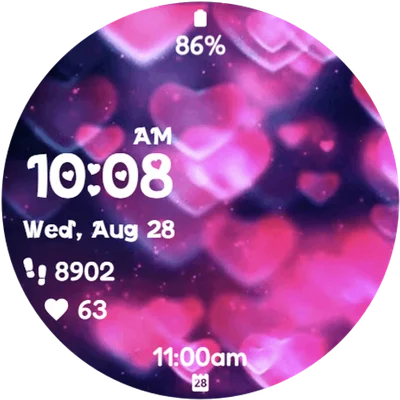
¡Enamórate de nuestra adorable carátula del Día de San Valentín, Hearts Animated!
¡Enamórate de nuestra nueva y adorable esfera del Día de San Valentín, Hearts Animated! Con divertidos corazones animados de fondo y una fuente linda y caprichosa para la hora y la fecha, esta esfera del reloj seguramente te hará sonreír. Perfecto para difundir el amor durante todo el año.
Hearts Animated para Wear OS cuenta con una variedad de funciones para ayudarlo a mantenerse organizado y encaminado, incluida una visualización de la hora digital de 12/24 horas, fecha en el idioma de su reloj, seguimiento de pasos y frecuencia cardíaca, una pantalla siempre activa personalizada optimizada para uso bajo de batería. , así como dos complicaciones y atajos personalizables.
Personalízalo a tu gusto con 20 temas de colores diferentes para elegir. Y si alguna vez necesitas ahorrar batería, puedes detener fácilmente la animación de fondo desde el menú Personalizar del reloj.
Hearts Animated no es solo para el Día de San Valentín, sino perfecto para todo el año, lo que lo convierte en el accesorio perfecto para tu reloj inteligente. No te pierdas esta esfera imprescindible, diseñada para hacerte la vida más fácil y añadir un toque de ternura a tu día.
Para personalizar la esfera del reloj:
1. Mantenga presionado en la pantalla
2. Toque el botón Personalizar para seleccionar el estado de la animación (activado o desactivado), los colores de la hora, la fecha y las estadísticas, los datos de las complicaciones que se mostrarán y las aplicaciones que se iniciarán con los accesos directos personalizados.
Personaliza la esfera del reloj como desees: elige el color más atractivo para la hora, la fecha y las estadísticas, selecciona los datos que deseas para las 2 complicaciones, selecciona las aplicaciones que desees iniciar usando los 2 atajos personalizables y ¡disfruta usando la esfera del reloj! Consulte las capturas de pantalla de la lista de tiendas para comprender mejor dónde se encuentran los accesos directos.
No lo olvides: ¡usa la aplicación complementaria en tu teléfono para descubrir otras increíbles esferas creadas por nosotros!
Con el lanzamiento de la versión 4.5 de One UI Watch, hay nuevos pasos para instalar las esferas de los relojes Galaxy Watch4 y Galaxy Watch5 que son diferentes de las versiones anteriores de One UI.
Si tiene problemas para instalar la esfera del reloj, Samsung le proporcionó un tutorial detallado aquí: https://developer.samsung.com/sdp/blog/en-us/2022/11/15/install-watch-faces-for-galaxy-watch5 -y-uno-ui-watch-45
Las complicaciones pueden aparecer*:
- Clima
- Se siente como temporal.
- Barómetro
-Bixby
- Calendario
- Historial de llamadas
- Recordatorio
- Pasos
- Fecha y clima
- Amanecer/atardecer
- Alarma
- Cronómetro
- Reloj mundial
- Batería
- Notificaciones no leídas
Para mostrar los datos que desea, toque y mantenga presionada la pantalla, luego presione el botón Personalizar y elija los datos que desea para las 2 complicaciones.
* estas funciones dependen del dispositivo y es posible que no estén disponibles en todos los relojes
Para el acceso directo personalizable tienes estas opciones*:
- Acceso directo a aplicaciones: Alarma, Bixby, Controlador Buds, Calculadora, Calendario, Brújula, Contactos, Buscar mi teléfono, Galería, Google Pay, Mapas, Controlador multimedia, Mensajes, Música, Outlook, Teléfono, Play Store, Aplicaciones recientes, Recordatorio, Samsung Salud, Configuración, Cronómetro, Temporizador, Voz
Grabador, Clima, Reloj Mundial
- Aplicaciones recientes
- Oxígeno en sangre
- Composición corporal
- Respirar
- Consumido
- Actividad diaria
- Ritmo cardíaco
- Dormir
- Estrés
- Juntos
- Agua
- La salud de la mujer.
- Contactos
-Google pago
- Ejercicios: entrenamiento en circuito, ciclismo, bicicleta estática, senderismo, correr, natación, caminar, etc.
Para mostrar el acceso directo que desea, toque y mantenga presionada la pantalla, luego presione el botón Personalizar y elija el acceso directo que desee para las 3 ranuras de acceso directo personalizables.
* estas funciones dependen del dispositivo y es posible que no estén disponibles en todos los relojes
Para obtener más esferas de reloj, visite nuestro sitio web.
¡Disfrutar!
Mostrar el texto original
Fall in love with our new adorable Valentine's Day watchface, Hearts Animated! Featuring playful animated hearts in the background and a cute, whimsical font for the time and date, this watchface is sure to bring a smile to your face. Perfect for spreading the love all year round.
Hearts Animated for Wear OS boasts an array of features to help you stay organized and on track, including a 12/24H digital time display, date in your watch language, step and heart rate tracking, a custom Always On Display optimized for low battery usage, as well as two customizable complications and shortcuts.
Customize it to your liking with 20 different color themes to choose from. And if you ever need to conserve battery, you can easily stop the background animation, from the Customize menu of the watch.
Hearts Animated is not just for Valentine's Day but perfect for all year round, making it the perfect accessory for your smartwatch. Don't miss out on this must-have watchface, designed to make your life easier and add a touch of cuteness to your day.
To customize the watchface:
1. Press and hold on the display
2. Tap the Customize button to select animation state (on or off), colors for time, date and stats, data for complications to display and the apps to launch with the custom shortcuts.
Customize the watchface as you wish: choose the best looking color for time, date and stats, select the data you want for the 2 complications, select your desired apps to launch using the 2 customizable shortcuts and enjoy using the watchface! Check the screenshots from the store listing to better understand where the shortcuts are placed.
Don't forget: use the companion app on your phone to discover other amazing watchfaces made by us!
With the release of One UI Watch version 4.5, there are new steps for installing Galaxy Watch4 and Galaxy Watch5 watch faces that are different from previous One UI versions.
If you have issues installing the watchface, Samsung provided a detailed tutorial here: https://developer.samsung.com/sdp/blog/en-us/2022/11/15/install-watch-faces-for-galaxy-watch5-and-one-ui-watch-45
The complications can display*:
- Weather
- Feels like temp
- Barometer
- Bixby
- Calendar
- Call History
- Reminder
- Steps
- Date and weather
- Sunrise/sunset
- Alarm
- Stopwatch
- World Clock
- Battery
- Unread notifications
To display the data you want, tap and hold on the display, then press the Customize button and choose the data you want for the 2 complications.
* these functions are device dependent and might not be available on all watches
For the customizable shortcut you have these options*:
- App shortcut: Alarm, Bixby, Buds controller, Calculator, Calendar, Compass, Contacts, Find my phone, Gallery, Google Pay, Maps, Media Controller, Messages, Music, Outlook, Phone, Play Store, Recent apps, Reminder, Samsung Health, Settings, Stopwatch, Timer, Voice
Recorder, Weather, World Clock
- Recent apps
- Blood Oxygen
- Body Composition
- Breathe
- Consumed
- Daily Activity
- Heart rate
- Sleep
- Stress
- Together
- Water
- Woman’s health
- Contacts
- Google Pay
- Exercises: Circuit training, Cycling, Exercise bike, Hiking, Running, Swimming, Walking etc
To display the shortcut you want, tap and hold on the display, then press the Customize button and choose the shortcut you want for the 3 customizable shortcut slots.
* these functions are device dependent and might not be available on all watches
For more watchfaces, visit our website.
Enjoy!
Seguridad de los datos
Lo que StarWatchfaces declara en Google Play sobre los datos que esta aplicación recopila y comparte.
- No se comparten datos con tercerosMás información sobre cómo los desarrolladores declaran lo que comparten
- No se recogen datosMás información sobre cómo los desarrolladores declaran lo que recogen
Contacto del desarrollador
- Sitio webstarwatchfaces.com
- Correo electrónicoWearOS@starwatchfaces.com
- Política de privacidadstarwatchfaces.com
- DirecciónStrada Carol Davila 8 bloc 118A sc A et 1 ap 5 100462 Ploiești Romania
Información
- Ofrecida por
- StarWatchfaces
- Categoría
- Personalización
- Versión
- 1.0.0
- Actualizado
- 21/8/2026
- Publicado
- 11/1/2023
- Clasificación por edad
- PEGI 3
- Precio
- 1,99 €
- Nombre del paquete
- com.starwatchfaces.heartsanimated
Aplicaciones similares
-
 PW96 Valentine's Embrace Heart
Personalización
-
 Galaxy Universe Space Animated
Personalización
-
 Bloom Hearts
Personalización
-
 Valentine Hearts - watch face
Personalización
-
 Love Heart Animated Watch Face
Personalización
-
 Pink Purple (No Animation)
Personalización
-
 TVV Valentine's Day 2
Personalización
-
 Valentine Hearts
Personalización
-
 Valentine's Day Heart Radar
Personalización
-
 Bound by Love Esfera
Personalización
-
 PW08 Heart Bloom Watch
Personalización
-
 AZ287 Valentine's Watch Face
Personalización