Multifunctional X Watch Face
RADU GHEORGHE TURCU- USK ab 0 JahrenAltersfreigabe
- PersonalisierungKategorie
- 26.10.2025Aktualisiert
- 1,19 €Preis
Verlinkt auf den offiziellen Google Play-Eintrag von com.turcuradu.multifunctionalxwatchface. Zuletzt geprüft am 14.11.2026.

Screenshots

Über diese App
Automatische Übersetzung von Google. Originalsprache: Englisch (Vereinigte Staaten).
Probieren Sie dieses coole Zifferblatt für alle Wear OS-Geräte aus.
🕐 ✨ Modernes digitales Zifferblatt – stylisch & smart ⌚️
Bleiben Sie stilvoll in Verbindung! Dieses hochwertige digitale Zifferblatt bringt alle wichtigen Statistiken auf Ihr Handgelenk – übersichtlich und leicht lesbar, Tag und Nacht.
🔹 Hauptfunktionen
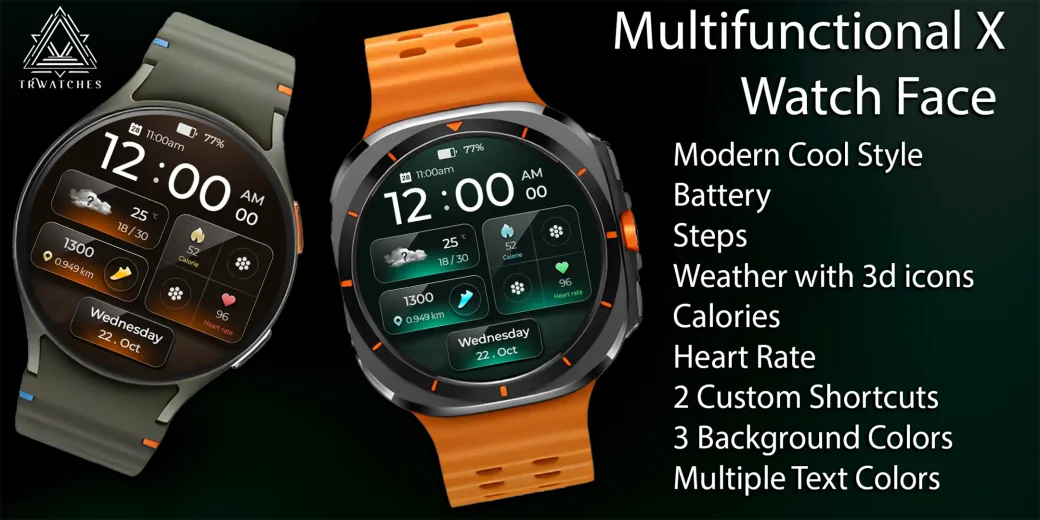
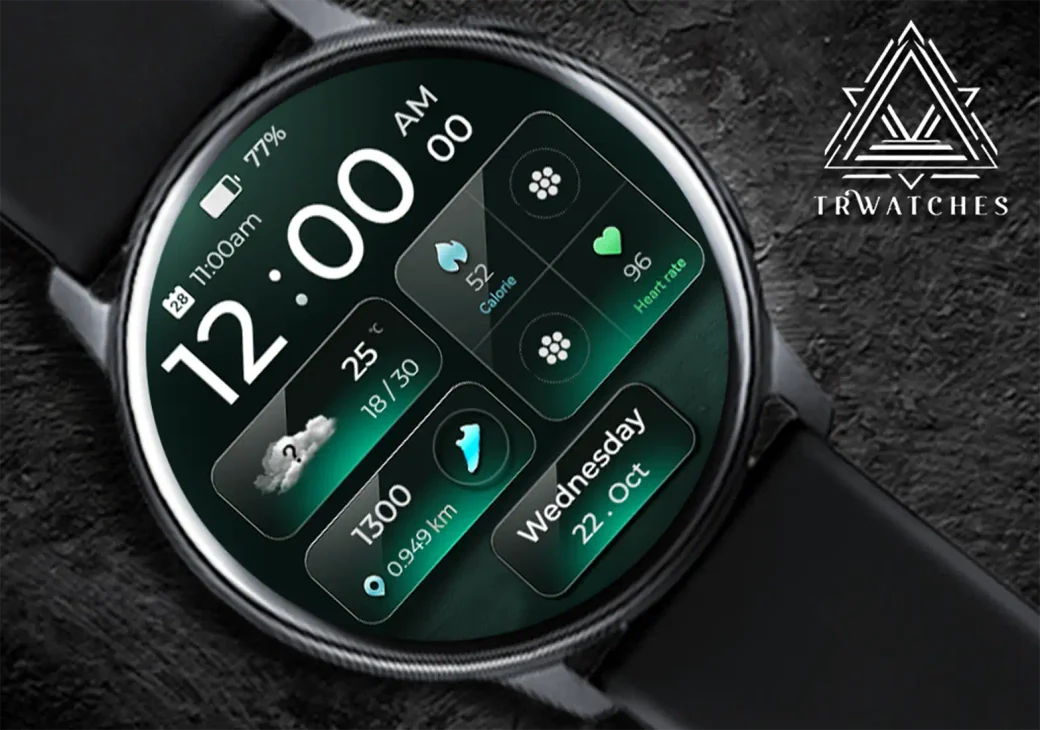
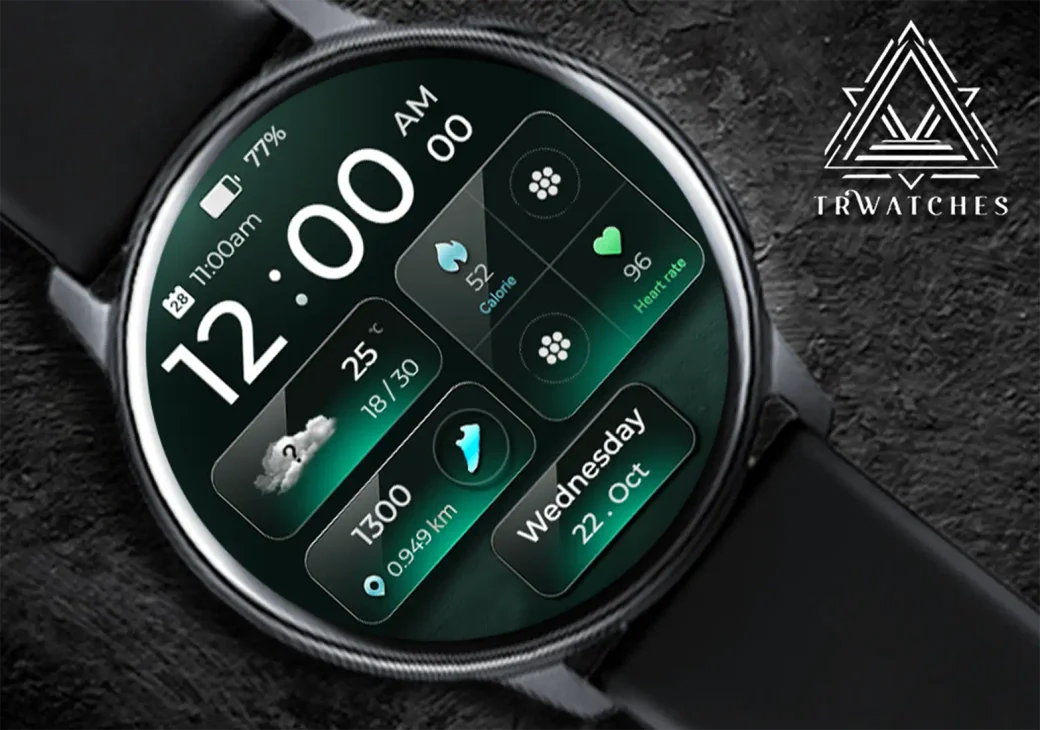
🕒 Große digitale Uhrzeitanzeige – 12/24 Stunden (AM/PM)
🔋 Echtzeit-Akkustandsanzeige
📅 Anzeige des nächsten Ereignisses direkt auf dem Display
🌤️ 3D-animierte Wettersymbole mit aktueller, minimaler und maximaler Temperatur
👣 Schrittzähler + Distanzmesser (km/mi)
🔥 Anzeige des Kalorienverbrauchs
💓 Live-Herzfrequenzsensor
📆 Vollständige Datumsanzeige (Tag/Monat/Wochentag)
⚙️ Zwei anpassbare Kurzbefehle – tippen Sie auf eines der Symbole und weisen Sie Ihre Lieblings-App zu (Musik, Nachrichten, Wetter usw.)
🌈 Elegante 3D-Tiefeneffekte und moderner grüner Schimmer
📱 Kompatibel mit allen Wear OS Smartwatches (Galaxy Watch 4/5/6, Pixel Watch, OnePlus Watch 2, TicWatch Pro 5 und mehr)
💡 Kurzbefehle anpassen
1️⃣ Berühren und halten Sie die Uhr Zifferblatt
2️⃣ Tippen Sie auf ⚙️ Anpassen
3️⃣ Wählen Sie einen Shortcut-Slot → Wählen Sie eine beliebige App
➡️ Fertig – Ihre Lieblings-Apps sind jetzt nur noch einen Fingertipp entfernt!
💚 Einfach. Elegant. Informativ.
Alles, was Sie brauchen, auf einen Blick – perfekt für Ihren Alltagsstil.
📌 Kompatibel mit:
Wear OS 3.0+
Geräte wie die Samsung Galaxy Watch Serie, Google Pixel Watch und andere
--------------------------------------------------------------------------------------------------------
Hinweise zur Installation des Zifferblatts auf der Smartwatch:
Die Telefon-App dient nur als Platzhalter, um die Installation und das Auffinden des Zifferblatts auf Ihrer Wear OS-Uhr zu erleichtern. Sie müssen Ihr Uhrgerät aus dem Installationsmenü auswählen.
Wenn Sie den Helper direkt mit dem Telefon herunterladen, müssen Sie die Anwendung öffnen und auf das Display oder die Download-Schaltfläche tippen. -> Die Installation auf der Uhr wird gestartet.
Eine Wear OS-Uhr muss verbunden sein.
Sollte das nicht funktionieren, kopieren Sie den Link in den Chrome-Browser Ihres Smartphones, klicken Sie auf den Pfeil rechts unten und wählen Sie das zu installierende Zifferblatt aus.
Nach der Installation müssen Sie das Zifferblatt in der Wear OS App auf Ihrem Bildschirm installieren. Gehen Sie dazu zu den heruntergeladenen Zifferblättern.
Bei Problemen kontaktieren Sie mich bitte unter raduturcu03@gmail.com.
--------------------------------------------------------------------------------------------------
FOLGEN SIE UNS AUF TELEGRAM: https://t.me/TRWatchfaces
FOLGEN SIE UNS AUF UNSERER WEBSITE, UM KOSTENLOSE GUTSCHEINE ZU ERHALTEN:
https://trwatches.odoo.com/
--------------------------------------------------------------------------------------------------
Schauen Sie sich auch andere Designs in meinem Google-Profil an.
Originaltext anzeigen
🕐 ✨ Modern Digital Watch Face – Stylish & Smart ⌚️
Stay connected in style! This premium digital watch face brings all your key stats to your wrist — beautifully organized and easy to read, day or night.
🔹 Main Features
🕒 Large digital time – 12h / 24h (AM / PM)
🔋 Real-time battery indicator
📅 Next event displayed right on the screen
🌤️ 3D animated weather icons with current, min & max temperature
👣 Step counter + distance tracker (km / mi)
🔥 Burned calories display
💓 Live heart rate sensor
📆 Full date view (day / month / weekday)
⚙️ Two customizable shortcuts — tap either icon and assign your favorite app (Music, Messages, Weather, etc.)
🌈 Elegant 3D depth effects and modern green glow
📱 Compatible with all Wear OS smartwatches (Galaxy Watch 4/5/6, Pixel Watch, OnePlus Watch 2, TicWatch Pro 5, and more)
💡 How to Customize Shortcuts
1️⃣ Touch and hold the watch face
2️⃣ Tap ⚙️ Customize
3️⃣ Select a shortcut slot → choose any app you like
➡️ Done — your favorite apps are now one tap away!
💚 Simple. Elegant. Informative.
Everything you need at a glance — designed for your everyday style.
📌 Compatible with:
Wear OS 3.0+
Devices such as Samsung Galaxy Watch series, Google Pixel Watch, and others
--------------------------------------------------------------------------------------------------------
Watch face installation notes on smart watch:
Phone app serves only as a placeholder to make it easier to install & find the watch face on your Wear OS watch. You have to select your watch device from the install dropdown menu.
If you download the helper directly with the phone , you need to open application and touch on the display or the download button. -> will start to install on the watch.
A wear os watch need to be connected.
If not working in that way , you can copy that link into your phone chrome browser and click on arrow down from right , and you choose the watch face to install.
..............................................
After installation you need to set that watch face to your screen , from wear OS app , go down at downloaded watch faces and you will find it.
If you have problems , please contact me on raduturcu03@gmail.com
--------------------------------------------------------------------------------------------------
FOLLOW US AT TELEGRAM : https://t.me/TRWatchfaces
FOLLOW US WEBSITE TO GET FREE COUPONS :
https://trwatches.odoo.com/
--------------------------------------------------------------------------------------------------
Try to see others designs in my google profile.
Datensicherheit
Was RADU GHEORGHE TURCU bei Google Play zu den Daten angibt, die diese App erfasst und weitergibt.
- Keine Daten werden mit Drittunternehmen oder -organisationen geteiltWeitere Informationen dazu, wie Entwickler Angaben zur Weitergabe von Daten machen
- Keine Daten erhobenWeitere Informationen dazu, wie Entwickler Angaben zur Datenerhebung machen
Kontakt zum Entwickler
- Websitetrwatches.odoo.com
- E-Mailraduturcu03@gmail.com
- Datenschutzerklärungtrwatches.odoo.com
- AdresseStr. Eduard Albert Bielz, Nr. 89d, Bl. b1, Sc. f, et.1, Ap. 60 550031 Sibiu Romania
Informationen
- Angeboten von
- RADU GHEORGHE TURCU
- Kategorie
- Personalisierung
- Aktualisiert
- 26.10.2025
- Veröffentlicht
- 26.10.2025
- Altersfreigabe
- USK ab 0 Jahren
- Preis
- 1,19 €
- Paketname
- com.turcuradu.multifunctionalxwatchface