Soviet electricity meter
Eugeniy Radzivill- USK ab 0 JahrenAltersfreigabe
- SportKategorie
- 25.08.2025Aktualisiert
- 2,09 €Preis
Verlinkt auf den offiziellen Google Play-Eintrag von com.watchfacestudio.scheteng. Zuletzt geprüft am 23.11.2026.
Über diese App
Automatische Übersetzung von Google. Originalsprache: Englisch (Vereinigte Staaten).
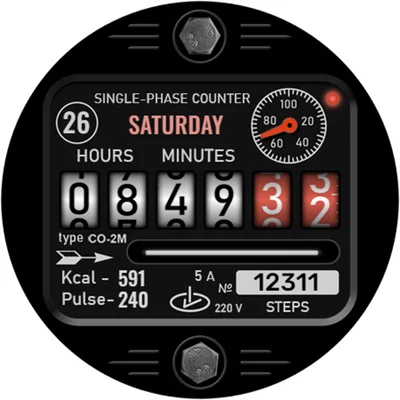
Sowjetischer Stromzähler für Wear OS-Smartwatches
Das Smartwatch-Zifferblatt auf der Wear OS-Plattform unterstützt die folgenden Funktionen:
- Anzeige des Datums (im oberen Kreis) und des gesamten Wochentags in Englisch
- Segmente mit Stunden (24-Uhr-Format), Minuten und Sekunden werden in Form von Trommeln eines sowjetischen Stromzählers mit darauf angebrachten Zahlen dargestellt
- Die Anzahl der durchgeführten Schritte wird angezeigt (auf einem Schild, das die Seriennummer des Messgeräts imitiert)
- Verbrannte Kalorien und der aktuelle Puls werden im unteren linken Teil des Zifferblatts in Form einer Nachahmung der technischen Aufzeichnungen des Stromzählers angezeigt
- Die Batterieladung wird in Form eines kleinen Zifferblatts mit rotem Pfeil angezeigt, das sich in der oberen rechten Ecke des Stromzähler-Displays (neben der blinkenden roten LED) befindet. Hier habe ich auch einen Tippbereich erstellt, auf den Sie klicken, um die Anwendung „Batterie“ zu öffnen (auf diese Weise können Sie mehr über die verbleibende Ladung erfahren).
WICHTIG! Ich kann die Einrichtung und den Betrieb von Tap Zone nur auf Uhren von Samsung garantieren. Wenn Sie eine Uhr eines anderen Herstellers besitzen, funktionieren die Tippzonen möglicherweise nicht richtig. Bitte berücksichtigen Sie dies beim Kauf eines Zifferblatts.
Für dieses Zifferblatt habe ich einen Original-AOD-Modus erstellt. Um es anzuzeigen, müssen Sie es im Menü Ihrer Uhr aktivieren. Bitte beachten Sie, dass im AOD-Modus das Bild auf der Uhr einmal pro Minute neu gezeichnet wird. Daher wird die Bewegung der Trommeln mit Zahlen und die Drehung der Scheibe, die den Energieverbrauch simuliert, gestoppt.
Für Kommentare und Vorschläge schreiben Sie bitte an E-Mail: eradzivill@mail.ru
Treten Sie uns in den sozialen Netzwerken bei:
https://vk.com/eradzivill
https://radzivill.com
https://t.me/eradzivill
Aufrichtig,
Eugeniy Radzivill
Originaltext anzeigen
The smartwatch dial on the Wear OS platform supports the following functionality:
- Display of the date (in the upper circle) and the full day of the week in English
- Segments with hours (24 time format), minutes and seconds are presented in the form of drums of a Soviet electricity meter with numbers applied to them
- The number of steps taken is displayed (on a plate that imitates the serial number of the meter)
- Burned kcal and the current pulse are displayed in the lower left part of the dial, in the form of an imitation of technical records of the electricity meter
- The battery charge is presented in the form of a small dial with a red arrow, which is located in the upper right corner of the electricity meter display (next to the flashing red LED). Here I also made a tap zone, clicking on which will open the "Battery" application (this way you can find out more about the amount of charge remaining)
IMPORTANT! I can guarantee the setup and operation of tap zone only on watches from Samsung. If you have a watch from another manufacturer, the tap zones may not work correctly. Please consider this when purchasing a watch face.
I made an original AOD mode for this watch face. To display it, you need to activate it in the menu of your watch. Please note that in AOD mode, the picture on the watch is redrawn once per minute. Therefore, the movement of the drums with numbers and the rotation of the disk simulating the amount of energy consumed will be stopped.
For comments and suggestions, please write to e-mail: eradzivill@mail.ru
Join us on social networks:
https://vk.com/eradzivill
https://radzivill.com
https://t.me/eradzivill
Sincerely,
Eugeniy Radzivill
Datensicherheit
Was Eugeniy Radzivill bei Google Play zu den Daten angibt, die diese App erfasst und weitergibt.
- Keine Daten werden mit Drittunternehmen oder -organisationen geteiltWeitere Informationen dazu, wie Entwickler Angaben zur Weitergabe von Daten machen
- Keine Daten erhobenWeitere Informationen dazu, wie Entwickler Angaben zur Datenerhebung machen
Kontakt zum Entwickler
- Websiteradzivill.com
- E-Maileradzivill@mail.ru
- Datenschutzerklärungeradzivill.wixsite.com
- Adresseдер. Терновка, ул. Песочная, д. 4 Наро-Фоминск Московская область Россия 143300
Informationen
- Angeboten von
- Eugeniy Radzivill
- Kategorie
- Sport
- Aktualisiert
- 25.08.2025
- Veröffentlicht
- 25.10.2024
- Altersfreigabe
- USK ab 0 Jahren
- Preis
- 2,09 €
- Paketname
- com.watchfacestudio.scheteng