Soviet electricity meter
Eugeniy Radzivill- 3 歳以上対象年齢
- スポーツカテゴリ
- 2025/8/25更新日
- ¥220価格
com.watchfacestudio.schetengのGoogle Play公式ページにリンクしています。最終確認:2026/11/23。
このアプリについて
Googleによる英語 (アメリカ合衆国)からの自動翻訳です。
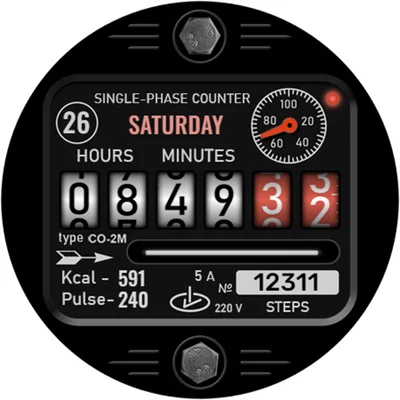
Wear OS スマートウォッチ用のソビエト電力メーター
Wear OS プラットフォームのスマートウォッチ ダイヤルは、次の機能をサポートしています。
- 日付(上の円内)と曜日を英語で表示
- 時間 (24 時間形式)、分、秒のセグメントは、数字が適用されたソ連の電力メーターのドラムの形で表示されます。
・歩数表示(メーターのシリアルナンバーを模したプレート)
- 消費カロリーと電流パルスは、電気メーターの技術記録を模倣して文字盤の左下に表示されます。
- バッテリー充電量は、電力メーター表示の右上隅 (点滅する赤色 LED の隣) にある赤い矢印の付いた小さなダイヤルの形で表示されます。ここではタップゾーンも作成し、クリックすると「バッテリー」アプリケーションが開きます(これにより、充電残量の詳細を確認できます)
重要!タップゾーンのセットアップと動作を保証できるのは、Samsung 製の時計のみです。他のメーカーの時計をお持ちの場合、タップゾーンが正しく動作しない可能性があります。ウォッチフェイスをご購入の際は、ぜひご検討ください。
このウォッチフェイス用にオリジナルのAODモードを作成しました。これを表示するには、ウォッチのメニューで有効にする必要があります。 AOD モードでは、時計上の画像は 1 分に 1 回再描画されることに注意してください。そのため、数字が書かれたドラムの動きやエネルギー消費量を模擬したディスクの回転が停止します。
コメントや提案については、電子メールでご連絡ください:eradzivill@mail.ru
ソーシャルネットワークに参加してください:
https://vk.com/eradzivill
https://radzivill.com
https://t.me/eradzivill
心から、
ユージェニー・ラジヴィル
原文を表示
The smartwatch dial on the Wear OS platform supports the following functionality:
- Display of the date (in the upper circle) and the full day of the week in English
- Segments with hours (24 time format), minutes and seconds are presented in the form of drums of a Soviet electricity meter with numbers applied to them
- The number of steps taken is displayed (on a plate that imitates the serial number of the meter)
- Burned kcal and the current pulse are displayed in the lower left part of the dial, in the form of an imitation of technical records of the electricity meter
- The battery charge is presented in the form of a small dial with a red arrow, which is located in the upper right corner of the electricity meter display (next to the flashing red LED). Here I also made a tap zone, clicking on which will open the "Battery" application (this way you can find out more about the amount of charge remaining)
IMPORTANT! I can guarantee the setup and operation of tap zone only on watches from Samsung. If you have a watch from another manufacturer, the tap zones may not work correctly. Please consider this when purchasing a watch face.
I made an original AOD mode for this watch face. To display it, you need to activate it in the menu of your watch. Please note that in AOD mode, the picture on the watch is redrawn once per minute. Therefore, the movement of the drums with numbers and the rotation of the disk simulating the amount of energy consumed will be stopped.
For comments and suggestions, please write to e-mail: eradzivill@mail.ru
Join us on social networks:
https://vk.com/eradzivill
https://radzivill.com
https://t.me/eradzivill
Sincerely,
Eugeniy Radzivill
データ セーフティ
このアプリが収集・共有するデータについて、Eugeniy RadzivillがGoogle Playで申告している内容です。
- 第三者と共有されるデータはありません詳しくは、デベロッパーが共有を申告する方法についての説明をご覧ください
- データは収集されません詳しくは、デベロッパーが収集を申告する方法についての説明をご覧ください
開発元の連絡先
- ウェブサイトradzivill.com
- メールeradzivill@mail.ru
- プライバシーポリシーeradzivill.wixsite.com
- 住所дер. Терновка, ул. Песочная, д. 4 Наро-Фоминск Московская область Россия 143300
情報
- 提供元
- Eugeniy Radzivill
- カテゴリ
- スポーツ
- 更新日
- 2025/8/25
- リリース
- 2024/10/25
- 対象年齢
- 3 歳以上
- 価格
- ¥220
- パッケージ名
- com.watchfacestudio.scheteng