Soviet electricity meter
Eugeniy Radzivill- Classificação LivreClassificação etária
- EsportesCategoria
- 25/08/2025Atualizado
- R$ 10,99Preço
Leva à página oficial de com.watchfacestudio.scheteng na Google Play. Última verificação em 23/11/2026.
Sobre este app
Tradução automática do Google. Idioma original: Inglês (Estados Unidos).
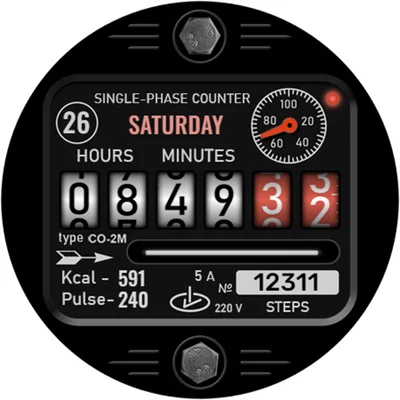
Medidor de eletricidade soviético para relógios inteligentes Wear OS
O mostrador do smartwatch na plataforma Wear OS oferece suporte às seguintes funcionalidades:
- Exibição da data (no círculo superior) e do dia completo da semana em inglês
- Segmentos com horas (formato 24 horas), minutos e segundos são apresentados na forma de tambores de um medidor de eletricidade soviético com números aplicados a eles
- O número de passos dados é exibido (em uma placa que imita o número de série do medidor)
- A kcal queimada e o pulso atual são exibidos na parte inferior esquerda do mostrador, na forma de uma imitação dos registros técnicos do medidor de energia elétrica
- A carga da bateria é apresentada na forma de um pequeno mostrador com uma seta vermelha, que se encontra no canto superior direito do display do medidor de energia elétrica (ao lado do LED vermelho piscante). Aqui também fiz uma zona de toque, clicando nela abrirá o aplicativo “Bateria” (assim você poderá saber mais sobre a quantidade de carga restante)
IMPORTANTE! Posso garantir a configuração e operação da zona de toque apenas em relógios Samsung. Se você possui um relógio de outro fabricante, as zonas de toque podem não funcionar corretamente. Considere isso ao comprar um mostrador de relógio.
Eu criei um modo AOD original para este mostrador. Para exibi-lo, você precisa ativá-lo no menu do seu relógio. Observe que no modo AOD, a imagem do relógio é redesenhada uma vez por minuto. Portanto, a movimentação dos tambores com números e a rotação do disco simulando a quantidade de energia consumida serão interrompidas.
Para comentários e sugestões, escreva para o e-mail: eradzivill@mail.ru
Junte-se a nós nas redes sociais:
https://vk.com/eradzivill
https://radzivill.com
https://t.me/eradzivill
Sinceramente,
Eugeniy Radzivill
Mostrar o texto original
The smartwatch dial on the Wear OS platform supports the following functionality:
- Display of the date (in the upper circle) and the full day of the week in English
- Segments with hours (24 time format), minutes and seconds are presented in the form of drums of a Soviet electricity meter with numbers applied to them
- The number of steps taken is displayed (on a plate that imitates the serial number of the meter)
- Burned kcal and the current pulse are displayed in the lower left part of the dial, in the form of an imitation of technical records of the electricity meter
- The battery charge is presented in the form of a small dial with a red arrow, which is located in the upper right corner of the electricity meter display (next to the flashing red LED). Here I also made a tap zone, clicking on which will open the "Battery" application (this way you can find out more about the amount of charge remaining)
IMPORTANT! I can guarantee the setup and operation of tap zone only on watches from Samsung. If you have a watch from another manufacturer, the tap zones may not work correctly. Please consider this when purchasing a watch face.
I made an original AOD mode for this watch face. To display it, you need to activate it in the menu of your watch. Please note that in AOD mode, the picture on the watch is redrawn once per minute. Therefore, the movement of the drums with numbers and the rotation of the disk simulating the amount of energy consumed will be stopped.
For comments and suggestions, please write to e-mail: eradzivill@mail.ru
Join us on social networks:
https://vk.com/eradzivill
https://radzivill.com
https://t.me/eradzivill
Sincerely,
Eugeniy Radzivill
Segurança dos dados
O que Eugeniy Radzivill declara na Google Play sobre os dados que este app coleta e compartilha.
- Os dados não são compartilhados com terceirosSaiba mais sobre como os desenvolvedores declaram o compartilhamento
- Nenhum dado foi coletadoSaiba mais sobre como os desenvolvedores declaram a coleta
Contato do desenvolvedor
- Siteradzivill.com
- E-maileradzivill@mail.ru
- Política de privacidadeeradzivill.wixsite.com
- Endereçoдер. Терновка, ул. Песочная, д. 4 Наро-Фоминск Московская область Россия 143300
Informações
- Oferecido por
- Eugeniy Radzivill
- Categoria
- Esportes
- Atualizado
- 25/08/2025
- Lançamento
- 25/10/2024
- Classificação etária
- Classificação Livre
- Preço
- R$ 10,99
- Nome do pacote
- com.watchfacestudio.scheteng