Soviet electricity meter
Eugeniy Radzivill- PEGI 3Clasificación por edad
- DeportesCategoría
- 25/8/2025Actualizado
- 2,09 €Precio
Enlaza a la ficha oficial de com.watchfacestudio.scheteng en Google Play. Última comprobación el 23/11/2026.
Acerca de esta aplicación
Traducción automática de Google. Idioma original: Inglés (Estados Unidos).
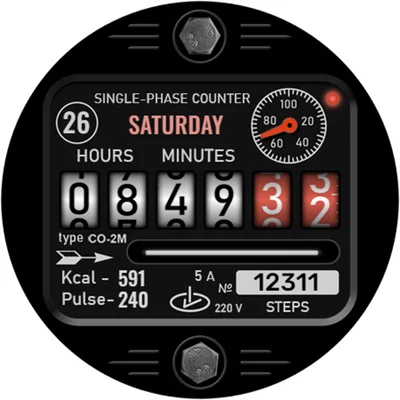
Medidor de electricidad soviético para relojes inteligentes Wear OS
El dial del reloj inteligente en la plataforma Wear OS admite las siguientes funciones:
- Visualización de la fecha (en el círculo superior) y el día completo de la semana en inglés.
- Los segmentos con horas (formato de 24 horas), minutos y segundos se presentan en forma de tambores de un medidor de electricidad soviético con números aplicados.
- Se muestra el número de pasos realizados (en una placa que imita el número de serie del medidor)
- Las kcal quemadas y el pulso actual se muestran en la parte inferior izquierda del dial, en forma de imitación de los registros técnicos del contador de electricidad.
- La carga de la batería se presenta en forma de un pequeño dial con una flecha roja, que se encuentra en la esquina superior derecha de la pantalla del medidor de electricidad (al lado del LED rojo parpadeante). Aquí también hice una zona de toque, al hacer clic en ella se abrirá la aplicación "Batería" (de esta manera podrás obtener más información sobre la cantidad de carga restante)
¡IMPORTANTE! Puedo garantizar la configuración y el funcionamiento de Tap Zone solo en relojes Samsung. Si tienes un reloj de otro fabricante, es posible que las zonas de grifo no funcionen correctamente. Tenga esto en cuenta al comprar una esfera de reloj.
Hice un modo AOD original para esta esfera de reloj. Para visualizarlo, debes activarlo en el menú de tu reloj. Tenga en cuenta que en el modo AOD, la imagen del reloj se vuelve a dibujar una vez por minuto. Por tanto, se detendrá el movimiento de los tambores con números y la rotación del disco simulando la cantidad de energía consumida.
Para comentarios y sugerencias, escriba al correo electrónico: eradzivill@mail.ru
Únase a nosotros en las redes sociales:
https://vk.com/eradzivill
https://radzivill.com
https://t.me/eradzivill
Atentamente,
Eugeniy Radzivill
Mostrar el texto original
The smartwatch dial on the Wear OS platform supports the following functionality:
- Display of the date (in the upper circle) and the full day of the week in English
- Segments with hours (24 time format), minutes and seconds are presented in the form of drums of a Soviet electricity meter with numbers applied to them
- The number of steps taken is displayed (on a plate that imitates the serial number of the meter)
- Burned kcal and the current pulse are displayed in the lower left part of the dial, in the form of an imitation of technical records of the electricity meter
- The battery charge is presented in the form of a small dial with a red arrow, which is located in the upper right corner of the electricity meter display (next to the flashing red LED). Here I also made a tap zone, clicking on which will open the "Battery" application (this way you can find out more about the amount of charge remaining)
IMPORTANT! I can guarantee the setup and operation of tap zone only on watches from Samsung. If you have a watch from another manufacturer, the tap zones may not work correctly. Please consider this when purchasing a watch face.
I made an original AOD mode for this watch face. To display it, you need to activate it in the menu of your watch. Please note that in AOD mode, the picture on the watch is redrawn once per minute. Therefore, the movement of the drums with numbers and the rotation of the disk simulating the amount of energy consumed will be stopped.
For comments and suggestions, please write to e-mail: eradzivill@mail.ru
Join us on social networks:
https://vk.com/eradzivill
https://radzivill.com
https://t.me/eradzivill
Sincerely,
Eugeniy Radzivill
Seguridad de los datos
Lo que Eugeniy Radzivill declara en Google Play sobre los datos que esta aplicación recopila y comparte.
- No se comparten datos con tercerosMás información sobre cómo los desarrolladores declaran lo que comparten
- No se recogen datosMás información sobre cómo los desarrolladores declaran lo que recogen
Contacto del desarrollador
- Sitio webradzivill.com
- Correo electrónicoeradzivill@mail.ru
- Política de privacidaderadzivill.wixsite.com
- Direcciónдер. Терновка, ул. Песочная, д. 4 Наро-Фоминск Московская область Россия 143300
Información
- Ofrecida por
- Eugeniy Radzivill
- Categoría
- Deportes
- Actualizado
- 25/8/2025
- Publicado
- 25/10/2024
- Clasificación por edad
- PEGI 3
- Precio
- 2,09 €
- Nombre del paquete
- com.watchfacestudio.scheteng