- Altersfreigabe4+
- KategorieProduktivität
- EntwicklerTomokazu Shinozaki
- SprachenEnglisch+ 9 weitere
- Größe6,8 MB
BatchOCR ist bei App Store derzeit möglicherweise nicht verfügbar
Bei unserer letzten Prüfung war der Store-Eintrag nicht erreichbar. Der Link führt weiterhin zur offiziellen App Store-Seite.
Screenshots

Info
Der Entwickler hat diesen Text nicht in Ihrer Sprache bereitgestellt.
Get the text from several photos together, ready to copy into a note or share. BatchOCR turns printed Japanese and English text into editable results on your iPhone.
FROM PHOTOS TO ONE TEXT RESULT
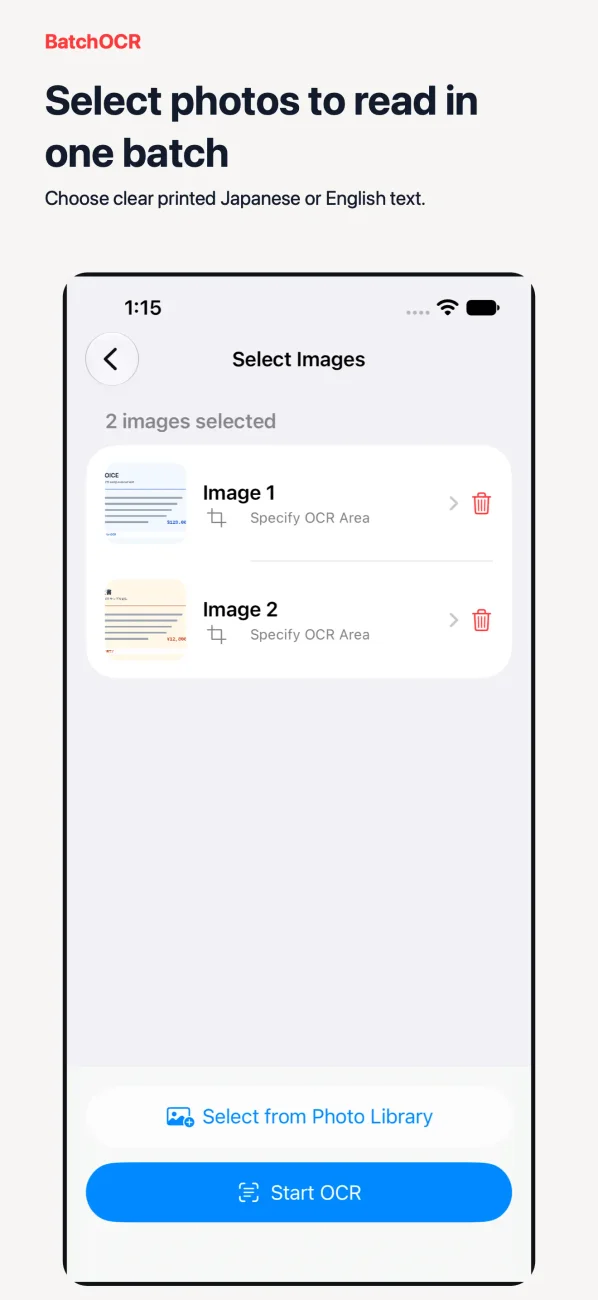
1. Choose multiple photos in the order you want to read them.
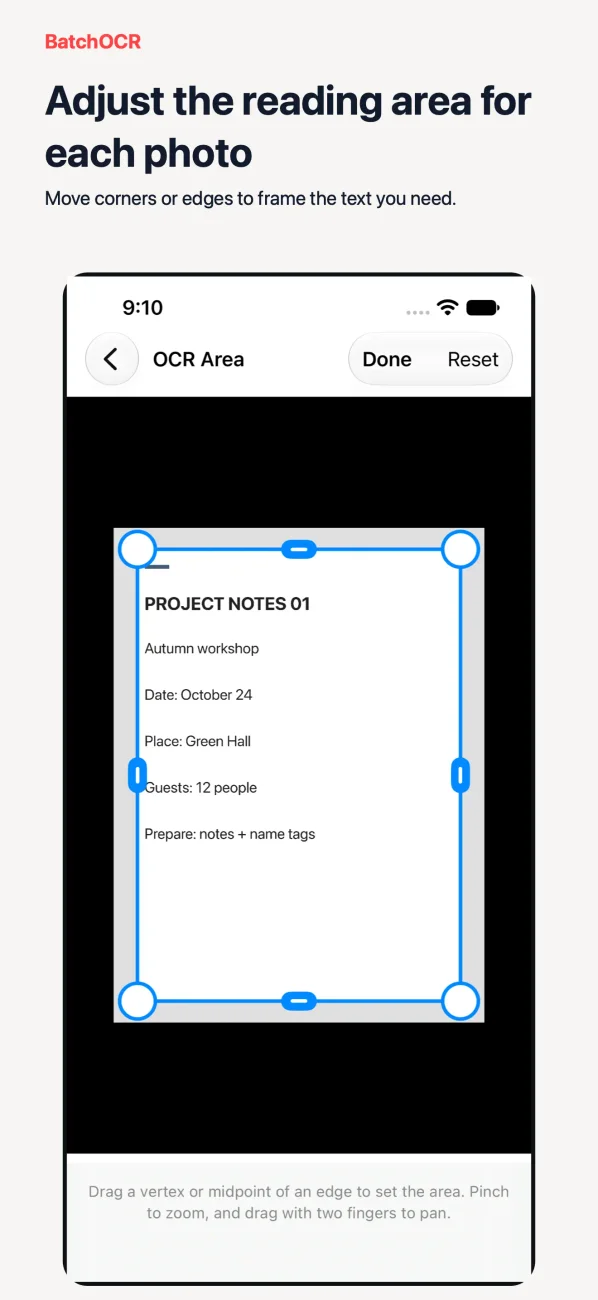
2. Adjust the recognition area for each photo when needed.
3. Extract the text and review or edit each image's result.
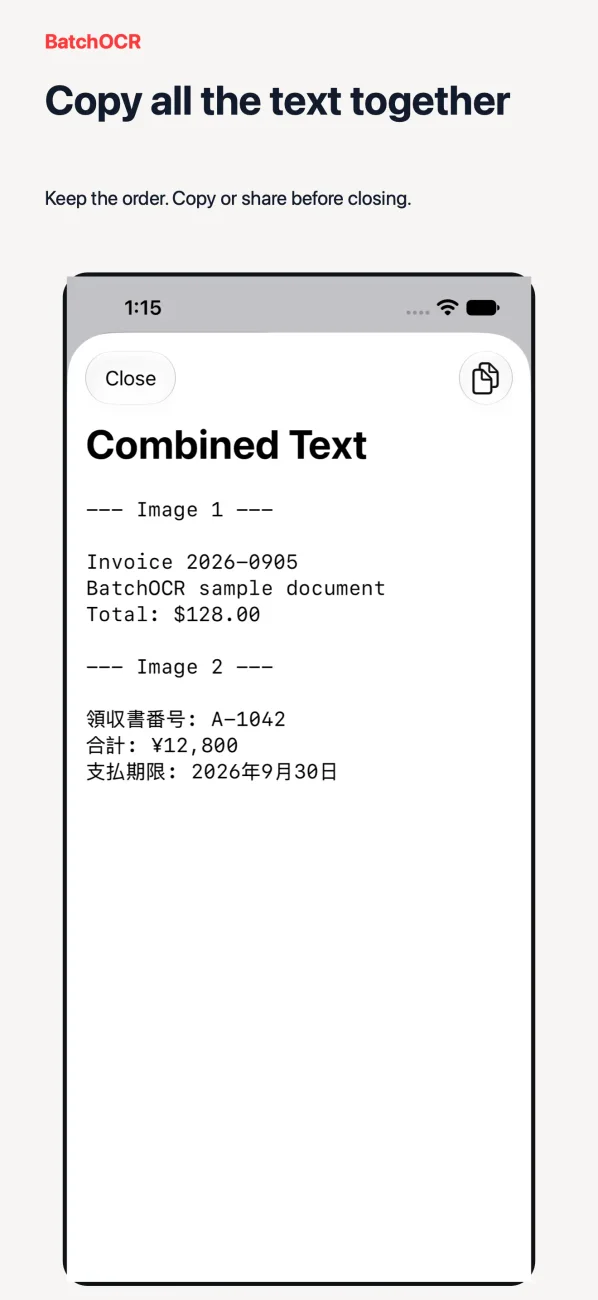
4. View the combined text, copy it all, or share it with another app.
Each photo's text stays in selection order in the combined result, with image-number headings to help you check it against the originals. Copy an individual result when you only need one part.
Useful for gathering printed instructions, reference pages, or other text spread across several photos without copying each result separately.
BEFORE YOU CLOSE
Results are not saved automatically. Copy or share the text you want to keep before closing OCR Results, resetting, or quitting the app. The combined-text view is for reading and copying; make corrections in each image's result before combining.
RECOGNITION AND PRIVACY
Recognition runs on your iPhone. Selected images and recognized text are not uploaded to a developer-operated server. No account or login is required. If a selected photo is stored in iCloud, iOS may download it according to your Apple settings.
Designed for clear printed Japanese and English text. Results depend on image quality, orientation, font, layout, and language. Check the recognized text before using it.
ADS AND OPTIONAL PURCHASE
BatchOCR is free to download. Users without the optional Remove Ads purchase may see a Google AdMob banner on the Home and OCR Results screens. Remove Ads is a one-time, non-consumable purchase; there is no subscription. Restore Purchases is available in Settings.
Google Mobile Ads and its consent component may process advertising, device, diagnostic, and consent information as described in the privacy policy. Ads and purchase services may use a network connection.
Privacy policy: https://reishabu.tokyo/batchocr-privacy-policy/
Support: https://reishabu.tokyo/batchocr-support/
Neue Funktionen
Version 1.0.3 · 22.11.2026
Updated the App Store screenshots to highlight selecting photos in a batch and adjusting the reading area for each image.
App-Datenschutz
Was Tomokazu Shinozaki im App Store zum Umgang dieser App mit Daten angibt.
-
Daten, die zum Tracking Ihrer Person verwendet werden
Können verwendet werden, um Sie über Apps und Websites anderer Unternehmen hinweg zu verfolgen.
- Kennungen
-
Mit Ihnen verknüpfte Daten
Können erfasst und mit Ihrer Identität verknüpft werden.
- Standort
- Kennungen
- Nutzungsdaten
- Diagnose
-
Nicht mit Ihnen verknüpfte Daten
Können erfasst werden, sind aber nicht mit Ihrer Identität verknüpft.
- Diagnose
Die Datenschutzpraktiken können variieren, zum Beispiel je nach den von Ihnen verwendeten Funktionen oder Ihrem Alter.
Informationen
- Anbieter
- Tomokazu Shinozaki
- Kategorie
- Produktivität
- Version
- 1.0.3
- Aktualisiert
- 22.11.2026
- Veröffentlicht
- 30.09.2026
- Größe
- 6,8 MB
- Erfordert
- iOS 17.0 oder neuer
- Altersfreigabe
- 4+
- In-App-Käufe
- Ja
- Sprachen
- Englisch, Hindi, Indonesisch, Japanisch, Koreanisch, Portugiesisch, Vereinf. Chinesisch, Spanisch, Tradit. Chinesisch, Vietnamesisch
- Copyright
- © 2026 Tomokazu Shinozaki
Das könnte Ihnen auch gefallen
-
 ImViz: Image & PDF to Text OCRProduktivität
-
 Scanry: PDF Scanner & OCRScans komprimieren & senden
-
 Papyr - Document ScannerProduktivität
-
 Texty Copy: Felder & OCRFelder erfassen, nicht Text
-
 OnlyScans: PDF & DokumentscanPrivat scannen & signieren
-
 Fototext Scanner Scan ObjektivBild in Text konvertieren OCR
-
 Actions For ObsidianDeine Notizen + Kurzbefehle.
-
 Möbius SyncProduktivität
-
 OCR Scanner - QuickScanScannen,Dokument,Signieren,PDF
-
 Textscanner - OCR Scan TextBild zu Text Scanner- Textscan