- Age rating4+
- CategoryProductivity
- DeveloperTomokazu Shinozaki
- LanguagesEnglish+ 9 more
- Size6.8 MB
Links to the official App Store page
Download.org hosts no file of BatchOCR. The button opens its official App Store page, published by Tomokazu Shinozaki. Listing last checked on Nov 23, 2026.
Screenshots

About
Get the text from several photos together, ready to copy into a note or share. BatchOCR turns printed Japanese and English text into editable results on your iPhone.
FROM PHOTOS TO ONE TEXT RESULT
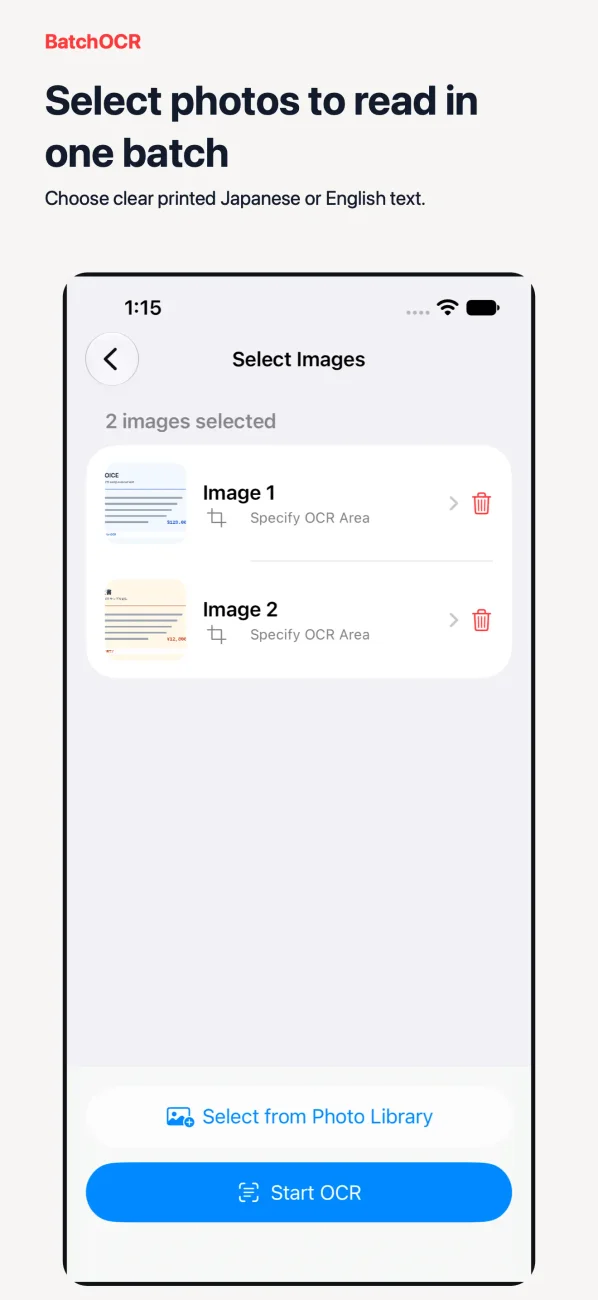
1. Choose multiple photos in the order you want to read them.
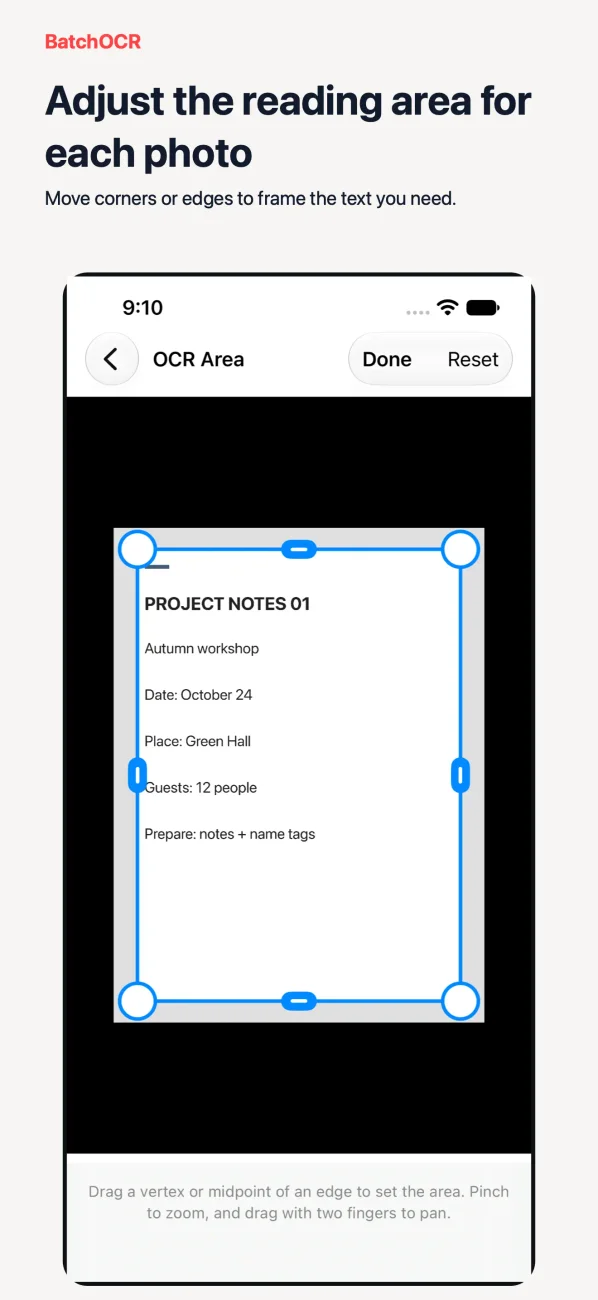
2. Adjust the recognition area for each photo when needed.
3. Extract the text and review or edit each image's result.
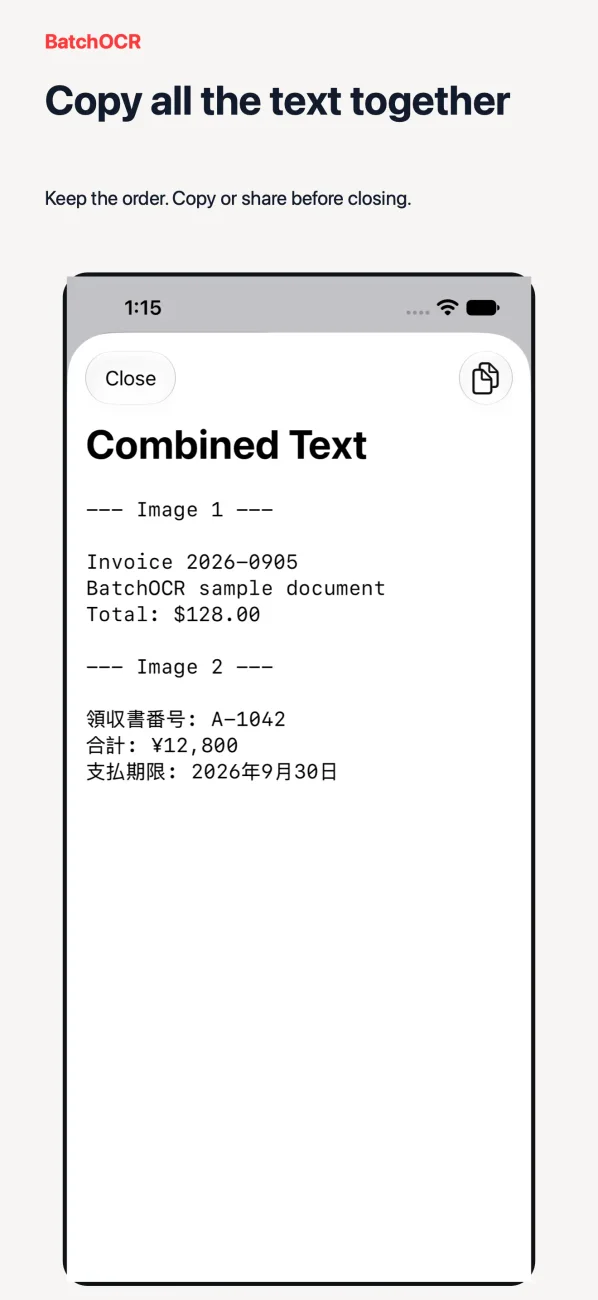
4. View the combined text, copy it all, or share it with another app.
Each photo's text stays in selection order in the combined result, with image-number headings to help you check it against the originals. Copy an individual result when you only need one part.
Useful for gathering printed instructions, reference pages, or other text spread across several photos without copying each result separately.
BEFORE YOU CLOSE
Results are not saved automatically. Copy or share the text you want to keep before closing OCR Results, resetting, or quitting the app. The combined-text view is for reading and copying; make corrections in each image's result before combining.
RECOGNITION AND PRIVACY
Recognition runs on your iPhone. Selected images and recognized text are not uploaded to a developer-operated server. No account or login is required. If a selected photo is stored in iCloud, iOS may download it according to your Apple settings.
Designed for clear printed Japanese and English text. Results depend on image quality, orientation, font, layout, and language. Check the recognized text before using it.
ADS AND OPTIONAL PURCHASE
BatchOCR is free to download. Users without the optional Remove Ads purchase may see a Google AdMob banner on the Home and OCR Results screens. Remove Ads is a one-time, non-consumable purchase; there is no subscription. Restore Purchases is available in Settings.
Google Mobile Ads and its consent component may process advertising, device, diagnostic, and consent information as described in the privacy policy. Ads and purchase services may use a network connection.
Privacy policy: https://reishabu.tokyo/batchocr-privacy-policy/
Support: https://reishabu.tokyo/batchocr-support/
What’s new
Version 1.0.3 · Nov 22, 2026
Updated the App Store screenshots to highlight selecting photos in a batch and adjusting the reading area for each image.
App privacy
What Tomokazu Shinozaki declares on the App Store about how this app handles data.
-
Data used to track you
May be used to track you across apps and websites owned by other companies.
- Identifiers
-
Data linked to you
May be collected and linked to your identity.
- Location
- Identifiers
- Usage data
- Diagnostics
-
Data not linked to you
May be collected but is not linked to your identity.
- Diagnostics
Privacy practices may vary, for example with the features you use or your age.
Information
- Seller
- Tomokazu Shinozaki
- Category
- Productivity
- Version
- 1.0.3
- Updated
- Nov 22, 2026
- Released
- Sep 30, 2026
- Size
- 6.8 MB
- Requires
- iOS 17.0 or later
- Age rating
- 4+
- Price
- Free
- In-app purchases
- Yes
- Languages
- English, Hindi, Indonesian, Japanese, Korean, Portuguese, Simplified Chinese, Spanish, Traditional Chinese, Vietnamese
- Copyright
- © 2026 Tomokazu Shinozaki
You might also like
-
 ImViz: Image & PDF to Text OCRBatch photo scanner, offline
-
 Scanry: PDF Scanner & OCRCompress scans. Share easily.
-
 Papyr - Document ScannerPrivate PDF Scanner · No Ads
-
 Texty Copy: Fields & OCRCapture fields, not just text
-
 OnlyScans: PDF & Doc ScannerOn-Device OCR, Sign & Organize
-
 PDF Text Scanner [OCR] : LensPDF & photo to text converter
-
 Actions For ObsidianYour notes + Shortcuts.
-
 Möbius SyncFile sync with Syncthing
-
 QuickScan:PDF OCR Text ScannerScan,Doc,Sign,Edit,Privacy
-
 Text Scanner OCR App: OCR ScanImage to Text - Word Scan Text