CapsulePad
Sticky notes, one hover away
Entwickelt für iPhone, iPad, Mac
Kostenlos
- Altersfreigabe4+
- KategorieProduktivität
- EntwicklerJonathan Wyatt
- SprachenEnglisch
- Größe2,9 MB
Verlinkt auf die offizielle App Store-Seite
Download.org hostet keine Datei von CapsulePad. Die Schaltfläche öffnet die App-Seite bei App Store, wo Jonathan Wyatt die App veröffentlicht. Eintrag zuletzt geprüft am 12.11.2026.
Screenshots

Info
Der Entwickler hat diesen Text nicht in Ihrer Sprache bereitgestellt.
CapsulePad is a native Mac and iPhone/iPad app for quick notes that stay out of your way until you need them.
On the Mac, CapsulePad docks a thin pill of colored notes to the edge of your screen. Move your pointer close and it fans out into labeled tabs — click one to open it full-size, or drive the whole thing from the keyboard (⌥⌘N for a new note, ⌥⌘A to see every note, ⌥⌘L to archive the one in front). Reorder notes by dragging, color-code them for quick scanning, and archive or permanently delete the ones you're done with.
Your notes sync automatically across every Mac and iPhone/iPad signed into the same iCloud account, so a note you jot down at your desk is already there when you pick up your phone.
For anything you'd rather keep private, lock individual notes with Face ID, Touch ID, or your device passcode. A locked note's title stays visible so you can still find it, but its contents stay encrypted until you unlock it — and it asks again every time you open it.
Back up everything at once as Markdown, plain text, or a full-fidelity CapsulePad archive you can import back in later, on this Mac or another.
CapsulePad has no account system, no ads, and no analytics — your notes stay on your own devices and sync only through your own iCloud, the same as any other Apple app.
Neue Funktionen
Version 1.1 · 10.09.2026
This update adds:
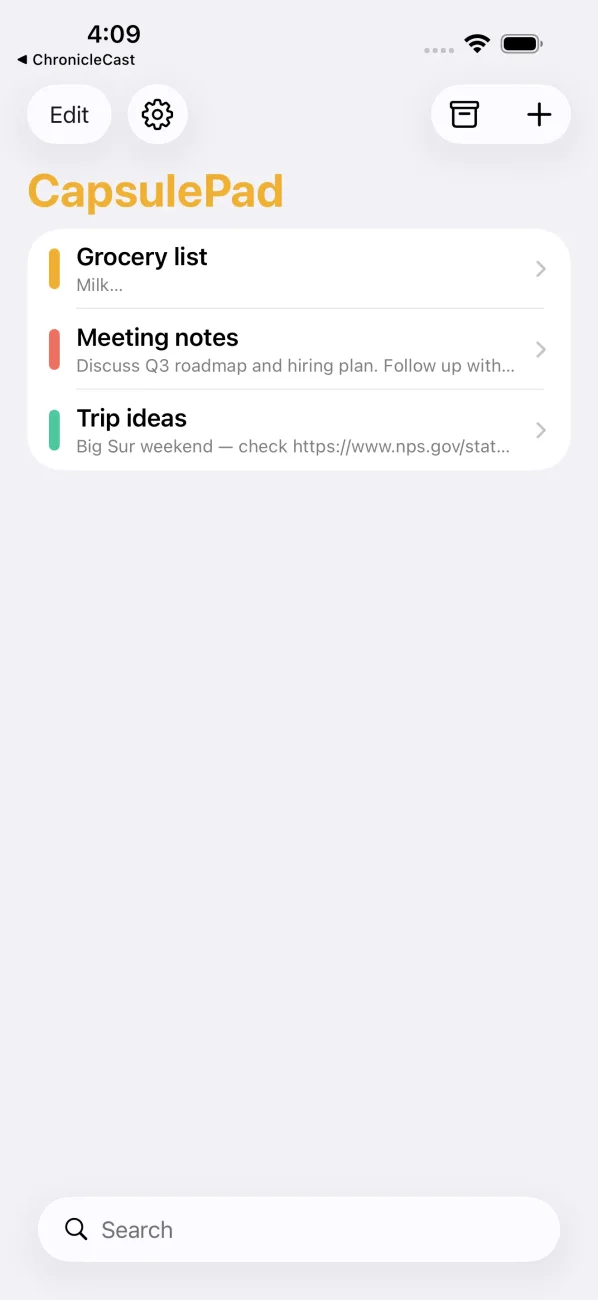
- The note title now lives right in the navigation bar next to the back button, still fully editable
- Archive and Delete buttons right on the note itself, not just the notes list
- Clickable links inside note bodies
- Larger, more readable note body text
Also includes fixes: the notes list title now stays compact instead of briefly appearing large, and a locked note is now properly hidden from the app-switcher snapshot instead of only when fully backgrounded.
App-Datenschutz
Was Jonathan Wyatt im App Store zum Umgang dieser App mit Daten angibt.
-
Keine Daten erfasst
Der Entwickler erfasst keine Daten von dieser App.
Die Datenschutzpraktiken können variieren, zum Beispiel je nach den von Ihnen verwendeten Funktionen oder Ihrem Alter.
Informationen
- Anbieter
- Jonathan Wyatt
- Kategorie
- Produktivität
- Version
- 1.1
- Aktualisiert
- 10.09.2026
- Veröffentlicht
- 05.09.2026
- Größe
- 2,9 MB
- Erfordert
- iOS 17.0 oder neuer
- Altersfreigabe
- 4+
- Preis
- Kostenlos
- Sprachen
- Englisch
- Copyright
- © 2026 Jonathan Wyatt
Das könnte Ihnen auch gefallen
-
 Wiola: AI To-Do PlannerAI To-Do & Daily Planner
-
 To-do-Liste - DayTodoNotizbuch für heute und morgen
-
 noglow: quick notes scratchpadProduktivität
-
 Narratives: Private AI NotesProduktivität
-
 Proonus: Task ManagerProduktivität
-
 Inkoum: Tasks, Notes & FocusProduktivität
-
 Audio Transcribe App : AudiaProduktivität
-
 Clipy - Clipboard SyncProduktivität
-
 NoeHub NotesProduktivität
-
 PlanThat: Geteilter PlanerKalender, Aufgaben & RSVP