- Clasificación por edad4+
- CategoríaProductividad
- DesarrolladorJonathan Wyatt
- IdiomasInglés
- Tamaño2,9 MB
Enlaza a la página oficial de App Store
Download.org no aloja ningún archivo de CapsulePad. El botón abre la página de la aplicación en App Store, donde la publica Jonathan Wyatt. Ficha comprobada por última vez el 12/11/2026.
Capturas de pantalla

Acerca de
El desarrollador no ha proporcionado este texto en tu idioma.
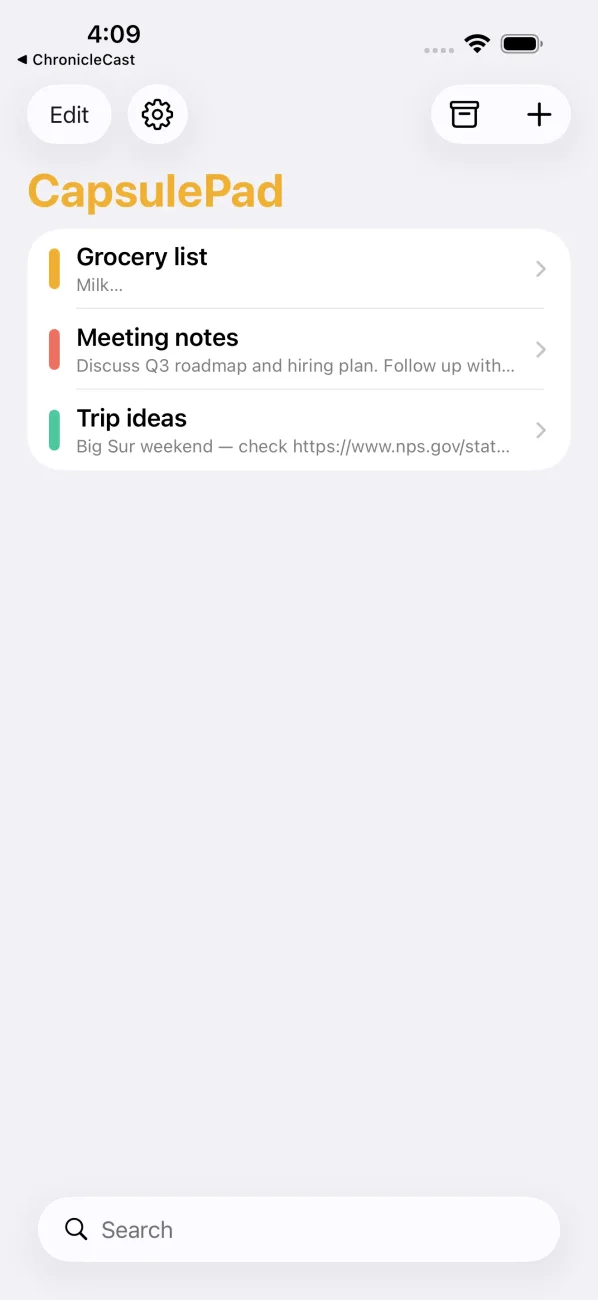
CapsulePad is a native Mac and iPhone/iPad app for quick notes that stay out of your way until you need them.
On the Mac, CapsulePad docks a thin pill of colored notes to the edge of your screen. Move your pointer close and it fans out into labeled tabs — click one to open it full-size, or drive the whole thing from the keyboard (⌥⌘N for a new note, ⌥⌘A to see every note, ⌥⌘L to archive the one in front). Reorder notes by dragging, color-code them for quick scanning, and archive or permanently delete the ones you're done with.
Your notes sync automatically across every Mac and iPhone/iPad signed into the same iCloud account, so a note you jot down at your desk is already there when you pick up your phone.
For anything you'd rather keep private, lock individual notes with Face ID, Touch ID, or your device passcode. A locked note's title stays visible so you can still find it, but its contents stay encrypted until you unlock it — and it asks again every time you open it.
Back up everything at once as Markdown, plain text, or a full-fidelity CapsulePad archive you can import back in later, on this Mac or another.
CapsulePad has no account system, no ads, and no analytics — your notes stay on your own devices and sync only through your own iCloud, the same as any other Apple app.
Novedades
Versión 1.1 · 10/9/2026
This update adds:
- The note title now lives right in the navigation bar next to the back button, still fully editable
- Archive and Delete buttons right on the note itself, not just the notes list
- Clickable links inside note bodies
- Larger, more readable note body text
Also includes fixes: the notes list title now stays compact instead of briefly appearing large, and a locked note is now properly hidden from the app-switcher snapshot instead of only when fully backgrounded.
Privacidad de la aplicación
Lo que Jonathan Wyatt declara en App Store sobre cómo esta aplicación gestiona los datos.
-
No se recopilan datos
El desarrollador no recopila ningún dato de esta aplicación.
Las prácticas de privacidad pueden variar, por ejemplo, según las funciones que uses o tu edad.
Información
- Vendedor
- Jonathan Wyatt
- Categoría
- Productividad
- Versión
- 1.1
- Actualizado
- 10/9/2026
- Publicado
- 5/9/2026
- Tamaño
- 2,9 MB
- Requiere
- iOS 17.0 o posterior
- Clasificación por edad
- 4+
- Precio
- Gratis
- Idiomas
- Inglés
- Copyright
- © 2026 Jonathan Wyatt
Quizá también te guste
-
 Wiola: AI To-Do PlannerAI To-Do & Daily Planner
-
 Lista de tareas - DayTodoLibreta para hoy y mañana
-
 noglow: quick notes scratchpadProductividad
-
 Narratives: Private AI NotesProductividad
-
 Proonus: Task ManagerProductividad
-
 Inkoum: Tasks, Notes & FocusProductividad
-
 Audio Transcribe App : AudiaProductividad
-
 Clipy - Clipboard SyncProductividad
-
 NoeHub NotesProductividad
-
 PlanThat: Agenda CompartidaCalendario, Tareas y RSVP