- Classification d’âge4+
- CatégorieProductivité
- DéveloppeurJonathan Wyatt
- LanguesAnglais
- Taille2,9 Mo
Renvoie vers la page App Store officielle
Download.org n’héberge aucun fichier de CapsulePad. Le bouton ouvre la page de l’application sur App Store, où Jonathan Wyatt la publie. Fiche vérifiée pour la dernière fois le 12/11/2026.
Captures d’écran

À propos
Le développeur n’a pas fourni ce texte dans votre langue.
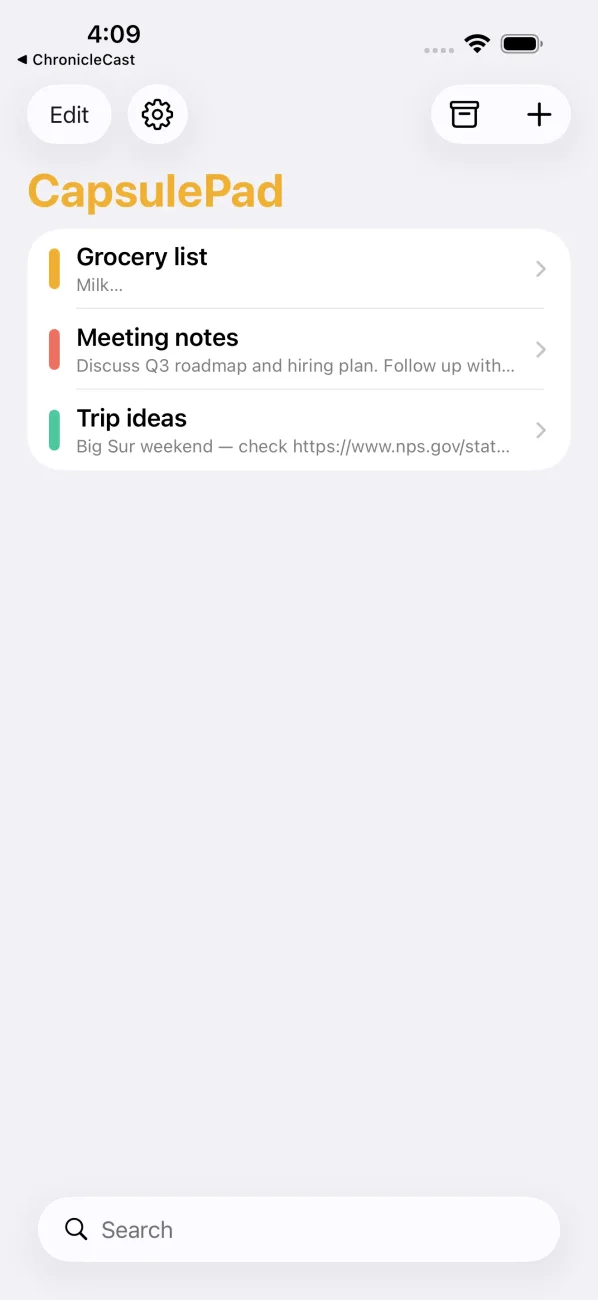
CapsulePad is a native Mac and iPhone/iPad app for quick notes that stay out of your way until you need them.
On the Mac, CapsulePad docks a thin pill of colored notes to the edge of your screen. Move your pointer close and it fans out into labeled tabs — click one to open it full-size, or drive the whole thing from the keyboard (⌥⌘N for a new note, ⌥⌘A to see every note, ⌥⌘L to archive the one in front). Reorder notes by dragging, color-code them for quick scanning, and archive or permanently delete the ones you're done with.
Your notes sync automatically across every Mac and iPhone/iPad signed into the same iCloud account, so a note you jot down at your desk is already there when you pick up your phone.
For anything you'd rather keep private, lock individual notes with Face ID, Touch ID, or your device passcode. A locked note's title stays visible so you can still find it, but its contents stay encrypted until you unlock it — and it asks again every time you open it.
Back up everything at once as Markdown, plain text, or a full-fidelity CapsulePad archive you can import back in later, on this Mac or another.
CapsulePad has no account system, no ads, and no analytics — your notes stay on your own devices and sync only through your own iCloud, the same as any other Apple app.
Nouveautés
Version 1.1 · 10/09/2026
This update adds:
- The note title now lives right in the navigation bar next to the back button, still fully editable
- Archive and Delete buttons right on the note itself, not just the notes list
- Clickable links inside note bodies
- Larger, more readable note body text
Also includes fixes: the notes list title now stays compact instead of briefly appearing large, and a locked note is now properly hidden from the app-switcher snapshot instead of only when fully backgrounded.
Confidentialité de l’application
Ce que Jonathan Wyatt déclare sur l’App Store au sujet du traitement des données par cette application.
-
Données non collectées
Le développeur ne collecte aucune donnée à partir de cette application.
Les pratiques en matière de confidentialité peuvent varier, notamment en fonction des fonctionnalités que vous utilisez ou de votre âge.
Informations
- Vendeur
- Jonathan Wyatt
- Catégorie
- Productivité
- Version
- 1.1
- Mis à jour
- 10/09/2026
- Publié
- 05/09/2026
- Taille
- 2,9 Mo
- Nécessite
- iOS 17.0 ou version ultérieure
- Classification d’âge
- 4+
- Prix
- Gratuit
- Langues
- Anglais
- Copyright
- © 2026 Jonathan Wyatt
Vous aimerez peut-être aussi
-
 Wiola: AI To-Do PlannerAI To-Do & Daily Planner
-
 Liste de tâches - DayTodoCarnet d'aujourd'hui et demain
-
 noglow: quick notes scratchpadProductivité
-
 Narratives: Private AI NotesProductivité
-
 Proonus: Task ManagerProductivité
-
 Inkoum: Tasks, Notes & FocusProductivité
-
 Audio Transcribe App : AudiaProductivité
-
 Clipy - Clipboard SyncProductivité
-
 NoeHub NotesProductivité
-
 PlanThat: Agenda PartagéCalendrier, Tâches & RSVP