
CopyPasteClip
Easy copy and paste tool
Entwickelt für iPhone, iPad, iPod touch
Kostenlos
- Altersfreigabe4+
- KategorieProduktivität
- Entwicklerlittlesyntax
- SprachenEnglisch+ 2 weitere
- Größe29,8 MB
Verlinkt auf die offizielle App Store-Seite
Download.org hostet keine Datei von CopyPasteClip. Die Schaltfläche öffnet die App-Seite bei App Store, wo littlesyntax die App veröffentlicht. Eintrag zuletzt geprüft am 18.11.2026.
Screenshots

Info
Der Entwickler hat diesen Text nicht in Ihrer Sprache bereitgestellt.
With "CopyPasteClip", you can copy a saved text with one click and immediately paste it in another application!
Folders can also be separated, so it is recommended for those who want to organize and manage their data!
Data is stored only in the app's database, and is not saved to servers or the cloud, so you can rest assured!
Features of "CopyPasteClip" :
--- Basic functions ---
The contents being copied to the clipboard can be saved as-is in the app (saved contents are referred to as "clips" below).
You can manually type in any content and save it in the app.
Clicking on a saved clip copies its contents to the clipboard, where they can be pasted into other apps.
* Clicking on a saved clip copies its contents to the clipboard, where they can be pasted into other applications. You can also save the contents copied by other apps. Are you sure? If a confirmation dialog box appears, click "Allow Paste".
* Data is stored only in the application's database. Data will not be stored on servers or in the cloud.
--- Clip editing function ---
You can add a star to frequently used clips so that they will be displayed at the top of the list.
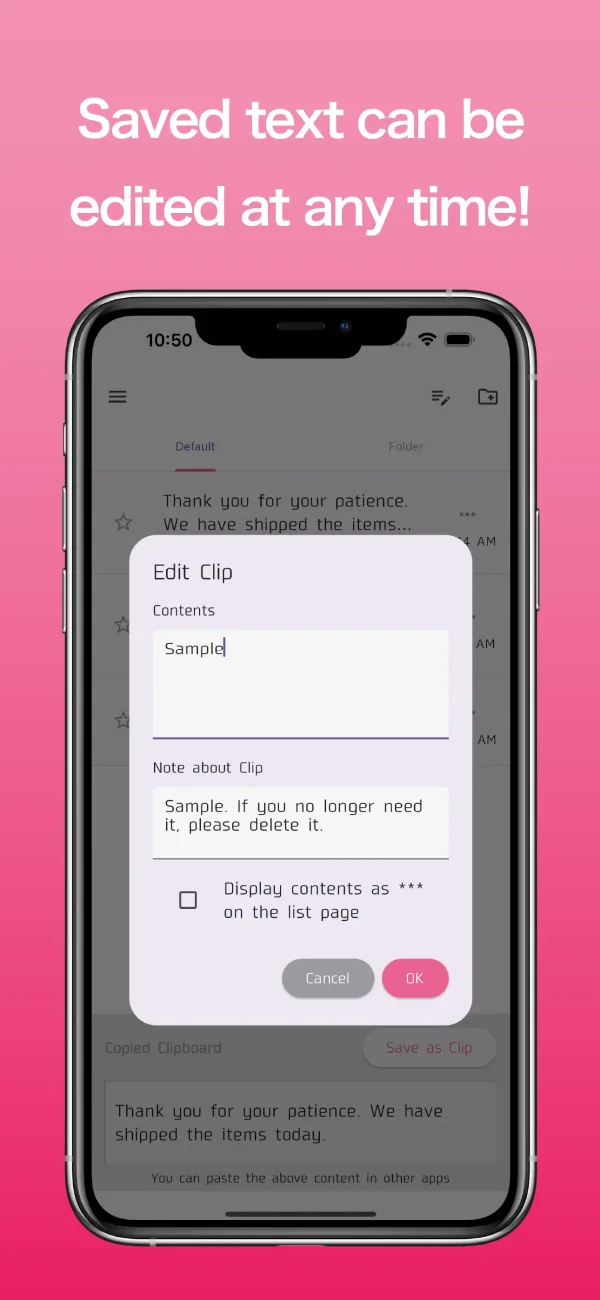
You can add a note to each clip.
Clips that you do not want to be seen by others can be marked as "****" in the list view.
Clips can be edited and deleted later.
Keyword search for clips is also available.
--- Folder management function ---
Folders can be created to sort and manage clips. Folders are displayed in tabs within the application, making it easy to switch between them.
Folders with saved clips can be changed (moved) at a later time.
Folder names can be changed.
Folders can be deleted.
Folders can be locked by folder. Locked folders cannot be viewed without biometric authentication (or PIN input). This can be used to manage passwords, etc.
* When deleting a folder, the clips in the folder will be deleted as well.
--- Backup function ---
The contents saved in the application can be exported to a file and sent as an attachment to any e-mail address. This function can be used for daily backup or data transfer at the time of model change.
Data can be restored by importing the exported data file.
* Backup and data recovery is possible even between smartphones with different OS.
* All data in the application will be overwritten when data is restored by importing.
Neue Funktionen
Version 1.5.0 · 05.04.2025
v1.5.0: Vertical orientation display is now supported.
App-Datenschutz
Was littlesyntax im App Store zum Umgang dieser App mit Daten angibt.
-
Daten, die zum Tracking Ihrer Person verwendet werden
Können verwendet werden, um Sie über Apps und Websites anderer Unternehmen hinweg zu verfolgen.
- Kennungen
- Nutzungsdaten
-
Nicht mit Ihnen verknüpfte Daten
Können erfasst werden, sind aber nicht mit Ihrer Identität verknüpft.
- Kennungen
- Nutzungsdaten
Die Datenschutzpraktiken können variieren, zum Beispiel je nach den von Ihnen verwendeten Funktionen oder Ihrem Alter.
Informationen
- Anbieter
- littlesyntax
- Kategorie
- Produktivität
- Version
- 1.5.0
- Aktualisiert
- 05.04.2025
- Veröffentlicht
- 18.02.2023
- Größe
- 29,8 MB
- Erfordert
- iOS 14.0 oder neuer
- Altersfreigabe
- 4+
- Preis
- Kostenlos
- Sprachen
- Englisch, Französisch, Japanisch
- Copyright
- © Copyright 2025 littlesyntax. All Rights Reserved.
Das könnte Ihnen auch gefallen
-
 Kopieren Einfügen - NotizenSchnell kopieren einfügen!
-
 Clipboard History IO MobileProduktivität
-
 Copy & Paste - Clipboard AppProduktivität
-
 Snippeta – text verwaltenTextmanager & einfügetastatur
-
 Copy BetterProduktivität
-
 CopyClip: Clipboard MangerProduktivität
-
 Paste Manager - Clipboard syncProduktivität
-
 Copy 'Em + Paste KeyboardProduktivität
-
 Ditto – Clipboard CompanionProduktivität
-
 Zwischenablage - Quick PasteClipboard tastatur einfügen