
CopyPasteClip
Easy copy and paste tool
Được thiết kế cho iPhone, iPad, iPod touch
Miễn phí
- Độ tuổi4+
- Danh mụcHiệu Suất
- Nhà phát triểnlittlesyntax
- Ngôn ngữTiếng Anh+ 2 ngôn ngữ khác
- Kích thước29,8 MB
Liên kết đến trang App Store chính thức
Download.org không lưu trữ tệp nào của CopyPasteClip. Nút này mở trang ứng dụng trên App Store, nơi littlesyntax phát hành ứng dụng. Trang được kiểm tra lần cuối: 18/11/2026.
Ảnh chụp màn hình

Giới thiệu
Nhà phát triển chưa cung cấp nội dung này bằng ngôn ngữ của bạn.
With "CopyPasteClip", you can copy a saved text with one click and immediately paste it in another application!
Folders can also be separated, so it is recommended for those who want to organize and manage their data!
Data is stored only in the app's database, and is not saved to servers or the cloud, so you can rest assured!
Features of "CopyPasteClip" :
--- Basic functions ---
The contents being copied to the clipboard can be saved as-is in the app (saved contents are referred to as "clips" below).
You can manually type in any content and save it in the app.
Clicking on a saved clip copies its contents to the clipboard, where they can be pasted into other apps.
* Clicking on a saved clip copies its contents to the clipboard, where they can be pasted into other applications. You can also save the contents copied by other apps. Are you sure? If a confirmation dialog box appears, click "Allow Paste".
* Data is stored only in the application's database. Data will not be stored on servers or in the cloud.
--- Clip editing function ---
You can add a star to frequently used clips so that they will be displayed at the top of the list.
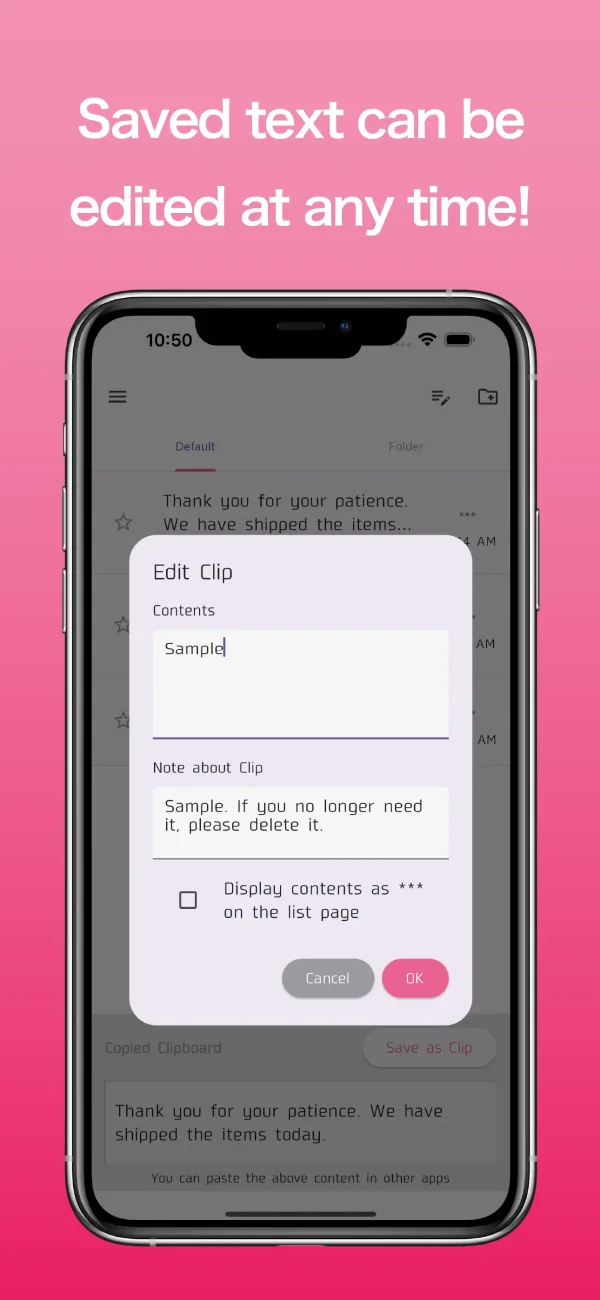
You can add a note to each clip.
Clips that you do not want to be seen by others can be marked as "****" in the list view.
Clips can be edited and deleted later.
Keyword search for clips is also available.
--- Folder management function ---
Folders can be created to sort and manage clips. Folders are displayed in tabs within the application, making it easy to switch between them.
Folders with saved clips can be changed (moved) at a later time.
Folder names can be changed.
Folders can be deleted.
Folders can be locked by folder. Locked folders cannot be viewed without biometric authentication (or PIN input). This can be used to manage passwords, etc.
* When deleting a folder, the clips in the folder will be deleted as well.
--- Backup function ---
The contents saved in the application can be exported to a file and sent as an attachment to any e-mail address. This function can be used for daily backup or data transfer at the time of model change.
Data can be restored by importing the exported data file.
* Backup and data recovery is possible even between smartphones with different OS.
* All data in the application will be overwritten when data is restored by importing.
Có gì mới
Phiên bản 1.5.0 · 05/04/2025
v1.5.0: Vertical orientation display is now supported.
Quyền riêng tư của ứng dụng
Những gì littlesyntax khai báo trên App Store về cách ứng dụng này xử lý dữ liệu.
-
Dữ liệu được sử dụng để theo dõi bạn
Có thể được sử dụng để theo dõi bạn trên các ứng dụng và trang web do công ty khác sở hữu.
- Mã định danh
- Dữ liệu sử dụng
-
Dữ liệu không liên kết với bạn
Có thể được thu thập nhưng không liên kết với danh tính của bạn.
- Mã định danh
- Dữ liệu sử dụng
Phương thức đảm bảo quyền riêng tư có thể khác nhau, chẳng hạn như tuỳ theo các tính năng bạn sử dụng hoặc độ tuổi của bạn.
Thông tin
- Người bán
- littlesyntax
- Danh mục
- Hiệu Suất
- Phiên bản
- 1.5.0
- Cập nhật
- 05/04/2025
- Phát hành
- 18/02/2023
- Kích thước
- 29,8 MB
- Yêu cầu
- iOS 14.0 trở lên
- Độ tuổi
- 4+
- Giá
- Miễn phí
- Ngôn ngữ
- Tiếng Anh, Tiếng Pháp, Tiếng Nhật
- Bản quyền
- © Copyright 2025 littlesyntax. All Rights Reserved.
Có thể bạn cũng thích
-
 Sao Chép Dán - Bộ Nhớ TạmSao chép nhanh và dễ dàng!
-
 Clipboard History IO MobileHiệu Suất
-
 Copy & Paste - Clipboard AppHiệu Suất
-
 Snippeta - copy, manage, pasteHiệu Suất
-
 Copy BetterHiệu Suất
-
 CopyClip: Clipboard MangerHiệu Suất
-
 Paste Manager - Clipboard syncHiệu Suất
-
 Copy 'Em + Paste KeyboardHiệu Suất
-
 Ditto – Clipboard CompanionHiệu Suất
-
 Quick Paste: Quản Lý ClipboardSao chép và dán bàn phím