
- Age rating4+
- CategoryProductivity
- Developerlittlesyntax
- LanguagesEnglish+ 2 more
- Size29.8 MB
Links to the official App Store page
Download.org hosts no file of CopyPasteClip. The button opens its official App Store page, published by littlesyntax. Listing last checked on Nov 18, 2026.
Screenshots

About
With "CopyPasteClip", you can copy a saved text with one click and immediately paste it in another application!
Folders can also be separated, so it is recommended for those who want to organize and manage their data!
Data is stored only in the app's database, and is not saved to servers or the cloud, so you can rest assured!
Features of "CopyPasteClip" :
--- Basic functions ---
The contents being copied to the clipboard can be saved as-is in the app (saved contents are referred to as "clips" below).
You can manually type in any content and save it in the app.
Clicking on a saved clip copies its contents to the clipboard, where they can be pasted into other apps.
* Clicking on a saved clip copies its contents to the clipboard, where they can be pasted into other applications. You can also save the contents copied by other apps. Are you sure? If a confirmation dialog box appears, click "Allow Paste".
* Data is stored only in the application's database. Data will not be stored on servers or in the cloud.
--- Clip editing function ---
You can add a star to frequently used clips so that they will be displayed at the top of the list.
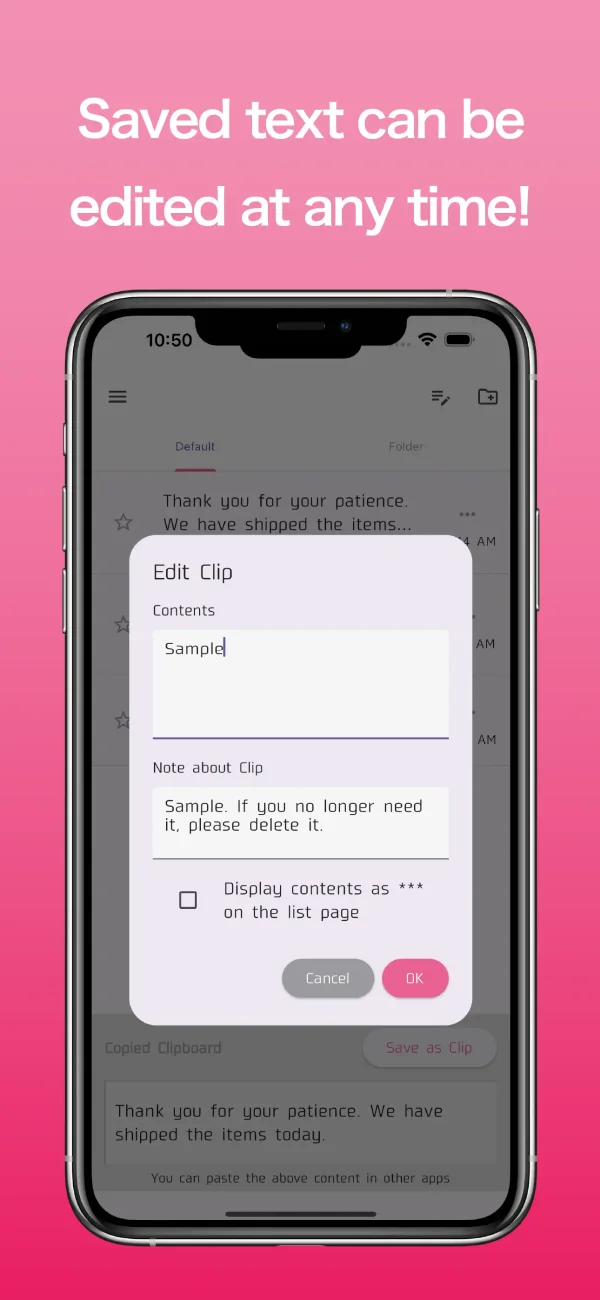
You can add a note to each clip.
Clips that you do not want to be seen by others can be marked as "****" in the list view.
Clips can be edited and deleted later.
Keyword search for clips is also available.
--- Folder management function ---
Folders can be created to sort and manage clips. Folders are displayed in tabs within the application, making it easy to switch between them.
Folders with saved clips can be changed (moved) at a later time.
Folder names can be changed.
Folders can be deleted.
Folders can be locked by folder. Locked folders cannot be viewed without biometric authentication (or PIN input). This can be used to manage passwords, etc.
* When deleting a folder, the clips in the folder will be deleted as well.
--- Backup function ---
The contents saved in the application can be exported to a file and sent as an attachment to any e-mail address. This function can be used for daily backup or data transfer at the time of model change.
Data can be restored by importing the exported data file.
* Backup and data recovery is possible even between smartphones with different OS.
* All data in the application will be overwritten when data is restored by importing.
What’s new
Version 1.5.0 · Apr 5, 2025
v1.5.0: Vertical orientation display is now supported.
App privacy
What littlesyntax declares on the App Store about how this app handles data.
-
Data used to track you
May be used to track you across apps and websites owned by other companies.
- Identifiers
- Usage data
-
Data not linked to you
May be collected but is not linked to your identity.
- Identifiers
- Usage data
Privacy practices may vary, for example with the features you use or your age.
Information
- Seller
- littlesyntax
- Category
- Productivity
- Version
- 1.5.0
- Updated
- Apr 5, 2025
- Released
- Feb 18, 2023
- Size
- 29.8 MB
- Requires
- iOS 14.0 or later
- Age rating
- 4+
- Price
- Free
- Languages
- English, French, Japanese
- Copyright
- © Copyright 2025 littlesyntax. All Rights Reserved.
You might also like
-
 CopyPaste - Paste Quickly NowCopy and paste quickly!
-
 Clipboard History IO MobileProductivity
-
 Copy & Paste - Clipboard AppHashtag Password Copy Paste
-
 Snippeta - copy, manage, pasteText manager & paste keyboard
-
 Copy BetterAn extended clipboard
-
 CopyClip: Clipboard MangerSpeed Up Copy Paste Workflow
-
 Paste Manager - Clipboard syncOrganize data, copy and paste
-
 Copy 'Em + Paste KeyboardCopy. Paste. Organize. Sync.
-
 Ditto – Clipboard CompanionCopy & paste snippets
-
 Clipboard Manager: Quick PasteCopy Text & Keyboard History