
CopyPasteClip
Easy copy and paste tool
iPhone, iPad, iPod touch için tasarlandı
Ücretsiz
- Yaş sınırı4+
- KategoriÜretkenlik
- Geliştiricilittlesyntax
- Dillerİngilizce+ 2 dil daha
- Boyut29,8 MB
Resmi App Store sayfasına bağlanır
Download.org, CopyPasteClip için hiçbir dosya barındırmaz. Düğme, uygulamanın App Store üzerindeki sayfasını açar; uygulamayı orada littlesyntax yayınlar. Sayfanın son kontrolü: 18.11.2026.
Ekran görüntüleri

Hakkında
Geliştirici bu metni dilinizde sunmamış.
With "CopyPasteClip", you can copy a saved text with one click and immediately paste it in another application!
Folders can also be separated, so it is recommended for those who want to organize and manage their data!
Data is stored only in the app's database, and is not saved to servers or the cloud, so you can rest assured!
Features of "CopyPasteClip" :
--- Basic functions ---
The contents being copied to the clipboard can be saved as-is in the app (saved contents are referred to as "clips" below).
You can manually type in any content and save it in the app.
Clicking on a saved clip copies its contents to the clipboard, where they can be pasted into other apps.
* Clicking on a saved clip copies its contents to the clipboard, where they can be pasted into other applications. You can also save the contents copied by other apps. Are you sure? If a confirmation dialog box appears, click "Allow Paste".
* Data is stored only in the application's database. Data will not be stored on servers or in the cloud.
--- Clip editing function ---
You can add a star to frequently used clips so that they will be displayed at the top of the list.
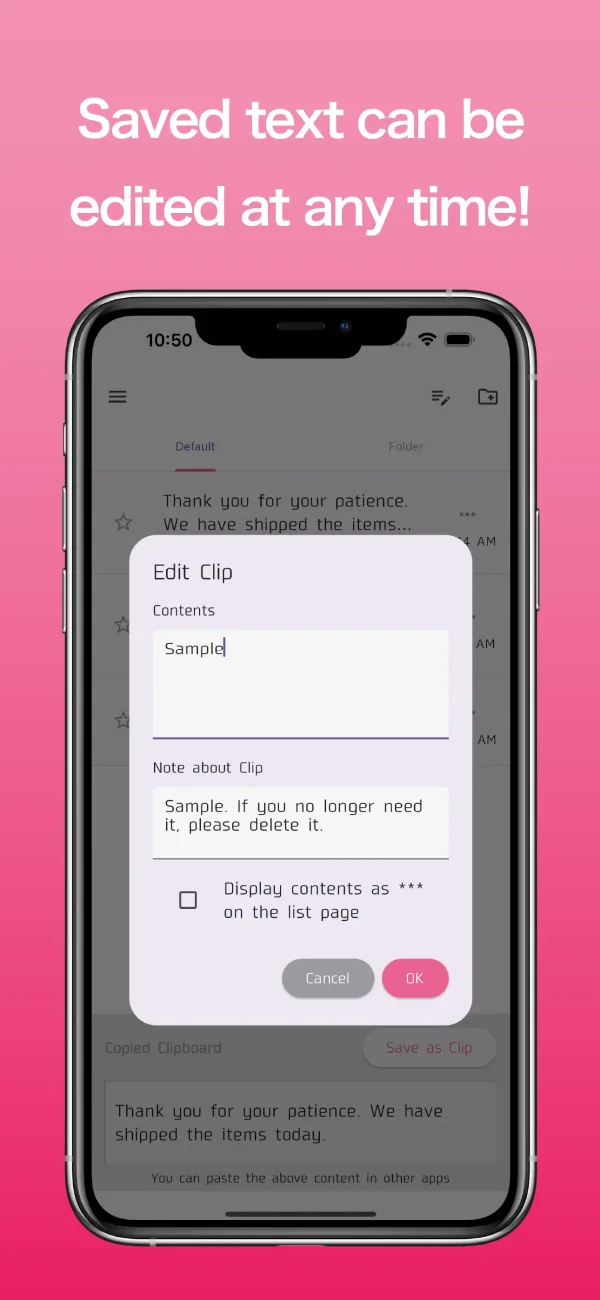
You can add a note to each clip.
Clips that you do not want to be seen by others can be marked as "****" in the list view.
Clips can be edited and deleted later.
Keyword search for clips is also available.
--- Folder management function ---
Folders can be created to sort and manage clips. Folders are displayed in tabs within the application, making it easy to switch between them.
Folders with saved clips can be changed (moved) at a later time.
Folder names can be changed.
Folders can be deleted.
Folders can be locked by folder. Locked folders cannot be viewed without biometric authentication (or PIN input). This can be used to manage passwords, etc.
* When deleting a folder, the clips in the folder will be deleted as well.
--- Backup function ---
The contents saved in the application can be exported to a file and sent as an attachment to any e-mail address. This function can be used for daily backup or data transfer at the time of model change.
Data can be restored by importing the exported data file.
* Backup and data recovery is possible even between smartphones with different OS.
* All data in the application will be overwritten when data is restored by importing.
Yenilikler
Sürüm 1.5.0 · 05.04.2025
v1.5.0: Vertical orientation display is now supported.
Uygulama gizliliği
Bu uygulamanın verileri nasıl işlediği hakkında littlesyntax tarafından App Store üzerinde yapılan beyan.
-
Sizi izlemek için kullanılan veriler
Başka şirketlere ait uygulamalarda ve web sitelerinde sizi izlemek için kullanılabilir.
- Tanımlayıcılar
- Kullanım verileri
-
Sizinle ilişkilendirilmeyen veriler
Toplanabilir ancak kimliğinizle ilişkilendirilmez.
- Tanımlayıcılar
- Kullanım verileri
Gizlilik uygulamaları, örneğin kullandığınız özelliklere veya yaşınıza göre değişiklik gösterebilir.
Bilgiler
- Satıcı
- littlesyntax
- Kategori
- Üretkenlik
- Sürüm
- 1.5.0
- Güncellendi
- 05.04.2025
- Yayın tarihi
- 18.02.2023
- Boyut
- 29,8 MB
- Gereksinim
- iOS 14.0 veya sonrası
- Yaş sınırı
- 4+
- Fiyat
- Ücretsiz
- Diller
- İngilizce, Fransızca, Japonca
- Telif hakkı
- © Copyright 2025 littlesyntax. All Rights Reserved.
Bunları da beğenebilirsiniz
-
 Kopyala Yapıştır - Pano MetinHızlı ve kolay kopyalayın!
-
 Clipboard History IO MobileÜretkenlik
-
 Copy & Paste - Clipboard AppÜretkenlik
-
 Snippeta - copy, manage, pasteÜretkenlik
-
 Copy BetterÜretkenlik
-
 CopyClip: Clipboard MangerÜretkenlik
-
 Paste Manager - Clipboard syncÜretkenlik
-
 Copy 'Em + Paste KeyboardÜretkenlik
-
 Ditto – Clipboard CompanionÜretkenlik
-
 Clipboard Manager: Quick PasteÜretkenlik