
Stickman Studio
AI stories, art & narration
Entwickelt für iPhone, iPad
Kostenlos · In-App-Käufe
- Altersfreigabe12+
- KategorieFoto und Video
- EntwicklerDicken Christian
- SprachenEnglisch
- Größe119,4 MB
Verlinkt auf die offizielle App Store-Seite
Download.org hostet keine Datei von Stickman Studio. Die Schaltfläche öffnet die App-Seite bei App Store, wo Dicken Christian die App veröffentlicht. Eintrag zuletzt geprüft am 21.11.2026.
Screenshots



Info
Der Entwickler hat diesen Text nicht in Ihrer Sprache bereitgestellt.
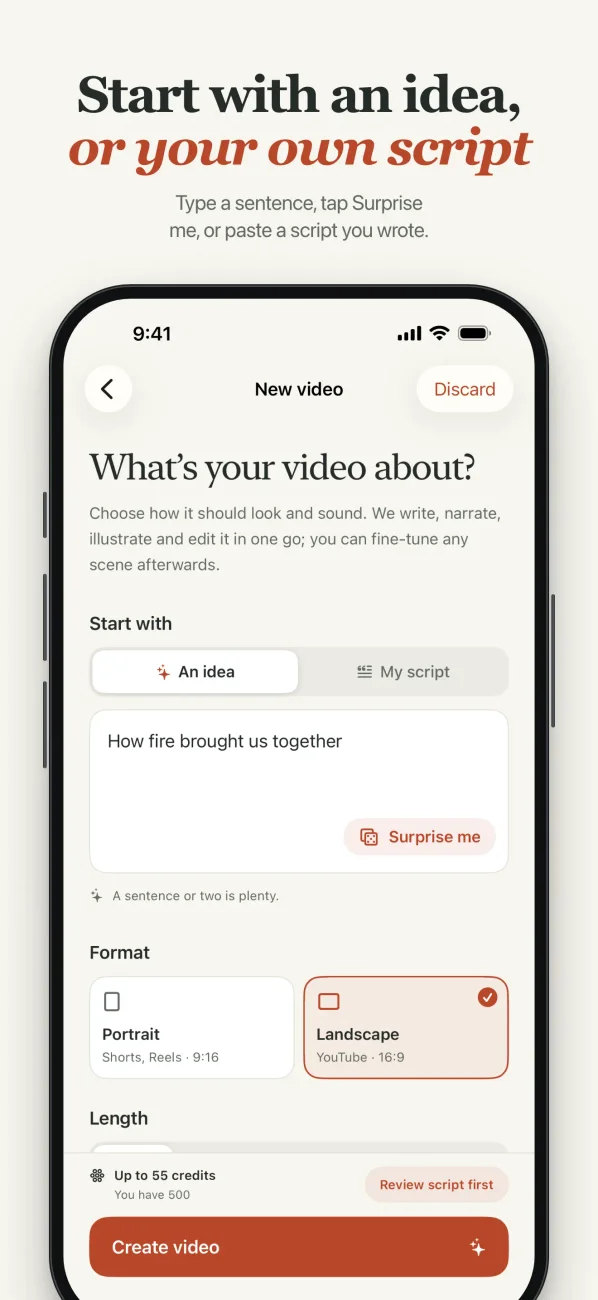
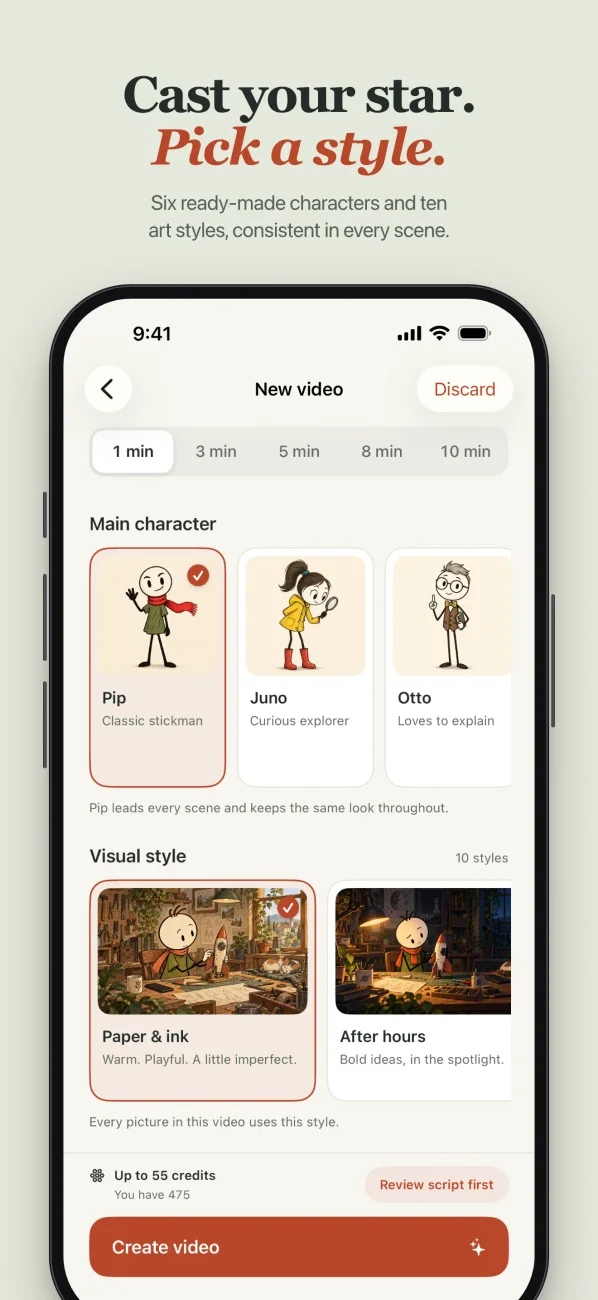
Create illustrated videos from your ideas with Stickman Studio. Pick a main character like Pip, a visual style and a narrator on one screen, and Create video writes the script, records narration, illustrates every scene and renders the movie. Then refine any part in the editor.
SCRIPT
Start with an idea or paste your own words. Choose the tone, audience, source notes, and speaking length, then review and edit the script.
NARRATION
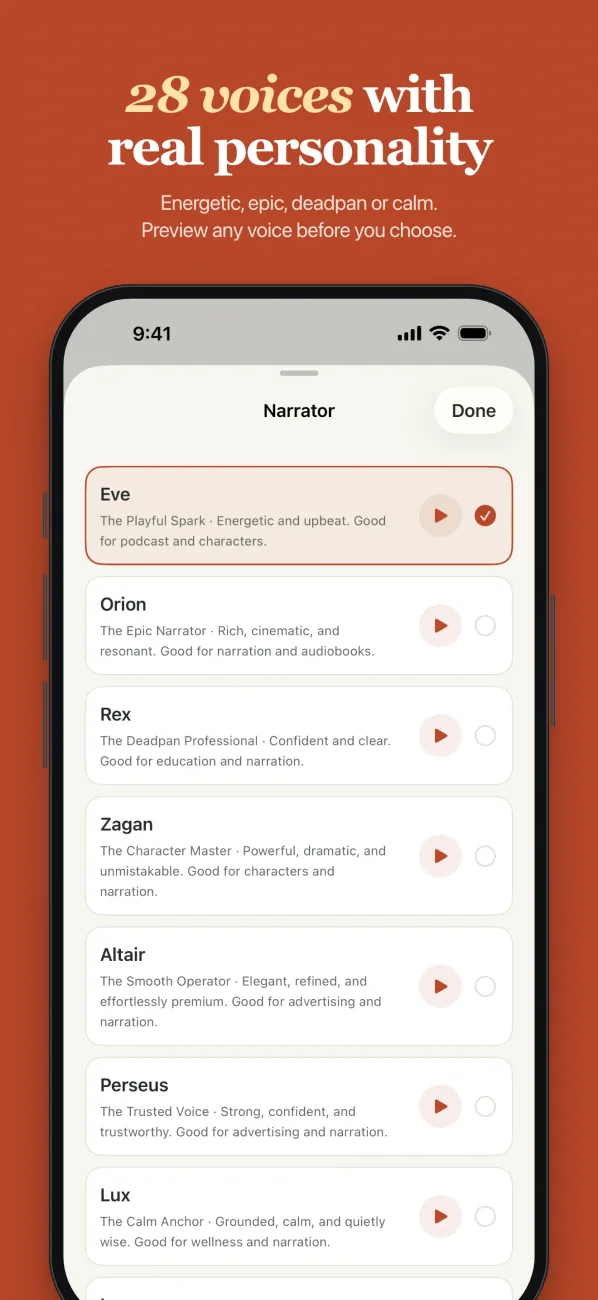
Choose from 28 AI voices and set the pace. Generate narration, review saved takes, and add background music. Narration is in English for now.
VIDEO
Choose portrait or landscape framing, a visual style, and scene artwork. Adjust camera motion, timing, and captions, then export a 1080p movie to Photos or Files.
YOUR PROJECTS, ON YOUR DEVICE
Edit saved projects, keep alternate takes, and export project backups. Temporary cloud generation files are removed from our service within 24 hours; download completed takes into your project.
Sign in with Apple and allow cloud AI processing to start with 60 free credits. Additional consumable credit packs are available through in-app purchase. New scripts, illustrations, and narration use credits, including edits that need new pictures or narration; the app shows the cost first. Other edits and exporting videos use no credits. An internet connection is required for AI generation.
AI can make mistakes. Review the words, pictures, and narration before sharing.
Privacy: https://stickman.swiftapps.club/privacy
Terms: https://stickman.swiftapps.club/terms
Apple's Standard EULA: https://www.apple.com/legal/internet-services/itunes/dev/stdeula/
Neue Funktionen
Version 1.0.1 · 10.11.2026
Blocked scenes: The app now shows which scene was blocked and takes you straight to the edit.
Clearer credits: Credit packs now say that their video counts assume Relaxed pace.
Long scripts: Pasted scripts over 3 minutes now start on Relaxed, which uses fewer credits.
App-Datenschutz
Was Dicken Christian im App Store zum Umgang dieser App mit Daten angibt.
-
Mit Ihnen verknüpfte Daten
Können erfasst und mit Ihrer Identität verknüpft werden.
- Käufe
- Benutzerinhalte
- Kennungen
- Nutzungsdaten
- Diagnose
Die Datenschutzpraktiken können variieren, zum Beispiel je nach den von Ihnen verwendeten Funktionen oder Ihrem Alter.
Informationen
- Anbieter
- Dicken Christian
- Kategorie
- Foto und Video
- Version
- 1.0.1
- Aktualisiert
- 10.11.2026
- Veröffentlicht
- 30.10.2026
- Größe
- 119,4 MB
- Erfordert
- iOS 17.0 oder neuer
- Altersfreigabe
- 12+
- Preis
- Kostenlos
- In-App-Käufe
- Ja
- Sprachen
- Englisch
- Copyright
- © 2026 Dicken Christian
Das könnte Ihnen auch gefallen
-
 ReactCut - AI Video EditorFoto und Video
-
 BG Eraser - Background RemoverFoto und Video
-
 Reakt: Record Reaction VideosFoto und Video
-
 vStory - Your AI Video MakerFoto und Video
-
 Collage Maker: Picture LayoutFoto und Video
-
 StoryblockerFoto und Video
-
 Pomy: Auto-Schnitt für VideosDeine Clips, viral geschnitten
-
 Dare: AI Photo & VideoFoto und Video
-
 Faceless Video: AI ShortsKI-Videogenerator & Reels
-
 Cartoon.ai ⁃ AI Art GeneratorFoto und Video