
Stickman Studio
AI stories, art & narration
Designed for iPhone, iPad
Free · In-app purchases
- Age rating12+
- CategoryPhoto & Video
- DeveloperDicken Christian
- LanguagesEnglish
- Size119.4 MB
Links to the official App Store page
Download.org hosts no file of Stickman Studio. The button opens its official App Store page, published by Dicken Christian. Listing last checked on Nov 21, 2026.
Screenshots
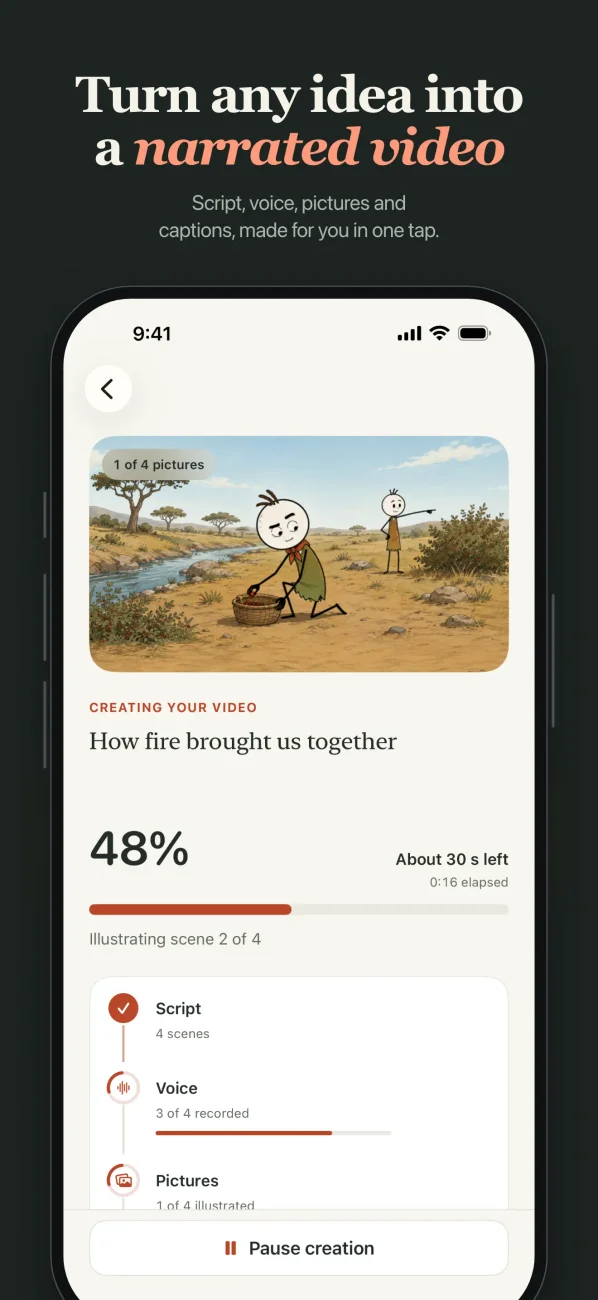


About
Create illustrated videos from your ideas with Stickman Studio. Pick a main character like Pip, a visual style and a narrator on one screen, and Create video writes the script, records narration, illustrates every scene and renders the movie. Then refine any part in the editor.
SCRIPT
Start with an idea or paste your own words. Choose the tone, audience, source notes, and speaking length, then review and edit the script.
NARRATION
Choose from 28 AI voices and set the pace. Generate narration, review saved takes, and add background music. Narration is in English for now.
VIDEO
Choose portrait or landscape framing, a visual style, and scene artwork. Adjust camera motion, timing, and captions, then export a 1080p movie to Photos or Files.
YOUR PROJECTS, ON YOUR DEVICE
Edit saved projects, keep alternate takes, and export project backups. Temporary cloud generation files are removed from our service within 24 hours; download completed takes into your project.
Sign in with Apple and allow cloud AI processing to start with 60 free credits. Additional consumable credit packs are available through in-app purchase. New scripts, illustrations, and narration use credits, including edits that need new pictures or narration; the app shows the cost first. Other edits and exporting videos use no credits. An internet connection is required for AI generation.
AI can make mistakes. Review the words, pictures, and narration before sharing.
Privacy: https://stickman.swiftapps.club/privacy
Terms: https://stickman.swiftapps.club/terms
Apple's Standard EULA: https://www.apple.com/legal/internet-services/itunes/dev/stdeula/
What’s new
Version 1.0.1 · Nov 10, 2026
Blocked scenes: The app now shows which scene was blocked and takes you straight to the edit.
Clearer credits: Credit packs now say that their video counts assume Relaxed pace.
Long scripts: Pasted scripts over 3 minutes now start on Relaxed, which uses fewer credits.
App privacy
What Dicken Christian declares on the App Store about how this app handles data.
-
Data linked to you
May be collected and linked to your identity.
- Purchases
- User content
- Identifiers
- Usage data
- Diagnostics
Privacy practices may vary, for example with the features you use or your age.
Information
- Seller
- Dicken Christian
- Category
- Photo & Video
- Version
- 1.0.1
- Updated
- Nov 10, 2026
- Released
- Oct 30, 2026
- Size
- 119.4 MB
- Requires
- iOS 17.0 or later
- Age rating
- 12+
- Price
- Free
- In-app purchases
- Yes
- Languages
- English
- Copyright
- © 2026 Dicken Christian
You might also like
-
 ReactCut - AI Video EditorAI Node Canvas + Timeline
-
 BG Eraser - Background RemoverAI Background Remover
-
 Reakt: Record Reaction VideosRecord Facecam & Split Screen
-
 vStory - Your AI Video MakerScript, voice, music included
-
 Collage Maker: Picture LayoutBefore and After Photo Compare
-
 StoryblockerCreate storyboards fast
-
 Pomy: Auto Edit Viral VideosGet more views, zero editing
-
 Dare: AI Photo & VideoCreate AI photos & videos
-
 Faceless Video: AI ShortsAI Video Generator & Reels
-
 Cartoon.ai ⁃ AI Art GeneratorAvatar Maker & Photo to Toon