
Stickman Studio
AI stories, art & narration
Conçue pour iPhone, iPad
Gratuit · Achats intégrés
- Classification d’âge12+
- CatégoriePhoto et vidéo
- DéveloppeurDicken Christian
- LanguesAnglais
- Taille119,4 Mo
Renvoie vers la page App Store officielle
Download.org n’héberge aucun fichier de Stickman Studio. Le bouton ouvre la page de l’application sur App Store, où Dicken Christian la publie. Fiche vérifiée pour la dernière fois le 21/11/2026.
Captures d’écran



À propos
Le développeur n’a pas fourni ce texte dans votre langue.
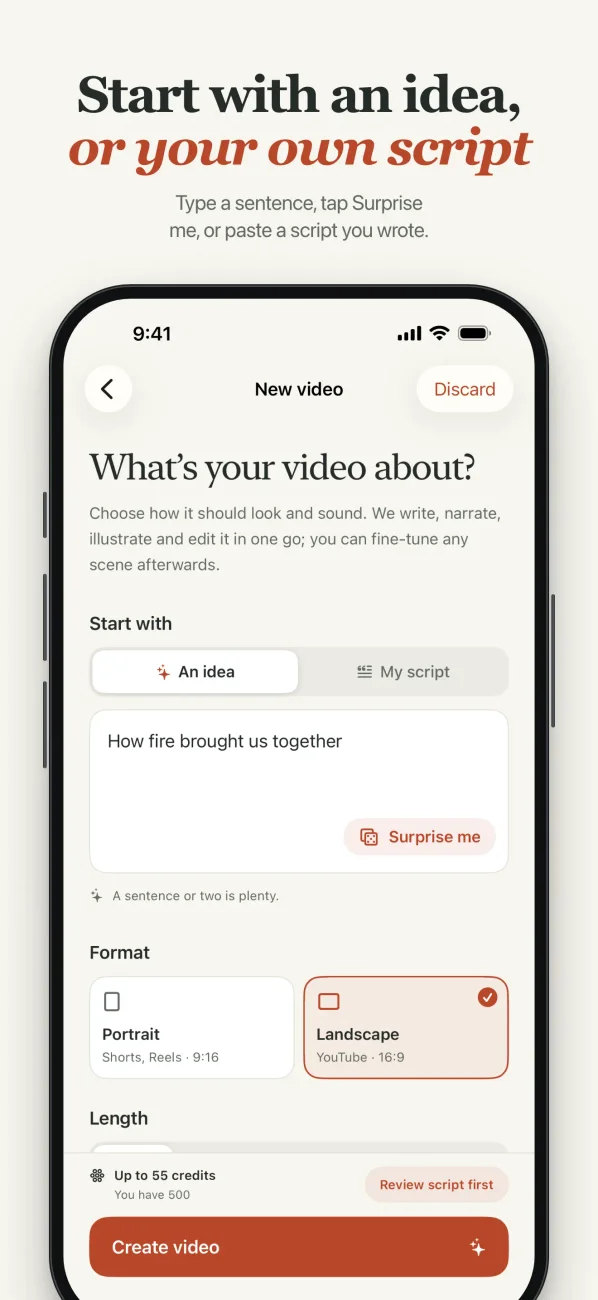
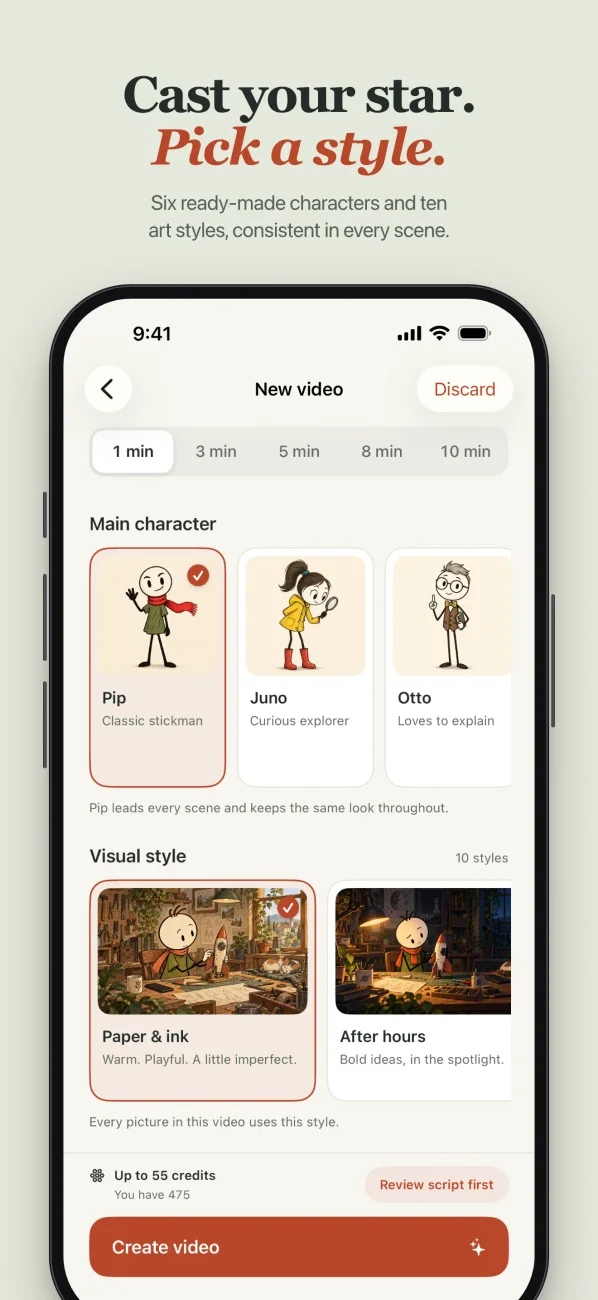
Create illustrated videos from your ideas with Stickman Studio. Pick a main character like Pip, a visual style and a narrator on one screen, and Create video writes the script, records narration, illustrates every scene and renders the movie. Then refine any part in the editor.
SCRIPT
Start with an idea or paste your own words. Choose the tone, audience, source notes, and speaking length, then review and edit the script.
NARRATION
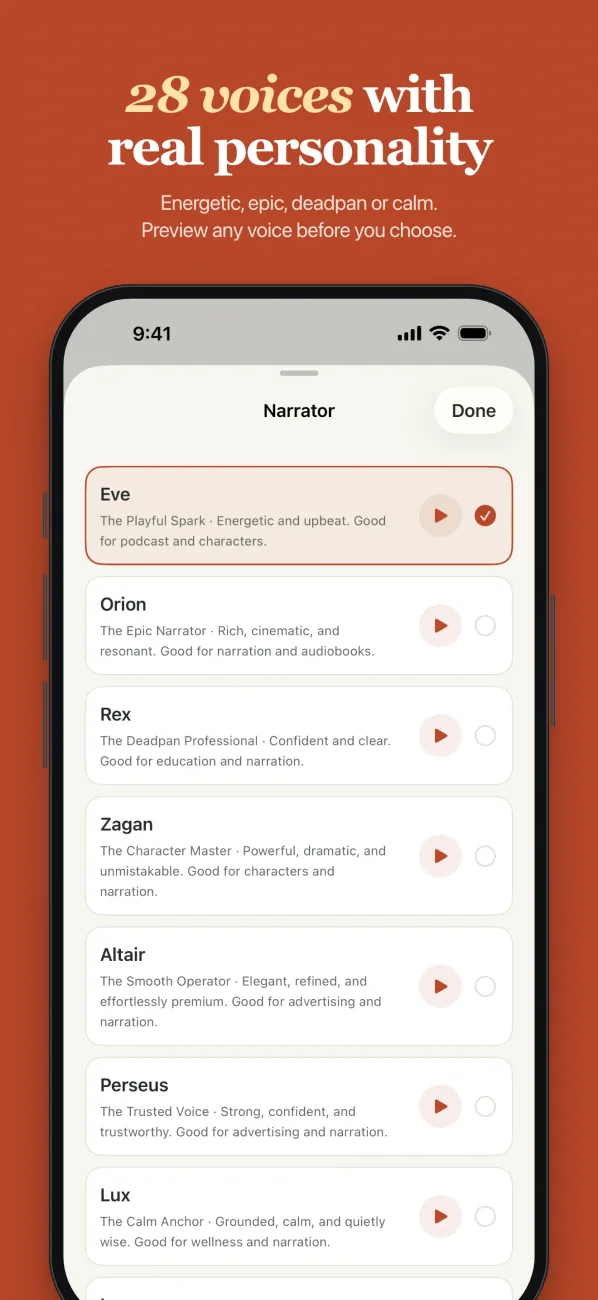
Choose from 28 AI voices and set the pace. Generate narration, review saved takes, and add background music. Narration is in English for now.
VIDEO
Choose portrait or landscape framing, a visual style, and scene artwork. Adjust camera motion, timing, and captions, then export a 1080p movie to Photos or Files.
YOUR PROJECTS, ON YOUR DEVICE
Edit saved projects, keep alternate takes, and export project backups. Temporary cloud generation files are removed from our service within 24 hours; download completed takes into your project.
Sign in with Apple and allow cloud AI processing to start with 60 free credits. Additional consumable credit packs are available through in-app purchase. New scripts, illustrations, and narration use credits, including edits that need new pictures or narration; the app shows the cost first. Other edits and exporting videos use no credits. An internet connection is required for AI generation.
AI can make mistakes. Review the words, pictures, and narration before sharing.
Privacy: https://stickman.swiftapps.club/privacy
Terms: https://stickman.swiftapps.club/terms
Apple's Standard EULA: https://www.apple.com/legal/internet-services/itunes/dev/stdeula/
Nouveautés
Version 1.0.1 · 10/11/2026
Blocked scenes: The app now shows which scene was blocked and takes you straight to the edit.
Clearer credits: Credit packs now say that their video counts assume Relaxed pace.
Long scripts: Pasted scripts over 3 minutes now start on Relaxed, which uses fewer credits.
Confidentialité de l’application
Ce que Dicken Christian déclare sur l’App Store au sujet du traitement des données par cette application.
-
Données établissant un lien avec vous
Peuvent être collectées et liées à votre identité.
- Achats
- Contenu utilisateur
- Identifiants
- Données d’utilisation
- Diagnostic
Les pratiques en matière de confidentialité peuvent varier, notamment en fonction des fonctionnalités que vous utilisez ou de votre âge.
Informations
- Vendeur
- Dicken Christian
- Catégorie
- Photo et vidéo
- Version
- 1.0.1
- Mis à jour
- 10/11/2026
- Publié
- 30/10/2026
- Taille
- 119,4 Mo
- Nécessite
- iOS 17.0 ou version ultérieure
- Classification d’âge
- 12+
- Prix
- Gratuit
- Achats intégrés
- Oui
- Langues
- Anglais
- Copyright
- © 2026 Dicken Christian
Vous aimerez peut-être aussi
-
 ReactCut - AI Video EditorPhoto et vidéo
-
 BG Eraser - Background RemoverPhoto et vidéo
-
 Reakt: Record Reaction VideosPhoto et vidéo
-
 vStory - Your AI Video MakerPhoto et vidéo
-
 Avant Apres: Collage LayoutBefore and After Photo Compare
-
 StoryblockerPhoto et vidéo
-
 Pomy : Monteur Vidéo Viral IAMonté pour percer, zéro effort
-
 Dare: AI Photo & VideoPhoto et vidéo
-
 Faceless Video: AI ShortsGénérateur Vidéo IA & Reels
-
 Cartoon.ai ⁃ AI Art GeneratorPhoto et vidéo