
- 対象年齢12+
- カテゴリ写真/ビデオ
- 開発元Dicken Christian
- 言語英語
- サイズ119.4 MB
App Storeの公式ページにリンクしています
Download.orgはStickman Studioのファイルを一切ホストしていません。ボタンを押すと、Dicken Christianが公開しているApp Storeのアプリページが開きます。ページの最終確認:2026/11/21。
スクリーンショット



概要
開発元はこのテキストをお使いの言語で提供していません。
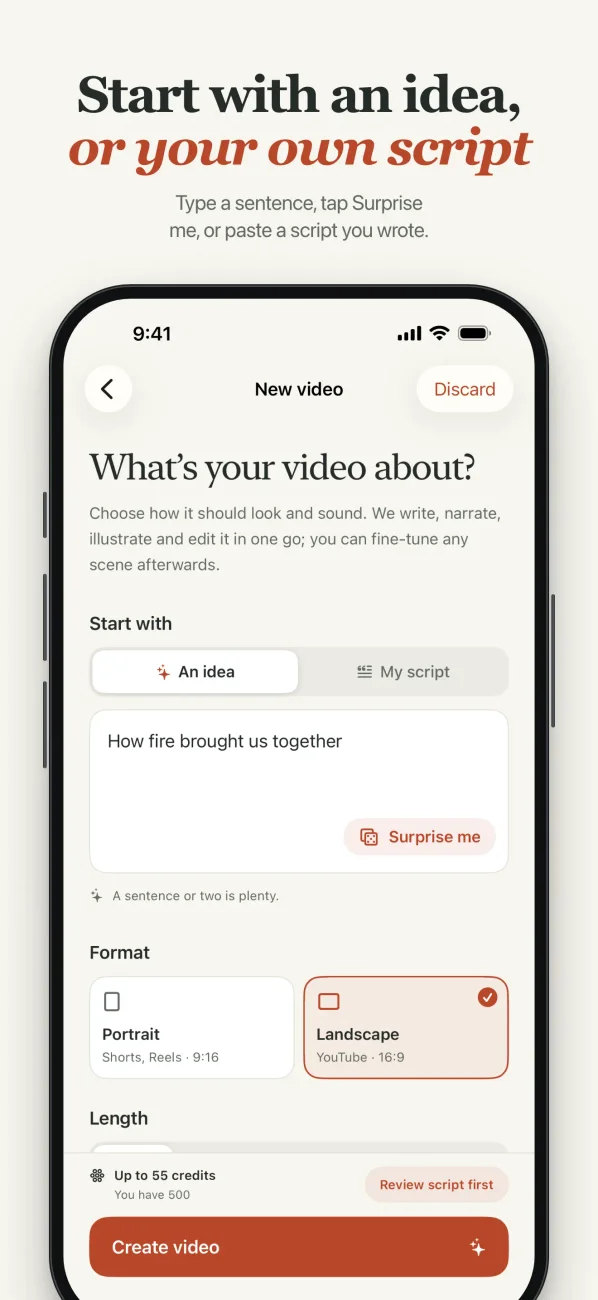
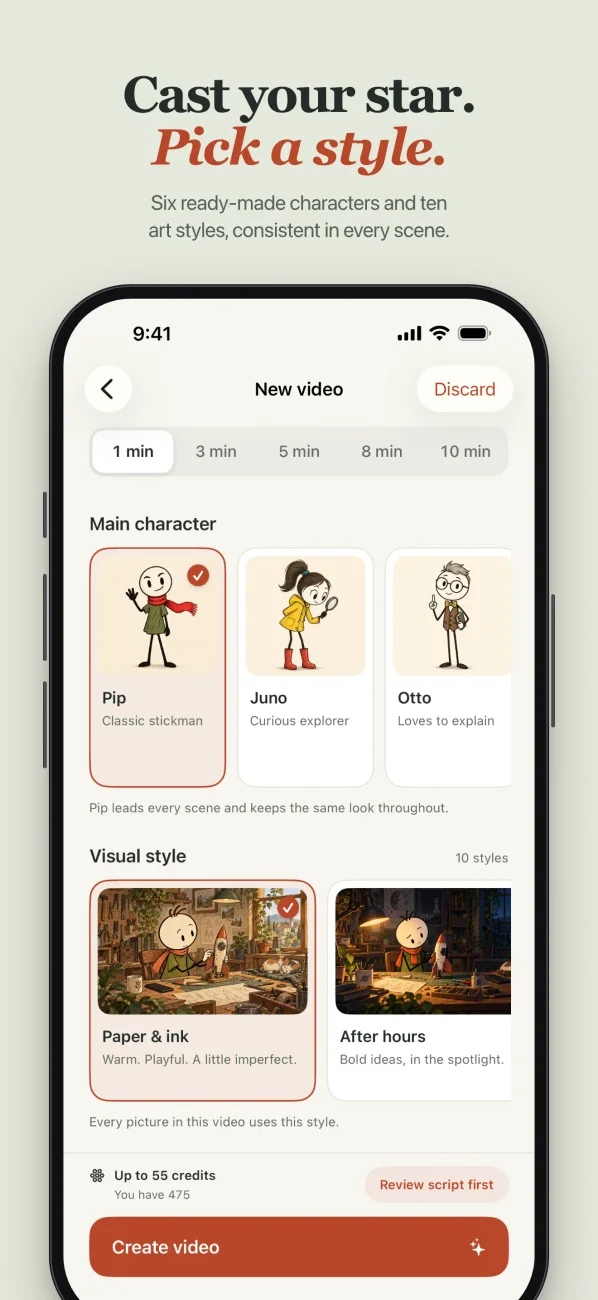
Create illustrated videos from your ideas with Stickman Studio. Pick a main character like Pip, a visual style and a narrator on one screen, and Create video writes the script, records narration, illustrates every scene and renders the movie. Then refine any part in the editor.
SCRIPT
Start with an idea or paste your own words. Choose the tone, audience, source notes, and speaking length, then review and edit the script.
NARRATION
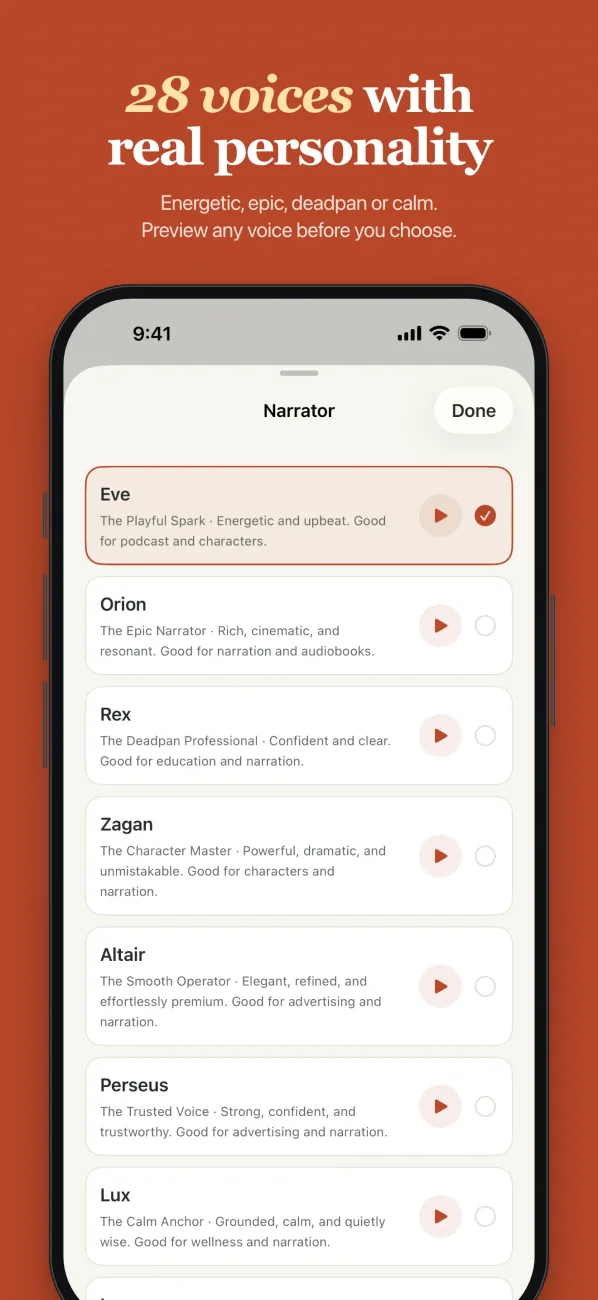
Choose from 28 AI voices and set the pace. Generate narration, review saved takes, and add background music. Narration is in English for now.
VIDEO
Choose portrait or landscape framing, a visual style, and scene artwork. Adjust camera motion, timing, and captions, then export a 1080p movie to Photos or Files.
YOUR PROJECTS, ON YOUR DEVICE
Edit saved projects, keep alternate takes, and export project backups. Temporary cloud generation files are removed from our service within 24 hours; download completed takes into your project.
Sign in with Apple and allow cloud AI processing to start with 60 free credits. Additional consumable credit packs are available through in-app purchase. New scripts, illustrations, and narration use credits, including edits that need new pictures or narration; the app shows the cost first. Other edits and exporting videos use no credits. An internet connection is required for AI generation.
AI can make mistakes. Review the words, pictures, and narration before sharing.
Privacy: https://stickman.swiftapps.club/privacy
Terms: https://stickman.swiftapps.club/terms
Apple's Standard EULA: https://www.apple.com/legal/internet-services/itunes/dev/stdeula/
新機能
バージョン 1.0.1 · 2026/11/10
Blocked scenes: The app now shows which scene was blocked and takes you straight to the edit.
Clearer credits: Credit packs now say that their video counts assume Relaxed pace.
Long scripts: Pasted scripts over 3 minutes now start on Relaxed, which uses fewer credits.
アプリのプライバシー
このアプリのデータの取り扱いについて、Dicken ChristianがApp Storeで申告している内容です。
-
ユーザーに関連付けられたデータ
収集され、ユーザーの識別情報に関連付けられる場合があります。
- 購入
- ユーザーコンテンツ
- ID
- 使用状況データ
- 診断
プライバシーの取り扱いは、ご利用の機能やお客様の年齢などに応じて異なる場合があります。
情報
- 販売元
- Dicken Christian
- カテゴリ
- 写真/ビデオ
- バージョン
- 1.0.1
- 更新日
- 2026/11/10
- リリース
- 2026/10/30
- サイズ
- 119.4 MB
- 必要条件
- iOS 17.0以降
- 対象年齢
- 12+
- 価格
- 無料
- アプリ内課金
- あり
- 言語
- 英語
- 著作権
- © 2026 Dicken Christian
こちらもおすすめ
-
 ReactCut - AI Video Editor写真/ビデオ
-
 BG Eraser - Background Remover写真/ビデオ
-
 Reakt: Record Reaction Videos写真/ビデオ
-
 vStory - 写真からAI動画を作成台本・声・音楽まで自動で
-
 Collage Maker: Picture Layout写真/ビデオ
-
 Storyblocker写真/ビデオ
-
 Pomy: AI自動動画編集あなたの素材を、バズる動画に
-
 Dare: AI Photo & Video写真/ビデオ
-
 Faceless Video: AI ShortsAI動画作成・ショート動画
-
 Cartoon.ai ⁃ AI Art Generator写真/ビデオ