BreakFinder Wind Explorer
Philipp Winkler- PEGI 3Clasificación por edad
- PersonalizaciónCategoría
- 9/11/2026Actualizado
- GratisPrecio
Enlaza a la ficha oficial de com.breakfinder.watchface.wind en Google Play. Última comprobación el 19/11/2026.
Acerca de esta aplicación
Traducción automática de Google. Idioma original: Inglés (Estados Unidos).
Un medidor de viento para cometas y alas: nudos, dirección, viento de tierra o mar adentro.
Un indicador para deportes de viento en tu muñeca. Echa un vistazo y sabrás si hay viento, de dónde viene y si merece la pena probarlo.
La esfera es gratuita. Necesitas la app gratuita BreakFinder para Wear OS y una cuenta de BreakFinder con un spot base (breakfinder.surf). Sin la app, la esfera muestra la hora y el mensaje INSTALAR BREAKFINDER.
⌚ EN TU RELOJ WEAR OS
Una esfera, nada más: sin pantallas de apps, sin mosaicos, sin complicaciones propias. Sus tres ranuras leen por defecto tres complicaciones de la app gratuita BreakFinder para Wear OS (Indicador de viento, Dirección del viento y Tamaño de la cometa). En el editor de esferas puedes seleccionar otra fuente de datos para cada ranura. La hora proviene del propio reloj.
LO QUE VERÁS
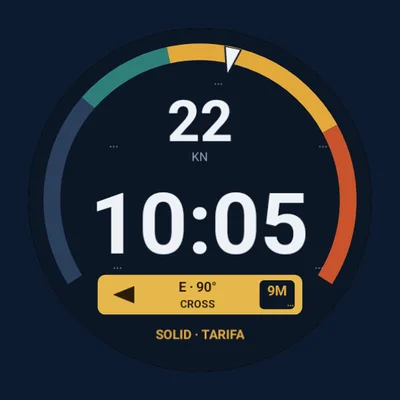
• Viento en nudos en una escala de 0 a 40 (calma, ligero, suave, fuerte) con una aguja.
• Un reloj grande.
• Un indicador de dirección con colores: verde (mar adentro), amarillo (cruz) o rojo (costa adentro), con la dirección indicada en palabras.
• Un chip para el tamaño de la cometa (BreakFinder Premium).
• La pantalla siempre activa muestra un contorno de calma.
HONESTO CUANDO NO HAY NOVEDADES
Un informe antiguo atenúa el indicador en lugar de mostrarlo como en tiempo real. Sin datos, la esfera lo indica.
DISEÑADO PARA EL RELOJ
Formato de esfera de reloj, sin código en ejecución, por lo que consume poca batería.
CONFIGURACIÓN
1. Instala la aplicación BreakFinder en tu reloj Wear OS e inicia sesión.
2. Configura tu lugar de surf en breakfinder.surf.
3. Selecciona BreakFinder Wind Explorer como esfera de tu reloj.
Wear OS 4 o posterior.
Guía de configuración: https://breakfinder.surf/watch
Soporte: support@breakfinder.surf
Privacidad: https://breakfinder.surf/en/datenschutz
Mostrar el texto original
A gauge for wind sports on your wrist. Glance down and know if it blows, from where, and whether the gusts are worth it.
The face is free. It needs the free BreakFinder Wear OS app and a BreakFinder account with a home spot (breakfinder.surf). Without the app the face shows the clock and the hint INSTALL BREAKFINDER.
⌚ ON YOUR WEAR OS WATCH
A watch face, nothing else: no app screens, no tile, no complications of its own. Its three slots read three complications by default from the free BreakFinder Wear OS app (Breakfinder Face Wind Gauge, Face Wind Direction, Face Kite Size). In the face editor you can pick another data source for every slot. The clock comes from the watch itself.
WHAT YOU SEE
• Wind in knots on a 0-40 scale (calm, light, sweet, over) with a needle
• A big clock
• A direction tile coloured by offshore (green), cross (yellow) or onshore (red), with the direction in words
• A kite size chip (BreakFinder Premium)
• The Always-On display shows a calm outline
HONEST WHEN IT HAS NOTHING NEW
An old report fades the gauge instead of passing it off as live. Without data the face says so.
BUILT FOR THE WATCH
Watch Face Format, no code running in the face, so it is light on the battery.
SET UP
1. Install the BreakFinder app on your Wear OS watch and sign in
2. Set your home spot at breakfinder.surf
3. Pick BreakFinder Wind Explorer as your watch face
Wear OS 4 or newer.
Setup guide: https://breakfinder.surf/watch
Support: support@breakfinder.surf
Privacy: https://breakfinder.surf/en/datenschutz
Seguridad de los datos
Lo que Philipp Winkler declara en Google Play sobre los datos que esta aplicación recopila y comparte.
- No se comparten datos con tercerosMás información sobre cómo los desarrolladores declaran lo que comparten
- No se recogen datosMás información sobre cómo los desarrolladores declaran lo que recogen
Novedades
Versión 1.0.1 · 9/11/2026
First release: a wind gauge for kite and wing on Wear OS.
Contacto del desarrollador
- Sitio webbreakfinder.surf
- Correo electrónicosupport@breakfinder.surf
- Política de privacidadbreakfinder.surf
- DirecciónBurghof 1 24939 Flensburg Germany
Información
- Ofrecida por
- Philipp Winkler
- Categoría
- Personalización
- Versión
- 1.0.1
- Actualizado
- 9/11/2026
- Publicado
- 9/11/2026
- Clasificación por edad
- PEGI 3
- Precio
- Gratis
- Nombre del paquete
- com.breakfinder.watchface.wind